1. One Click Charges
Español
  • Español
  • English
  • Bienvenida
    • Home Page
  • Perú 🇵🇪
    • Kushki Developer Portal 🚀
    • Perú 🇵🇪
    • Libraries & SDKs (Online Payments)
      • Release notes
      • Mobile
        • Kushki Android
        • Kushki iOS 
        • Kushki iOS ARM Setup
      • Web
        • Kushki.js 🌐
        • kushki.js-hosted-fields
          • kushki.js Hosted Fields
          • Guía de migración a Kushki.js 2.0
          • Antifraud
            • Interfaces
              • SecureInitRequest
              • SecureInitResponse
              • SiftScienceObject
            • Methods
              • requestInitAntiFraud
              • requestSecureInit
              • requestValidate3DS
          • Card
            • CarApplePay interface
              • ICardApplePay Interface
            • Card-Interface
              • ICard Interface
              • ICardSubscriptions Interface
            • Errors
              • Error list
            • Interfaces
              • Amount
              • ApplePayGetTokenOptions Interface
              • ApplePayOptions Interface
              • ApplePayPaymentContact
              • AppleTokenResponse
              • BrandByMerchantResponse Interface
              • CardFieldValues
              • CardInfo
              • CardOptions
              • CardTokenResponse
              • DeferredByBinOptionsResponse
              • DeferredInputValues
              • DeferredValuesResponse
              • DeviceTokenRequest
              • Field
              • FieldInstance
              • Fields
              • FieldValidity
              • FormValidity
              • MasterCardBrandingRequest
              • SecureDeviceTokenOptions
              • Styles
              • TokenResponse
              • VisaBrandingRequest
            • Methods
              • initApplePayButton
              • initCardToken
              • initSecureDeviceToken
              • requestBrandsByMerchant method
              • requestDeviceToken method
              • requestInitCardBrandingAnimation
            • Types
              • CssProperties
              • Currency
              • FieldTypeEnum
          • Card Payouts
            • Card Payouts Interface
              • ICardPayouts
            • Enumerations
              • Enumeration `InputModelEnum`
            • Errors
              • Errors
            • Interfaces
              • CardPayoutOptions
              • CardPayoutSubscriptionTokenResponse
              • CardPayoutUniqueTokenResponse
              • Field
              • Fields
              • FieldValidity
              • Interface FormValidity
              • Interface `Styles`
            • Methods
              • initCardPayoutToken
            • Type Aliases
              • CardPayoutTokenResponse
              • InputTypeEnum
            • Types
              • CssProperties
          • Kushki
            • Methods
              • init function
              • requestBankList function
              • requestCommissionConfiguration function
            • Classes
              • KushkiError
            • Interfaces
              • CommissionConfigurationRequest
              • IKushki
              • KushkiOptions
    • Raíz
    • Schemas
      • API Raw Card Present
        • metadata
        • extra_taxes
        • card
        • sub_merchant
        • pos_details
        • enc_tlv
        • deferred
        • contact_details
        • card_details
        • amount
      • Chargebacks
      • Commissions
      • Gateway Status
      • ChargebackListResponse
      • StatusComponent
      • currency
      • one-and-two-step-payment
      • webhooksChargeback
      • ChargebackItem
      • webhooks
      • networkToken
      • webhooksItem
      • transactionType
      • ErrorResponse400
      • threeDomainSecure
      • ErrorResponse401
      • product
      • ErrorResponse403
      • payment_submethod
      • ErrorResponse500
      • payment_method
      • paymentMethod
      • orderDetails
      • Shipping Address
      • headers
      • extraTaxes
      • documentType
      • currency
      • currency-cash-in
      • currency-CL
      • binInfo
      • UnexpectedErrorResponse
      • citMit
      • SubscriptionUpdate
      • messageFields
      • network
      • SubscriptionAdjustmentRequest
      • Subscription
      • Submerchant
      • Shipping-Address
      • Promotions
      • Metadata
      • Language
      • InvalidBinResponse
      • GetConfigurationRequest
      • ErrorResponse
      • Deferred
      • Country
      • ContactDetails
      • ChargesVoidCardResponse
      • Channel
      • Card
      • Billing-Address
      • BadRequestResponse
      • Amount
      • Amount-cash-in
      • Amount-CL
  • México 🇲🇽
    • Bienvenidos
    • ONLINE PAYMENTS
      • CARD
        • CARD
        • 1. Request a card token
        • 2. Make a charge or deferred charge
        • 3. Void a transaction
        • 4. Refund a transaction
        • 5. Request deferred options
        • 6. Authorize payments
        • 7. Reauthorize payments
        • 8. Capture an authorized payment
        • 9. Bin Info
        • 10. Bin Info V2
        • 11. Validate OTP
        • 12. Verify Account
        • 12. Verify Account
        • 6. Authorize payments
        • 10. Bin Info V2
        • 8. Capture an authorized payment
        • 3. Void a transaction
        • 4. Refund a transaction
        • 7. Reauthorize payments
        • 1. Request a card token
        • 9. Bin Info
        • 5. Request deferred options
        • 2. Make a charge or deferred charge
        • 11. Validate OTP
      • CASH IN
        • 1. Request a cash in token
        • 2. Init Transaction
        • 3. Transaction Status
        • 1. Request a cash in token
        • 2. Init Transaction
        • 3. Transaction Status
      • TRANSFER IN
        • 1. Request a Transfer In token
        • 2. Init Transaction
        • 4. Get Status Copy
        • 1. Request a Transfer In token
        • 4. Get Status Copy
        • 2. Init Transaction
      • TRANSFER OUT
        • 1. Get Bank List
        • 2. Request a Transfer Out token
        • 3. Init Transaction
        • 4. Get Status
        • 5. Wallet Balance
        • 5. Wallet Balance
        • 1. Get Bank List
        • 4. Get Status
        • 2. Request a Transfer Out token
        • 3. Init Transaction
      • ONE-CLICK & SCHEDULED PAYMENTS
        • 1. Request a recurring charge token
        • 2. Create a recurring charge
        • 3. Update recurring charge card data
        • 4. Make an One-click payment
        • 5. Cancel a recurring charge
        • 6. Update a recurring charge
        • 7. Add a temporary charge or discount
        • 8. Authorize payments Copy
        • 9. Capture an authorized payment Copy
        • 10. Get recurring charge Info
        • 1. Request a recurring charge token
        • 8. Authorize payments Copy
        • 3. Update recurring charge card data
        • 6. Update a recurring charge
        • 10. Get recurring charge Info
        • 2. Create a recurring charge
        • 5. Cancel a recurring charge
        • 9. Capture an authorized payment Copy
        • 4. Make an One-click payment
        • 7. Add a temporary charge or discount
      • PAYMENT BUTTON
        • 1. Create a payment button
        • 1. Create a payment button
      • SMARTLINKS V2
        • 1. Create a Smartlink
        • 2. Get a Smartlink
        • 3. Delete a Smartlink
        • 4. Update a Smartlink
        • 1. Create a Smartlink
        • 4. Update a Smartlink
        • 2. Get a Smartlink
        • 3. Delete a Smartlink
      • PAYMENT CREDENTIALS
        • 1. Create a credential
        • 2. Search credentials
        • 3. Advanced search
        • 4. Activate or deactivate
        • 5. Delete credential
        • 6. Update credential
        • 7. Regenerate a credential
        • 3. Advanced search
        • 6. Update credential
        • 5. Delete credential
        • 2. Search credentials
        • 4. Activate or deactivate
        • 7. Regenerate a credential
        • 1. Create a credential
      • COMMISSIONS
        • 1. Get Commission Configuration
        • 1. Get Commission Configuration
      • GATEWAY STATUS
        • 1. Get gateway status
        • 1. Get gateway status
      • ANALYTICS
        • 1. Get transactions list
        • 1. Get transactions list
    • CARD PRESENT PAYMENTS (BILLPOCKET)
      • Get token
      • States
      • Validate token
      • Municipalities
      • Collect payments
      • Tax companies
      • Capture an authorized payment
      • Commercial activities
      • Refund
      • Create checkout
      • Get status
      • Get checkout details
      • Collect card payments
      • Print Ticket
      • Collect card payments v2
      • Cancel Push Notification
      • Get transaction status
      • Add or update CLABE account
      • Configure payment link
      • Get payment link configuration
      • Create payment link
      • Update payment link
      • List payment links
      • Delete payment link
      • Add CLABE account
      • Get token
      • Get transaction list
      • Get transaction list v2
      • Get transaction list v3
      • Get transaction list v4
      • Create user
    • CARD PRESENT PAYMENTS (API RAW) Copy Copy
      • error-catalog
      • Test data
      • One-time payments
        • Single payment
      • Two-step-payments
        • Authorization and capture
      • Voids & Refunds
        • Void & Reverse
        • Refund a transaction
      • Card information
        • Balance inquiries
        • Get BIN Info
        • BIN info V2
        • Request deferred options
      • Query Transactions
        • Transaction Search
  • Ecuador 🇪🇨
    • Bienvenidos
    • ONLINE PAYMENTS
      • Card
        • Overview
        • Request a card token
        • Make a charge or deferred charge
        • Void a transaction
        • Request deferred options
        • Validate OTP
        • Refund a transaction
        • Bin Info
        • Bin Info V2
      • One Click Charges
        • Overview
        • Request a recurring charge token
          POST
        • Create a recurring charge
          POST
        • Make an One-click payment
          POST
        • Cancel a recurring charge
          DELETE
        • Add a temporary charge or discount
          PUT
        • Get recurring charge Info
          GET
        • Update a recurring charge
          PATCH
        • Update recurring charge card data
          PUT
      • Transfer in
        • Overview
        • Get Bank List
        • Request a Transfer In token
        • Init Transaction
        • Get Status
      • Cash in
        • Overview
        • Request a cash in token
        • Init Transaction
        • Transaction Status
        • Update a cash in transaction
        • Delete a cash in transaction
      • Chargebacks
        • Overview
        • Query chargebacks
        • Request chargeback export
      • Smartlinks
        • Overview
        • Create a Smartlink
        • Update a Smartlink
        • Get a Smartlink
        • Delete a smartlink
        • Get a Smartlink
        • Delete a Smartlink
        • Update a Smartlink
        • Create a Smartlink
      • Payment Button
        • Overview
        • Create a payment button
      • Payment Credentials
        • Overview
        • Regenerate a credential
        • Activate or deactivate
        • Update credential
        • Search credentials
        • Delete credential
        • Create a credential
        • Advanced search
      • Gateway Status
        • Overview
        • Get gateway status
      • Analytics
        • Overview
        • Get transactions list v2
        • Get transactions list v1
      • Commissions
        • Commissions
        • Get Commission Configuration
  • Colombia 🇨🇴
    • ANALYTICS
      • Get transactions list v1
      • Get transactions list v2
    • CARD-OUTS
      • Request a cash out token
      • Init Transaction
      • Update a cash out transaction
      • Delete a cash out transaction
      • Transaction Status
    • CARD
      • Bin Info
      • Bin Info V2
      • Request deferred options
      • Request a card token
      • Make a charge or deferred charge
      • Create payment (tokenless)
      • Authorize payments
      • Preauthorization (tokenless)
      • Capture an authorized payment
      • Reauthorize payments
      • Refund a transaction
      • Void a transaction
      • Verify Account
      • Validate OTP
    • TRANSFER IN
      • Get Bank List
      • Request a Transfer In token
      • Init Transaction
      • Get Status
    • TRANSFER OUT
      • Get Bank List
      • Get Bank List V2
      • Request a Transfer Out token
      • Init Transaction
      • Get Status
      • Void a transaction
      • Balance for Payouts
    • CASH-IN
      • Request a cash in token
      • Init Transaction
      • Update a cash in transaction
      • Delete a cash in transaction
      • Transaction Status
    • CASH-OUT
      • Request a cash out token
      • Init Transaction
      • Update a cash out transaction
      • Delete a cash out transaction
      • Transaction Status
    • COMMISSIONS
      • Get Commission Configuration
    • GATEWAY-STATUS
      • Get gateway status
      • Get platform status
    • ONE-CLICK & SCHEDULED PAYMENTS
      • Request a recurring charge token
      • Update recurring charge card data
      • Update a recurring charge
      • Add a temporary charge or discount
      • Get recurring charge Info
      • Create a recurring charge
      • Make an One-click payment
      • Cancel a recurring charge
      • Authorize payments
      • Capture an authorized payment
    • PAYMENT-BUTTON
      • Create a payment button
    • PAYMENT-CREDENTIALS
      • Advanced search
      • Delete credential
      • Regenerate a credential
      • Search credentials
      • Activate or deactivate
      • Update credential
      • Create a credential
    • SMARTLINKS-V2
      • Create a Smartlink
      • Get a Smartlink
      • Update a Smartlink
      • Delete a smartlink
    • TRANSFER-IN
      • Get Bank List
      • Request a Transfer In token
      • Init Transaction
      • Get Status
    • TRANSFER-OUT
      • Balance for Payouts
      • Get Bank List
      • Get Bank List V2
      • Request a Transfer Out token
      • Init Transaction
      • Get Status
      • Void a transaction
  • Chile 🇨🇱
    • Bienvenidos
    • CARD PRESENT PAYMENTS (API RAW) Copy
      • One-time payments
      • Two-step-payments
      • Voids & Refunds
      • Card information
      • Query Transactions
    • Online Payments
      • Card Async
        • Request a card async token
        • Authorize payments
        • Get Status
        • Capture an authorized payment
        • Init Transaction
      • Async Card Recurring Charges
        • Request an async card recurring charge token
        • Init an async card recurring charge
        • Capture an authorized payment
        • Authorize payments
        • Capture an authorized payment
        • Authorize payments
      • Card
        • Bin Info
        • Bin Info V2
        • Request deferred options
        • Request a card token
        • Make a charge or deferred charge
        • Create payment (tokenless)
        • Authorize payments
        • Capture an authorized payment
        • Reauthorize payments
        • Void a transaction
        • Refund a transaction
        • Voucher
        • Validate OTP
        • Verify Account
      • Chargebacks
        • Query chargebacks
        • Request chargeback export
      • Transfer In
      • Transfer Out
      • Cash In
      • Smartlinks V2
      • Analytics
        • Get transactions list v1
        • Get transactions list v2
      • Gateway Status
        • Get gateway status
      • Commissions
      • Payment Credentials
      • Payment Button
      • Platform Status
      • Subscription Transactions
      • Preauthorization (tokenless)
  1. One Click Charges

Overview

Gemini_Generated_Image_kkez58kkez58kkez.png

Discover a bit more about the recurring payment process#

Credit cards have global coverage and are one of the most popular ways to pay online. There are different types of cards and several steps in the process. Learn how it works, the parties involved, and the stages of a subscription payment.
WARNING

To keep in mind#

Due to our risk policies, the available payment methods and the integration type may vary once you complete the affiliation. We will tell you how to proceed if this process applies to your merchant.
NOTE
NOTE: This service is also known as Tokenization and recurrent charge execution.

Payment process#

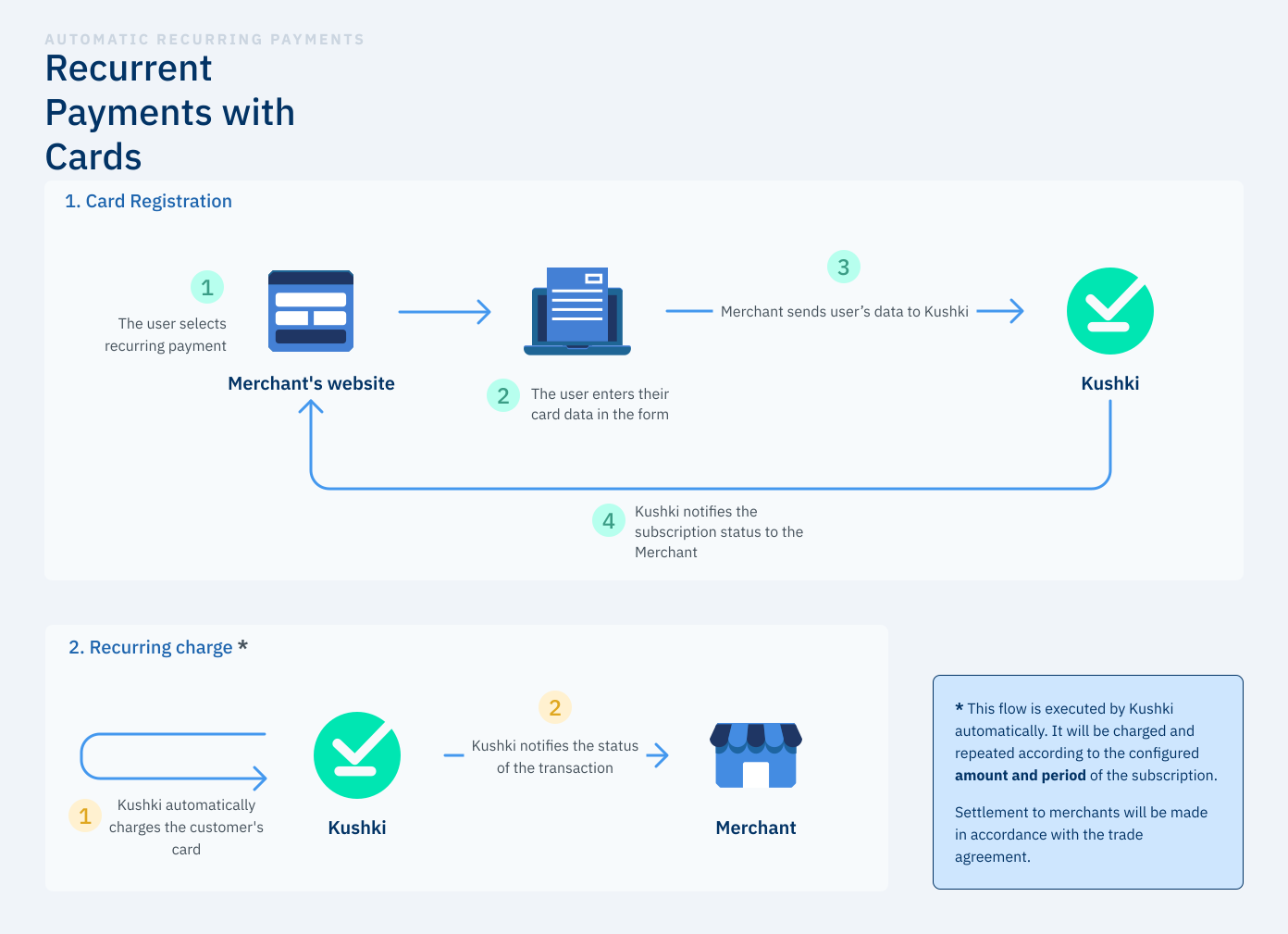
A credit card payment for a subscription is made in 2 main steps: Credit or debit card registration and execution of the recurring charge.
Recurrent_payment

Credit or Debit Card Registration#

1
1. Selecting a Payment Method
In your website or app, the user will select the payment method. Make sure that it is clear for the payer that their credit or debit card will be registered for paying a recurring value.
2
2. Providing Card Data
At this step, the user provides the data of the card that he/she will use to pay. Your website or app should be capable of verifying that the card information is correct (for example, that the expiration date is not outdated, or that the card number can be validated using Luhn's algorithm). In this step, it cannot be yet warranted that the card is valid.
3
3. Submitting Data to Kushki
Kushki will receive this data and will verify whether there are enough funds in the account associated with the credit or debit card by using a charge for subscription validation. This small fee is charged by Kushki and is automatically reversed if successful. This fee ensures that your client's credit card can be charged after registration.
4
4. Creating a Subscription Notification
At this step, we will inform you about the result of the card registration process, so that you can show it on screen to the user.

Recurring Payment#

1
1. Payment Execution
Kushki processes recurring charges to the registered card automatically. Payments will be executed and repeated according to the amount and period indicated in the subscription.
The billing logic starts running every day from 6am GMT-5. Make sure that the subscription was created before this time if you want the first payment to be executed on the same day of registration. Alternatively, your customer can register his/her card some days in advance, before Kushki executes the first charge. When creating a subscription, you must indicate the start date startDate.
2
2. Transaction Status Notification
At this step, you will be notified of the status of each automatic charge. You may receive the Webhook notifications that you expose for Kushki to consume. You also use Kushki's console to verify transactions, as well as their details and their status.

Retries#

If a payment is rejected, Kushki has a retry logic to try to recover the charge. By default, there are 3 retries for 3 days in a row from the payment day originally defined in startDate. For example, for a monthly subscription with start date: 10-01-2021, with a rejection on 10-02-2021, payment will be retried until 13-02-2021, 3 times each day, for a total of 9 payment attempts.
You can modify the retry days for a subscription and also define specific charging days.
Customized retry logic#
You can customize the collection retry logic by submitting the retryConfiguration object as follows:
1.
retryType:"schedule". If you choose a schedule, you can specify in the value field you can specify in value how often the collection will be reattempted.
In the next example, the collection will be reattempted 3 times per day every 2 days for the entire month.
{
   "retryConfiguration":{
      "retryType":"scheduled",
      "value":[2]
   }
}
2.
retryType:"fixed". Send the specific days of the month to retry. Ex. 10th, 20th, 30th.
In the following example, the charge will only be reattempted 3 times a day, on the 10th, 20th and 30th of the corresponding month.
{
  "retryConfiguration":{
     "retryType":"fixed",
     "value":[10,20,30]
  }
}
NOTE
Send the retryType as fixed if you do not want to retry the collection for the entire month.
If the last charge attempt was declined, we may send you a notification via WebHook informing you about it. In these cases, we recommend you to contact the card owner and offer him/her a set of alternatives for paying the fee that could not be charged; for example, changing the registered credit card and generating an One-click payment only for one time. Kushki will continue executing automatic charges over the following periods.
Start your integration and accept recurring payments online safely.

Using the API#

To use the API you must ask for your Kushki Sandbox, composed of a Public-Merchant-Id and a Private-Merchant-Id.
EnvironmentURL
Productionhttps://api.kushkipagos.com/
Testing (Sandbox)https://api-uat.kushkipagos.com/

Idempotency#

Kushki’s API supports idempotent requests to safely retry operations without the risk of executing the same transaction twice. This feature is especially useful when network issues, timeouts, or client retries might otherwise create duplicate records.

How it works#

To perform an idempotent request, include the header Idempotency-Key with a unique value when calling one of the supported endpoints.
Kushki stores the resulting status code and response body only if the original request succeeds.
If the same key is sent again within the validity window, the same successful response is returned.
If the original request failed with a 4XX or 5XX error, no idempotency record is stored, and the client can safely retry the entire process with the same Idempotency-Key.

Header#

Rules#

Valid for: 24 hours. After this period, if the same Idempotency-Key is sent again, a new transaction will be generated.
Maximum length: 56 characters.
Uniqueness: must be unique per transaction type.
Scope: applies only to supported endpoints (see below).
Generation: clients are responsible for generating keys. We recommend UUIDv4 or another random string generator with sufficient entropy.

Supported endpoints#

The Idempotency-Key header is currently supported in:
Void a transaction (one-time charges, preauthorizations, and subscription charges).
Refund a transaction (one-time charges, preauthorizations, and subscription charges).
Subscription preauthorizations.

Error scenarios#

5XX errors (server-side issues)#

No idempotency record is stored.
The client may retry with the same Idempotency-Key.
Retrying is at the integrator’s discretion.

4XX errors (client-side issues)#

No idempotency record is stored.
The client may retry with the same Idempotency-Key after correcting the input.
Retrying is at the integrator’s discretion.

Best practices#

Always generate a new Idempotency-Key for each unique transaction attempt.
Use a UUID or another strong random string generator to ensure uniqueness.

Endpoints#

We dispose various endpoints to start your payment flows, find our products available:
Request a recurring charge token
Create a recurring charge
Make an One-click payment
Cancel a recurring charge
Add a temporary charge or discount
Get recurring charge Info
Update a recurring charge
Update recurring charge card data
Modified at 2026-04-15 21:33:25
Previous
Bin Info V2
Next
Request a recurring charge token
Built with