1. Online Payments
  • API Docs Colombia 🇨🇴
  • Online Payments
    • Release Notes
    • Card Payments
      • Request a card token
      • Make a charge or deferred charge
      • Create payment (tokenless)
      • Void a transaction
      • Refund a transaction
      • Request deferred options
      • Authorize payments
      • Preauthorization (tokenless)
      • Reauthorize payments
      • Capture an authorized payment
      • Verify Account
      • Validate OTP
      • Bin Info
      • BIN info V2
    • One-Click & Scheduled Payments
      • Request a recurring charge token
      • Create a recurring charge
      • Make an One-click payment
      • Update recurring charge card data
      • Cancel a recurring charge
      • Update a recurring charge
      • Add a temporary charge or discount
      • Authorize payments
      • Capture an authorized payment
      • Get recurring charge Info
    • Chargebacks
      • Query chargebacks
      • Request chargeback export
    • Transfer in
      • Get Bank List
      • Request a Transfer In token
      • Init Transaction
      • Get Status
    • Transfer out
      • Get Bank List
      • Get Bank List V2
      • Request a Transfer Out token
      • Init Transaction
      • Get Status
      • Balance for Payouts
    • CASH-IN
      • Request a cash in token
      • Init Transaction
      • Transaction Status
      • Delete a cash in transaction
      • Update a cash in transaction
    • Cash-out
      • Request a cash out token
      • Init Transaction
      • Transaction Status
      • Update a cash out transaction
      • Delete a cash out transaction
    • Smartlinks-v2
      • Create a Smartlink
      • Get a Smartlink
      • Update a Smartlink
      • Delete a smartlink
    • Analytics
      • Get transactions list v1
      • Get transactions list v2
    • Gateway-status
      • Get gateway status
      • Get platform status
    • Payment Credentials
      • Create a credential
      • Search credentials
      • Advanced search
      • Delete credential
      • Regenerate a credential
      • Activate or deactivate
      • Update credential
    • Payment Button
      • Create a payment button
    • Settlement
      • Query settlement
    • Subscription Transactions
      • Get subscription transactions
  • Kushki One
    • Cloud Services
      • Payment
        • Charge
        • Authorization (Pre-auth)
        • Capture
        • Re-authorization
        • Post-tip
        • Void
        • Refund
        • Abort
        • Transaction Search
      • Print
        • Create Print Job
        • Get Print Job Status
    • Local Services
      • Payment
        • Charge
        • Authorization (Pre-auth)
        • Capture
        • Re-authorization
        • Post-tip
        • Void
        • Refund
        • Abort
        • Transaction Search — Online
        • Transaction Search — Local
      • Print
        • Create Print Job
        • Get Print Job Status
        • Print Job Webhook (inbound — implemented by your POS)
  • API RAW CARD PRESENT PAYMENTS
    • Release Notes
    • Error Catalog
    • The Amount Object
    • Key Exchange Process
    • Test data
    • Card Information
      • Get BIN Info
      • Balance inquiries
      • BIN info V2
      • Request deferred options
    • One-time Payments
      • Single payment
    • Two-step Payments
      • Authorization and capture
    • Voids & Refunds
      • Void & Reverse
      • Refund a transaction
    • Query Transactions
      • Transaction Search
    • Webhooks
      • Introduction
      • Good Practices
      • Webhooks-Card Payments
      • Webhooks-Refunds
      • Check your webhooks
  • Appian - Submerchant Register
    • Submerchant Validation in Batch
    • Query submerchant status by requestId/submerchantId
    • Get submerchantIds
    • Get credentials for submerchants
  • Schemas
    • RequestBodies
      • one-and-two-step-payment
    • SubscriptionTransactionsResponse
    • Card
    • Channel
    • Amount-cash-in
    • ChargebackListResponse
    • SettlementDateRangeRequest
    • AmountWithTaxes
    • PrintJobRequest
    • card
    • SubscriptionTransaction
    • networkToken
    • ChargebackItem
    • SettlementTicketRequest
    • AmountCore
    • CommandText
    • amount
    • ErrorResponse
    • currency
    • webhooksItem
    • ErrorResponse400
    • SettlementResponse
    • ExtraTaxes
    • CommandColumns
    • extra_taxes
    • Amount
    • ErrorResponse401
    • SettlementRecord
    • ColumnItem
    • pos_details
    • extraTaxes
    • ErrorResponse403
    • TransactionResponse
    • CommandDivider
    • card_details
    • Deferred
    • Country
    • payment_method
    • ErrorResponse500
    • RawResponse
    • CommandFeed
    • enc_tlv
    • Metadata
    • CardData
    • CommandSpace
    • contact_details
    • ContactDetails
    • AmountWithTip
    • CommandCut
    • deferred
    • sub_merchant
    • documentType
    • Subscription
    • LinkFailure
    • CommandImage
    • metadata
    • orderDetails
    • Language
    • TransactionSearchRequest
    • CommandQR
    • Shipping Address
    • payment_submethod
    • CommandBarcode
    • Billing-Address
    • PrinterError
    • product
    • SubscriptionUpdate
    • PrintJobStatus
    • threeDomainSecure
    • SubscriptionAdjustmentRequest
    • PrintWebhookPayload
    • webhooks
    • headers
    • webhooksChargeback
    • citMit
    • network
    • binInfo
    • messageFields
    • UnexpectedErrorResponse
    • transactionType
    • ExternalReferenceId
    • ExternalSubscriptionId
BienvenidaPerú 🇵🇪México 🇲🇽Ecuador 🇪🇨Colombia 🇨🇴
Chile 🇨🇱
BienvenidaPerú 🇵🇪México 🇲🇽Ecuador 🇪🇨Colombia 🇨🇴
Chile 🇨🇱
  1. Online Payments

ONE-CLICK & SCHEDULED PAYMENTS

Credit cards have global coverage and are one of the most popular ways to pay online. There are different types of cards and several steps in the process. Learn how it works, the parties involved, and the stages of a subscription payment.
Keep in mind!
Due to our risk policies, the available payment methods and the integration type may vary once you complete the affiliation. We will tell you how to proceed if this process applies to your merchant.
This service is also known as Tokenization and recurrent charge execution.

Payment Process#

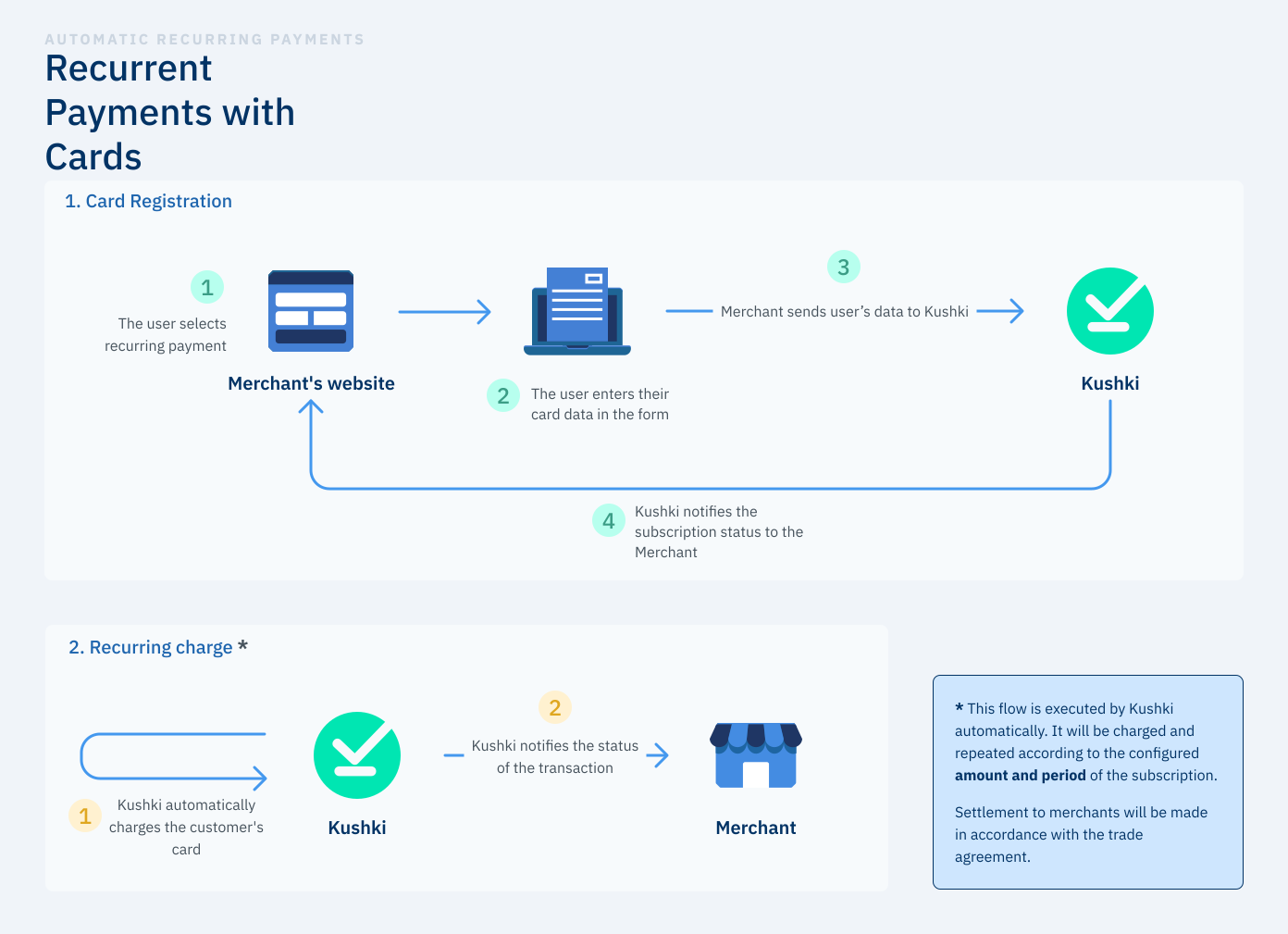
A credit card payment for a subscription is made in 2 main stages: card registration and recurring charge execution.
Recurring payment flow

Stage 1 — Credit or Debit Card Registration#

Select a Payment Method
In your website or app, the user selects the payment method. Make sure it is clear to the payer that their credit or debit card will be registered for recurring charges.
Provide Card Data
The user provides their card details. Your website or app should verify that the card information is correct — for example, that the expiration date is not outdated, or that the card number passes Luhn's algorithm.
Note: At this stage it cannot yet be confirmed that the card is valid.
Submit Data to Kushki
Kushki receives the data and verifies whether there are enough funds by running a charge for subscription validation. This small fee is charged by Kushki and is automatically reversed if successful. It ensures that the client's card can be charged after registration.
Subscription Notification
Kushki informs you about the result of the card registration so you can display it to the user on screen.

Stage 2 — Recurring Payment#

Payment Execution
Kushki processes recurring charges to the registered card automatically. Payments are executed and repeated according to the amount and period defined in the subscription.
The billing logic runs every day from 6 AM GMT-5. Make sure the subscription is created before this time if you want the first payment on the same day of registration. When creating a subscription, you must set the startDate field.
Retry logic
If a payment is rejected, Kushki retries the charge automatically. By default, there are 3 retries over 3 consecutive days starting from the original startDate. For example, for a monthly subscription with startDate: 10-01-2021 and a rejection on 10-02-2021, payment will be retried until 13-02-2021 — 3 times per day, for a total of 9 attempts.
You can customize the retry logic using the retryConfiguration object:
scheduled — Interval-based
fixed — Specific days
Retries every N days. The example below retries 3 times per day, every 2 days, for the entire month.
{
  "retryConfiguration": {
    "retryType": "scheduled",
    "value": [2]
  }
}
If the last charge attempt is declined, Kushki may notify you via Webhook. In this case, we recommend contacting the cardholder and offering alternatives — for example, updating the registered card or requesting a one-time One-click payment. Kushki will continue executing automatic charges for the following periods.
Transaction Status Notification
You will be notified of the status of each automatic charge via Webhook notifications exposed by your system. You can also verify transactions, their details, and status directly in the Kushki Console.

Using the API#

To use the API, you must request your Kushki Sandbox credentials, composed of a Public-Merchant-Id and a Private-Merchant-Id.
🟢 Production
🧪 Sandbox (UAT)
https://api.kushkipagos.com/

Available Endpoints#

Request a Recurring Charge Token
Tokenize card data to register it for recurring charges.
Create a Recurring Charge
Create a new subscription with the registered card token.
Make an One-Click Payment
Execute a single on-demand charge against a registered card.
Get Recurring Charge Info
Retrieve the details and current status of a subscription.
Update Recurring Charge Card Data
Replace the card associated with an active subscription.
Update a Recurring Charge
Modify the amount, frequency, or dates of an existing subscription.
Add a Temporary Charge or Discount
Apply a one-time extra charge or discount to the next billing cycle.
Cancel a Recurring Charge
Cancel and deactivate an active subscription.
Subscription Pre-Authorization
Reserve funds on a registered card without capturing them immediately.
Subscription Capture
Capture a previously authorized amount on a registered card.

Deferred Payments in Subscriptions#

Colombia 🇨🇴 supports deferred (installment) charges in one-click payments. Always call Request Deferred Options to verify the available plans for the customer's card BIN before offering installments.
Always call Request Deferred Options to verify available installment plans for the customer's card BIN before presenting deferred options to the user.
Acquirer model
Aggregator model
Send the deferred object with creditType, graceMonths, and months inside the charge request:
{
  "deferred": {
    "creditType": "01",
    "graceMonths": "00",
    "months": 3
  }
}
Common creditType values for Colombia:
CodeDescription
01Cuotas — Standard installments
02Cuotas con período de gracia — Installments with grace period

Subscription Pre-Authorization Flow#

Product in beta version 🔐👨‍💻
We are working on our beta version. Stay tuned for its official release! You can also contact your account manager for more information.
Use subscription pre-authorization to reserve funds on a registered card before committing to the charge.
1
Pre-authorize
Call Subscription Pre-Authorization (POST /subscriptions/v1/card/{subscriptionId}/preAuthorization). The bank reserves the amount on the customer's card.
The authorization will expire after 28 days for credit cards and after 7 days for debit cards from the time of the request.
2
Capture
Call Subscription Capture (POST /subscriptions/v1/card/{subscriptionId}/capture) with the ticketNumber from the pre-authorization response to collect the reserved funds.

Idempotency#

🔁
Kushki's API supports idempotent requests to safely retry operations without the risk of executing the same transaction twice. This is especially useful when network issues, timeouts, or client retries might otherwise create duplicate records.

How It Works#

To perform an idempotent request, include the Idempotency-Key header with a unique value when calling a supported endpoint.
Kushki stores the response only if the original request succeeds.
If the same key is sent again within the validity window, the same successful response is returned.
If the original request failed (4XX / 5XX), no record is stored and the client can retry with the same key.

Header#

Rules#

RuleDetail
Validity window24 hours. After this, the same key generates a new transaction.
Maximum length56 characters
UniquenessMust be unique per transaction type
Recommended formatUUIDv4 or equivalent high-entropy random string

Supported Endpoints#

The Idempotency-Key header is currently supported in:
Void a transaction — one-time charges, preauthorizations, and subscription charges.
Refund a transaction — one-time charges, preauthorizations, and subscription charges.
Subscription preauthorizations.

Error Scenarios#

5XX — Server Errors
4XX — Client Errors
No idempotency record is stored. The client may retry with the same Idempotency-Key. Retrying is at the integrator's discretion.

Best Practices#

Always generate a new Idempotency-Key for each unique transaction attempt.
Use UUIDv4 or another strong random string generator to ensure uniqueness.

Got a suggestion on this documentation? Contact us.
Modified at 2026-07-11 00:06:47
Previous
BIN info V2
Next
Request a recurring charge token
Built with