
Cash in
Keep in mind!
Payment Process
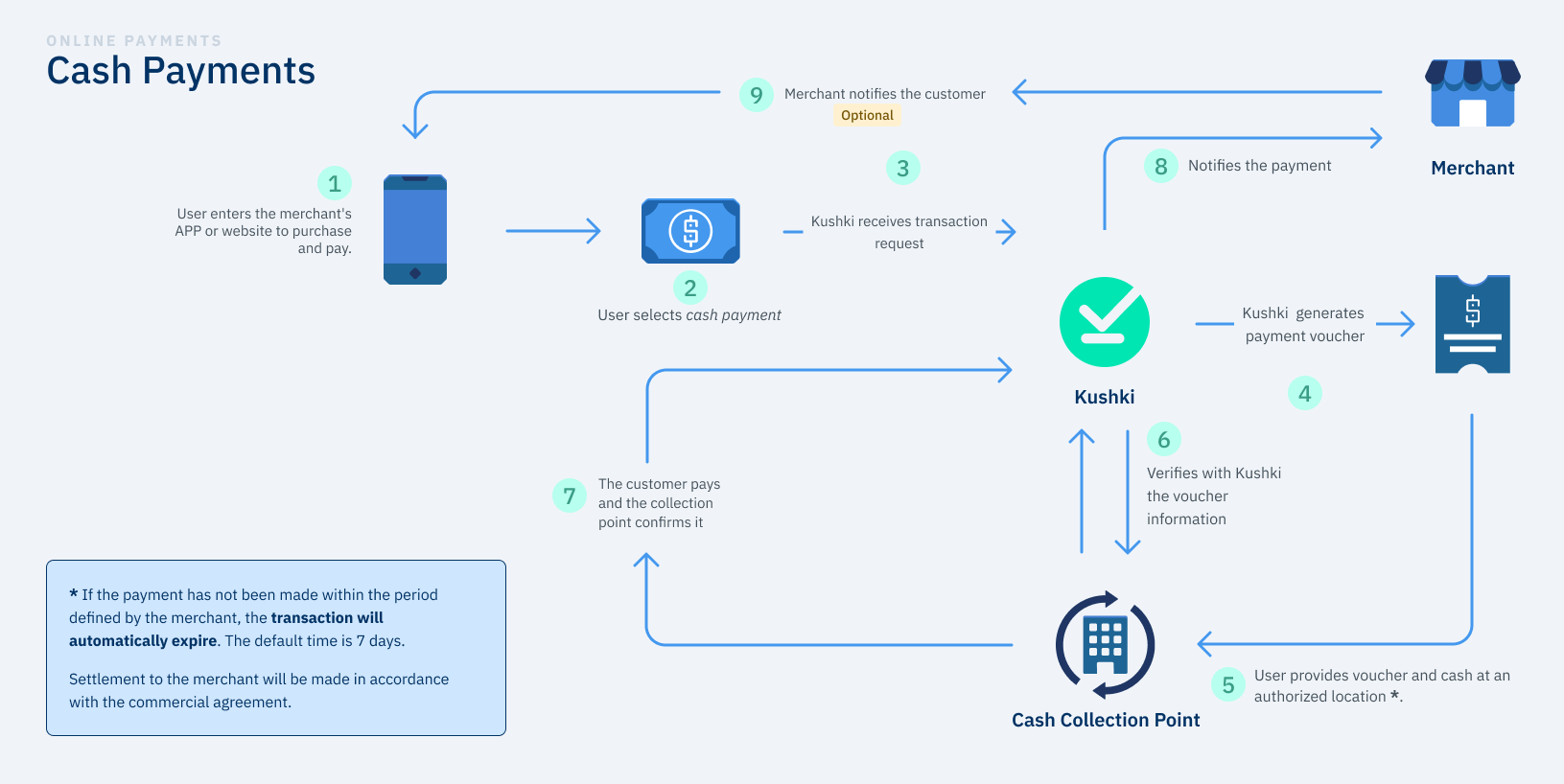
Cash In payment flow
Request a Cash In Token
The customer selects cash as their payment method at checkout. Your frontend calls the token endpoint using your Public Merchant ID and the customer's identity data.Required fields:
Document types accepted in Ecuador:
| Field | Type | Description |
|---|---|---|
name | string | Customer's first name |
lastName | string | Customer's last name |
identification | string | Customer's ID number (numeric only) |
documentType | string | CI, RUC, or PP (see below) |
totalAmount | number | Total transaction amount |
currency | string | Always USD for Ecuador |
email | string | Customer's email (optional) |
description | string | Payment description (optional) |
| Value | Document |
|---|---|
CI | Cédula de Identidad 🇪🇨 |
RUC | Registro Único de Contribuyentes 🇪🇨 |
PP | Passport 🇪🇨 |
Init Transaction
Your backend calls the Init Transaction endpoint using the Request fields:
Response fields:
token from the previous step and your Private Merchant ID. Kushki generates a PIN and a payment receipt (PDF) that the customer will present at the collection point.| Field | Required | Default | Description |
|---|---|---|---|
token | ✅ | — | Token from the previous step |
amount | ✅ | — | Amount object (see structure below) |
expirationDate | ❌ | 7 days | Date until which the PIN is valid. Format: YYYY-MM-DD HH:mm:ss (UTC). Must be at least 1 day after token creation. |
metadata | ❌ | — | Custom key-value pairs for your records |
webhooks | ❌ | — | Real-time notification URLs |
fullResponse | ❌ | — | Send "v2" to receive the extended response |
| Field | Description |
|---|---|
pin | Payment reference code the customer presents at the collection point |
pdfUrl | URL of the printable payment receipt |
ticketNumber | Kushki transaction identifier — use this for status checks |
transactionReference | Unique UUID-based reference for this transaction |
details.expiration | Unix timestamp (ms) of the PIN expiration date |
details.transactionStatus | Always initializedTransaction at this point |
details.agreementDetails | List of authorized collection points and their agreement numbers |
Share both pinandpdfUrlwith the customer — they can use either to pay at a collection point.
Customer Pays at a Collection Point
The customer goes to any authorized physical collection point with their PIN or printed receipt. The cashier validates the reference and accepts the cash payment for the transaction amount.No backend action is required during this step.
Check Transaction Status
After the payment window, poll the Transaction Status endpoint using the Transaction statuses in Ecuador:
ticketNumber as a path parameter to confirm whether the payment was completed.| Status | Meaning |
|---|---|
initializedTransaction | PIN generated — payment not yet made |
approvedTransaction | Cash received — funds credited to your account |
expiredTransaction | PIN expired before the customer paid |
Amount Object
amount object is required in the Init Transaction step. The structure depends on whether the transaction has taxes:Without taxes (IVA 0)
With IVA taxes
With ICE tax
{
  "amount": {
    "subtotalIva": 0,
    "subtotalIva0": 100.00,
    "iva": 0,
    "ice": 0,
    "currency": "USD"
  }
}subtotalIva0. Set all other fields to 0.Manage a Transaction
Webhook Notifications
webhooks object in your Init Transaction request to receive real-time payment notifications. This is independent of any webhooks configured in the Kushki Console — both channels fire simultaneously.{
"webhooks": [
{
"events": ["approvedTransaction", "declinedTransaction"],
"headers": [
{ "label": "Authorization", "value": "Bearer your-token" }
],
"urls": [
"https://merchant.example.com/webhooks/cash-in"
]
}
]
}Sandbox Testing
Test scenarios
identification values to simulate different outcomes in the Sandbox environment:identification | Simulated result |
|---|---|
| Any valid number | approvedTransaction |
9999999999 | initializedTransaction (pending payment) |
1000000000 | declinedTransaction |
Authentication
| Step | Header | Key type |
|---|---|---|
| Request a Token | Public-Merchant-Id | Public Key (Kushki Console → Credentials) |
| Init Transaction | Private-Merchant-Id | Private Key (Kushki Console → Credentials) |
| Transaction Status | Private-Merchant-Id | Private Key |
| Update Transaction | Private-Merchant-Id | Private Key |
| Delete Transaction | Private-Merchant-Id | Private Key |
Private-Merchant-Id in client-side code. Only the token request uses the Public Key and can be called from the frontend.Error Codes
| Code | Message | Cause |
|---|---|---|
C001 | Cuerpo de la petición inválido | Malformed or missing required fields |
C003 | Token inválido | The token provided is invalid or expired |
C005 | Id de transacción no válido | Invalid ticketNumber in the path |
C006 | Monto de la transacción inválido | Invalid transaction amount |
C017 | La fecha de expiración no es válida | expirationDate is in the past or less than 1 day from creation |
C018 | La transacción no existe o ha sido eliminada | Transaction was already deleted or does not exist |
C023 | No es posible actualizar la transacción | Transaction cannot be updated (already paid or expired) |
C040 | El ID de comercio no corresponde a la credencial enviada | Public and Private keys belong to different merchants |
C066 | Las credenciales no son correctas o no coinciden | Credentials are incorrect or mismatched |
K004 | ID de comercio o credencial no válido | Invalid merchant ID or credential |
Using the API
🟢 Production
🧪 Sandbox (UAT)
https://api.kushkipagos.com/Available Endpoints
Got a suggestion on this documentation? Contact us.
Modified at 2026-07-11 00:04:25