1. Online Payments
  • Developer Docs Ecuador 🇪🇨
  • Online Payments
    • Release Notes
    • Card Payments
      • Request a card token
      • Make a charge or deferred charge
      • Refund a transaction
      • Void a transaction
      • Request deferred options
      • Validate OTP
      • Bin Info V2
      • Bin Info
    • One Click and Scheduled Payments
      • Request a recurring charge token
      • Create a recurring charge
      • Update recurring charge card data
      • Make an One-click payment
      • Cancel a recurring charge
      • Update a recurring charge
      • Add a temporary charge or discount
      • Get recurring charge Info
    • Chargebacks
      • Query chargebacks
      • Request chargeback export
    • Subscription Transactions
      • Get subscription transactions
    • Transfer in
      • Request a Transfer In token
      • Init Transaction
      • Get Status
    • Cash in
      • Request a cash in token
      • Init Transaction
      • Update a cash in transaction
      • Transaction Status
      • Delete a cash in transaction
    • Smartlinks
      • Create a Smartlink
      • Update a Smartlink
      • Get a Smartlink
      • Delete a smartlink
    • Analytics
      • Get transactions list v1
      • Get transactions list v2
    • Status
      • Get gateway status
      • Get platform status
    • Commissions
      • Get Commission Configuration
    • Payment Credentials
      • Create a credential
      • Search credentials
      • Activate or deactivate
      • Delete credential
      • Update credential
      • Regenerate a credential
      • Advanced search
    • Payment Button
      • Create a payment button
    • Settlement
      • Query settlement
  • Appian - Submerchant Register
    • Submerchant Validation in Batch
    • Query submerchant status by requestId/submerchantId
    • Get submerchantIds
    • Get credentials for submerchants
  • Schemas
    • threeDomainSecure
    • webhooks
    • Card-old
    • Channel
    • Amount-cash-in
    • ChargebackListResponse
    • StatusComponent
    • SettlementDateRangeRequest
    • SubscriptionTransactionsResponse
    • Card
    • currency
    • networkToken
    • ChargebackItem
    • ErrorResponse
    • SettlementTicketRequest
    • SubscriptionTransaction
    • Subscription
    • Amount
    • ErrorResponse400
    • SettlementResponse
    • extraTaxes
    • Country
    • ErrorResponse401
    • SettlementRecord
    • Language
    • Deferred
    • ErrorResponse403
    • Metadata
    • payment_method
    • ErrorResponse500
    • ContactDetails
    • documentType
    • orderDetails
    • Shipping Address
    • Billing-Address
    • payment_submethod
    • SubscriptionUpdate
    • product
    • SubscriptionAdjustmentRequest
    • threeDomainSecure
    • webhooks
    • headers
    • webhooksChargeback
    • citMit
    • network
    • binInfo
    • messageFields
    • UnexpectedErrorResponse
    • ExternalReferenceId
    • transactionType
BienvenidaPerú 🇵🇪México 🇲🇽Ecuador 🇪🇨
Colombia 🇨🇴Chile 🇨🇱
BienvenidaPerú 🇵🇪México 🇲🇽Ecuador 🇪🇨
Colombia 🇨🇴Chile 🇨🇱
  1. Online Payments

Payment Button

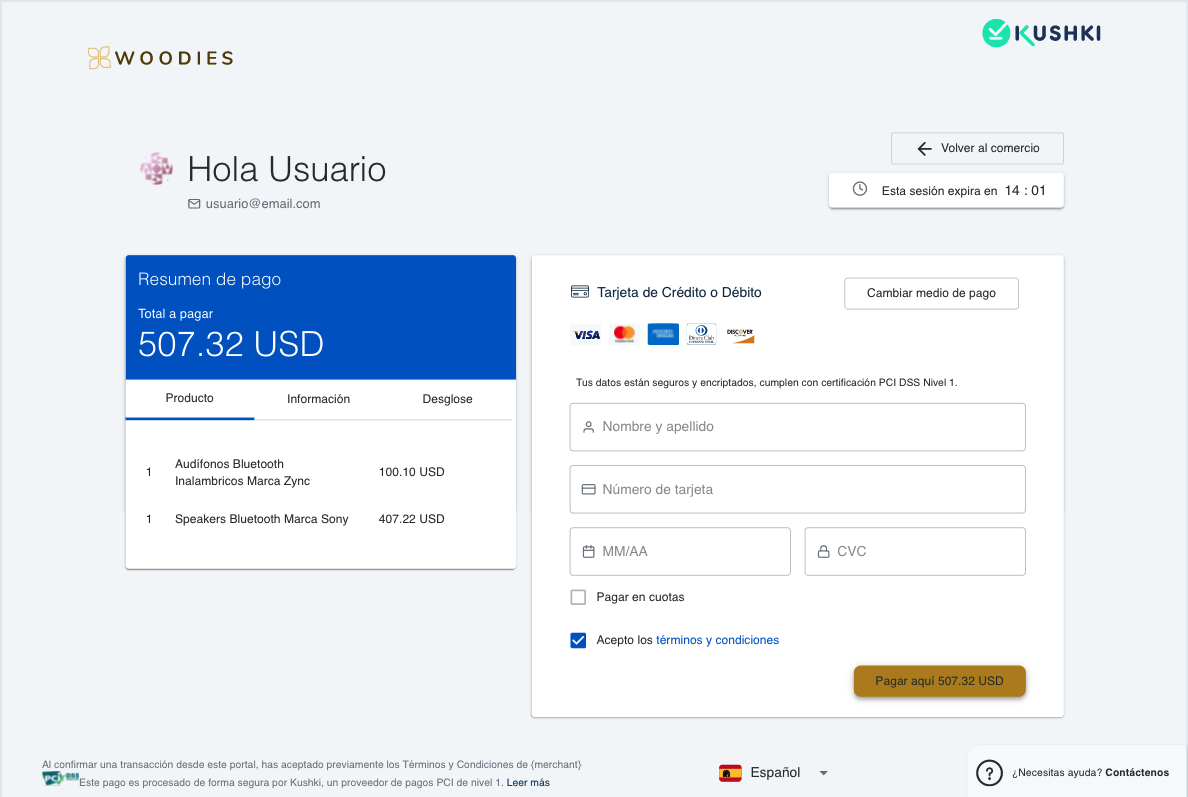
The Payment Button (also known as Webcheckout) is a hosted payment form on Kushki's servers that lets you accept cards, transfers, and cash payments with a single redirect — no frontend payment form to build or maintain.
Keep in mind!
Due to our risk policies, the available payment methods and the integration type may vary once you complete the affiliation. We will tell you how to proceed if this process applies to your merchant.
Payment Button EN
Payment Button example

Key Features#

Hosted and secured by Kushki — no PCI scope on your side.
Accepts card, transfer, and cash payment methods.
Available in Spanish, English, and Portuguese.
Customizable from the Console (colors, logo, subdomain).
Built-in security: OTP and Sift anti-fraud validation.
Conversion timer included by default.
Compatible with Chrome, Safari, Edge, and Firefox.
Supports pre-authorization flows (PRE_AUTH).

How It Works#

Create a Webcheckout
Your backend calls POST /smartlink/v1/webcheckout with the order details and payment configuration. Kushki returns a webcheckoutUrl — a unique, hosted payment page.
Redirect the Customer
Redirect the customer to the webcheckoutUrl. Kushki handles the entire payment experience: method selection, card entry, 3DS, OTP, and confirmation.
Receive the Result
After payment, the customer is redirected to your redirectURL. Kushki also sends a Webhook notification with the transaction result and any additionalInformation you included in the request.

Request#

Required fields:
FieldDescription
kindAlways "webcheckout"
redirectURLURL where the customer lands after payment
productsArray of at least one product (see below)
paymentConfigAmount breakdown and enabled payment methods
Optional fields:
FieldDescription
contactDetail.emailPre-fill the customer's email on the payment form
contactDetail.namePre-fill the customer's name
transactionTypeSend "PRE_AUTH" to use authorization and capture flow
additionalInformationFree-form object — fields appear in the webhook metadata

products[]#

Each item in the products array requires:
FieldTypeDescription
namestringProduct name
descriptionstringProduct description
quantitynumberUnits
unitPricenumberPrice per unit

paymentConfig#

FieldRequiredDescription
amount.subtotalIva✅Subtotal subject to VAT
amount.subtotalIva0✅Subtotal not subject to VAT
amount.iva✅VAT amount
amount.currency✅Always USD for Ecuador
paymentMethod✅Array of enabled methods: cash, transfer, credit-card

Full example#

{
  "kind": "webcheckout",
  "redirectURL": "https://www.tucomercio.com",
  "contactDetail": {
    "email": "customer@example.com",
    "name": "John Doe"
  },
  "products": [
    {
      "name": "Trekking Pro",
      "description": "Tenis",
      "quantity": 1,
      "unitPrice": 100.00
    }
  ],
  "paymentConfig": {
    "amount": {
      "subtotalIva": 89.28,
      "subtotalIva0": 0,
      "iva": 10.71,
      "currency": "USD"
    },
    "paymentMethod": ["credit-card", "transfer", "cash"]
  }
}

Response#

{
  "webcheckoutId": "mpEtCyMJV",
  "webcheckoutUrl": "https://uat-webcheckout.kushkipagos.com/webcheckout/mpEtCyMJV"
}
FieldDescription
webcheckoutIdUnique identifier for this webcheckout session
webcheckoutUrlHosted payment page URL — redirect the customer here immediately

Error Codes#

CodeMessageCause
K004ID de comercio o credencial no válidoInvalid or unauthorized Private-Merchant-Id
WCH001Cuerpo de la petición inválidoMalformed or missing required fields

Using the API#

🟢 Production
🧪 Sandbox (UAT)
https://api.kushkipagos.com/

Available Endpoints#

Create a Payment Button
Generates a hosted webcheckout URL to redirect the customer to the payment form.

Got a suggestion on this documentation? Contact us.
Modified at 2026-07-11 00:04:26
Previous
Advanced search
Next
Create a payment button
Built with