1. Webhooks
  • API Docs Peru 🇵🇪
  • Online Payments
    • Release Notes
    • Card Payments
      • Request a card token
      • Make a charge or deferred charge
      • Preauthorization (tokenless)
      • Create payment (tokenless)
      • Void a transaction
      • Refund a transaction
      • Verify Account
      • Request deferred options
      • Authorize payments
      • Reauthorize payments
      • Capture an authorized payment
      • Validate OTP
      • Bin Info V2
      • Bin Info
    • One-Click & Scheduled Payments
      • Request a recurring charge token
      • Create a recurring charge
      • Update recurring charge card data
      • Make an One-click payment
      • Cancel a recurring charge
      • Update a recurring charge
      • Add a temporary charge or discount
      • Authorize payments
      • Capture an authorized payment
      • Get recurring charge Info
    • Card Out
      • Get Card Payout Token
      • Get Subscription Token
      • Push funds
      • Push Funds in subscriptions
      • Get transaction status
      • Delete Subscription
    • Transfer In
      • Get Bank List
      • Request a Transfer In token
      • Init Transaction
      • Get Status
    • Transfer Out
      • Get Bank List
      • Get Bank List V2
      • Request a Transfer Out token
      • Init Transaction
      • Get Status
      • Balance for Payouts
    • Cash In
      • Request a cash in token
      • Init Transaction
      • Transaction Status
    • Smartlinks V2
      • Create a Smartlink
      • Update a Smartlink
      • Get a Smartlink
      • Delete a smartlink
    • Analytics
      • Get transactions list v1
      • Get transactions list v2
    • Chargebacks
      • Query chargebacks
      • Request chargeback export
    • Gateway Status
      • Get gateway status
    • Payment Credentials
      • Create a credential
      • Search credentials
      • Advanced search
      • Activate or deactivate
      • Delete credential
      • Update credential
      • Regenerate a credential
    • Payment Button
      • Create a payment button
    • Platform Status
      • Get platform status
    • Subscription Transactions
      • Get subscription transactions
    • Settlement
      • Query settlement
  • Card Present Payments (API Raw)
    • Release notes
    • Key Exchange Process
    • Test data
    • Kushki Error Catalog for POS transactions
    • The Amount Object
    • One-time Payments
      • Single payment
    • Two-step Payments
      • Authorization and capture
    • Voids & Refunds
      • Refund a transaction
      • Void & Reverse
    • Card information
      • Get BIN Info
      • Bin Info V2
      • Request deferred options
      • Balance inquiries
    • Query Transactions
      • Transaction Search
    • Webhooks
      • Introduction
      • Good practices
      • Refunds
      • Card Payments
      • Check your webhooks
  • Kushki One
    • Cloud Services
      • Payment Cloud
        • Charge
        • Authorization (Pre-auth)
        • Capture
        • Re-authorization
        • Post-tip
        • Void
        • Refund
        • Abort
        • Transaction Search
      • Print Cloud
        • Create Print Job
        • Get Print Job Status
    • Local Services
      • Payment Local
        • Charge
        • Authorization (Pre-auth)
        • Capture
        • Re-authorization
        • Post-tip
        • Void
        • Refund
        • Transaction Search — Local
        • Transaction Search — Online
        • Abort
      • Print Local
        • Create Print Job
        • Get Print Job Status
        • Print Job Webhook (inbound — implemented by your POS)
  • Appian - Submerchant Register
    • Submerchant Validation in Batch
    • Query submerchant status by requestId/submerchantId
    • Get submerchantIds
    • Get credentials for submerchants
  • Raíz
  • Schemas
    • Shared
      • ErrorResponse
      • BadRequestResponse
      • InvalidBinResponse
      • payment_method
      • payment_submethod
      • messageFields
      • Channel
    • Amount & Taxes
      • Amount-cash-in
      • GetConfigurationRequest
    • Identity & Contact
      • Shipping Address
    • Card & Payments
      • ChargesVoidCardResponse
      • Promotions
      • Submerchant
    • Subscriptions
      • SubscriptionUpdate
      • SubscriptionAdjustmentRequest
      • SubscriptionTransactionsResponse
    • Webhooks
    • Analytics
      • AnalyticsTransactionItem
      • AnalyticsListResponse
    • Settlement
      • SettlementDateRangeRequest
      • SettlementTicketRequest
      • SettlementResponse
    • Chargebacks
      • ChargebackListResponse
      • ChargebackSearchRequest
    • Cash
      • CashChargeInitRequest
      • CashStatusResponse
    • Transfer
      • TransferTokenRequest
      • TransferInitRequest
      • TransferStatusResponse
    • Payouts
      • PayoutsWebhooksItem
    • Smart Link
      • SmartLinkAmount
    • Terminal
      • AmountWithTaxes
      • AmountCore
      • AmountWithTip
      • TerminalCardDetails
      • TerminalPosDetails
      • TerminalContactDetails
      • TerminalCardData
      • TransactionResponse
      • LinkFailure
      • TransactionSearchRequest
      • PrintJobRequest
      • PrinterError
      • PrintJobStatus
      • PrintWebhookPayload
    • RequestBodies
      • one-and-two-step-payment
    • currency
    • SettlementDateRangeRequest
    • SubscriptionTransactionsResponse
    • card-old
    • AmountWithTaxes-old
    • Card
    • Shipping Address
    • transactionType
    • ChargebackItem-old
    • SettlementTicketRequest
    • SubscriptionTransaction
    • amount
    • AmountCore-old
    • CommandText-old
    • networkToken
    • Language
    • extra_taxes
    • card_details
    • currency
    • ErrorResponse400-old
    • webhooksItem
    • ErrorResponse
    • SettlementResponse
    • extra_taxes-old
    • ExtraTaxes-old
    • CommandColumns-old
    • currency
    • card
    • orderDetails-old
    • Country
    • ContactDetails-old
    • ErrorResponse401-old
    • SettlementRecord
    • pos_details-old
    • ColumnItem-old
    • Amount
    • amount
    • documentType
    • extraTaxes-old
    • ErrorResponse403-old
    • card_details-old
    • TransactionResponse-old
    • CommandDivider-old
    • extraTaxes
    • enc_tlv
    • payment_method
    • ErrorResponse500-old
    • threeDomainSecure
    • enc_tlv
    • RawResponse-old
    • CommandFeed-old
    • Deferred
    • pos_details
    • deferred
    • binInfo
    • contact_details-old
    • CardData-old
    • CommandSpace-old
    • paymentMethod-old
    • Metadata
    • contact_details
    • Billing-Address-old
    • Deferred-old
    • deferred-old
    • sub_merchant
    • AmountWithTip-old
    • CommandCut-old
    • ContactDetails
    • sub_merchant
    • headers
    • Amount-old
    • metadata
    • LinkFailure-old
    • CommandImage-old
    • metadata
    • SubscriptionUpdate
    • TransactionSearchRequest-old
    • CommandQR-old
    • orderDetails
    • Subscription
    • payment_submethod
    • citMit
    • SubscriptionAdjustmentRequest
    • CommandBarcode-old
    • Shipping Address
    • messageFields
    • PrinterError-old
    • Billing Address
    • webhooksChargeback
    • Language
    • PrintJobStatus-old
    • currency-cash-in-old
    • product
    • webhooks
    • networkToken-old
    • PrintWebhookPayload-old
    • currency-CL-old
    • threeDomainSecure
    • webhooks
    • product-old
    • headers
    • webhooksChargeback
    • UnexpectedErrorResponse-old
    • citMit
    • network
    • Card-old-old
    • Submerchant-old
    • binInfo
    • Shipping-Address-old
    • messageFields
    • Promotions-old
    • UnexpectedErrorResponse
    • transactionType
    • InvalidBinResponse-old
    • GetConfigurationRequest-old
    • BadRequestResponse-old
    • Amount-CL-old
BienvenidaPerú 🇵🇪
México 🇲🇽Ecuador 🇪🇨Colombia 🇨🇴Chile 🇨🇱
BienvenidaPerú 🇵🇪
México 🇲🇽Ecuador 🇪🇨Colombia 🇨🇴Chile 🇨🇱
  1. Webhooks

Introduction

Webhooks are callbacks that notify events in your account. A webhook will make an HTTP request to your application (usually by the POST method), whose body will contain an object describing the associated event. They are incredibly useful and a simple way to implement reactions to events.
For example: When a capture of an authorization is generated, a Webhook allows you to receive a notification so that you can take an action, such as sending a thank you email to the user.
Webhooks are also helpful in two situations:
When a generated event is not a direct result of a call to the API. For example, a chargeback.
When services or features need the response to a call, but they do not perform it directly. For example, an accounting service that needs to update accounting records when a transaction is generated.
These are some cases where Webhooks are used:
When updating a customer's membership in your database when payment is successful.
When recording an accounting entry after a transaction is made.

Consume a Webhook#

The first step to consume a Webhook is creating an endpoint to receive them. This is not different from creating any other page on your website. Simply create a new path with the desired URL.
Webhook data is sent in JSON format in the body of the POST call. All the event details are included and can be used directly (after parsing the JSON).

Security#

Encryption#

You may use an HTTP or an HTTPS URL for webhooks. In most cases, an HTTP is enough, but HTTPS may be useful if you're dealing with sensitive data or if you want to protect your system against replay attacks, for example.

Authentication#

In principle, anyone could send a request to your endpoint, so it is important to verify that these webhooks originate from Kushki. Therefore, to verify their authenticity, valid Webhooks will contain the following headings:
X-Kushki-Key: Merchant ID.
X-Kushki-Signature: It is the HMAC SHA256 signature of the body of the request, plus the timestamp, using your Webhook signature ID.
X-Kushki-SimpleSignature: Corresponds to the HMAC SHA256 signature of the X-Kushki-Id, using your webhook signature ID.
X-Kushki-Id: Date in timestamp format (UNIX Time).
INFO
What is the IP used to send notifications from Kushki?
Notifications are sent from the following static IP of Kushki, you can also check this as an additional validation.
UAT: 54.208.105.247
Production: 34.230.185.20
You should use these headings to compare the signature generated from your side by using your Merchant's Webhooks signature ID, that you can find in the console. You can use both X-Kushki-Signature and X-Kushki-SimpleSignature for the check.

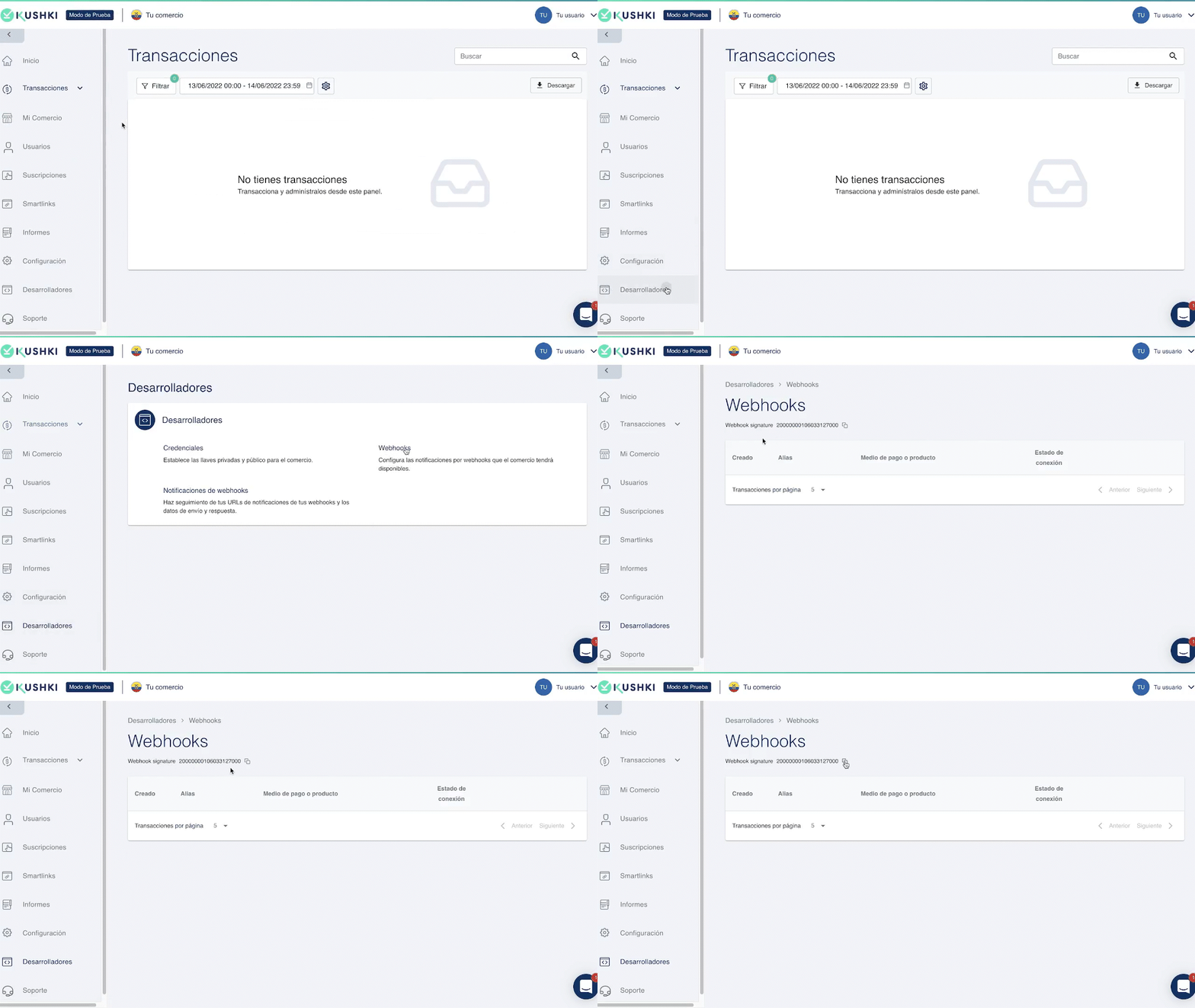
How to get the Webhook Signature?#

You can view and copy the webhook signature from the Console. To do this, go to Desarrolladores > Webhooks. At the top you can easily copy the webhook signature.
Webhook signature gif

Examples#

Below you'll find some examples of how to perform a signature check in the headings.
X-Kushki-Signature#
X-Kushki-SimpleSignature#

According to the functionalities you have integrated, there will be different types of body for requests:
Card Payments
Refunds

Modified at 2026-06-10 19:54:12
Previous
Webhooks
Next
Good practices
Built with