1. One-step Payments
Kushki Docs
English
  • Español
  • English
  • Home
  • Quick Start
    • Frequently Asked Questions
    • Moving to Production
    • Policy for Important API Changes
    • Test Data
    • Error Codes
    • Latest Features
  • Payment Glossary
    • Payments Glossary
  • One-time card payments (Online)
    • Supported card brands
    • Functionalities by business model
    • Network Tokens
    • One-step Payments
      • How do Card Payments Work?
      • Accept a Card Payment
      • Direct charge (without token)
      • Accept One-Time Payments with OTP
      • OTP Authentication Error Codes
      • Error codes for single card payments
    • Two-steps Payments
      • How do one-time payments with authorization and capture work?
      • Receive payments with authorization and capture
    • Webpay Plus Payments
      • Accept Payments through Webpay Plus
      • Reserve funds with Webpay Plus
    • Refunds
      • Returns, cancellations, and refunds
    • 3DS Authentication
      • Introduction to 3DS
      • 3DS API integration
      • 3DS integration with kushki.js library
      • 3DS API integration plus kushki.js library
      • 3DS Error Codes
    • Apple Pay Payments
      • Apple Pay Configuration
      • Apple Pay Sandbox testing
  • Recurring Card Payments (Online)
    • Functionalities by business model
    • External subscriptions to Kushki
    • Authenticate your subscriptions with 3DS
    • Accept one-click payments with 3DS
    • Error codes in recurring charges
    • Apple Pay for Subscriptions
    • Scheduled payments
      • How do Credit or Debit Card Payment Recurring Charges Work?
      • Create a recurring charge
      • Manage your Scheduled Charges
    • OneClick Webpay Scheduled Payments
      • Recurring Payments through Webpay OneClick
      • Reserve funds in subscriptions with Webpay OneClick
    • One Click Payments with Webpay OneClick
      • Webpay OneClick Payments
      • Reserve funds in one click payments with Webpay OneClick
    • OneClick Payments
      • Accepting One-Click Payments
      • How does authorization and capture work in OneClick payments?
      • Receive OneClick payments with authorization and capture
  • Card-present payments
    • Accept card present payments
    • Test data
    • Webhooks for card present
    • Raw card-present API
      • Raw card-present API overview
      • Cryptographic key exchange
      • Sample script to encrypt information
      • Take Payments
      • Frequently Asked Questions
      • Error codes for card-present transactions
    • Transactions
      • Transactions
      • Cancel payments
    • Kushki One
      • First Steps
      • Autenticación y Cifrado de Requests
      • Accept payments with Kushki One
      • Amount Format
      • Async services and webhooks
      • Printing on SmartPOS terminal
      • Unified Error Catalog — Kushki ONE Connect
    • Kushki One Payment App
      • Overview
      • Process a payment
      • Split payment on the terminal
      • Refunds and PreAuth & Capture
      • Review Your Transactions
      • Terminal Setup
  • Wire Transfers
    • Banks and transaction details for bank transfer payments.
    • Receive Wire Transfers
    • Check the Status of a Transaction
  • Cash Payments
    • How do Cash Payments Work?
    • Accept a Cash Payment
    • Authorized locations
    • Error Codes for declined cash transaction
  • Money Disbursement
    • Wire Transfer
      • How does the dispersion by means of bank transfer work?
      • Payment Distribution to Bank Accounts
      • Error codes for transfer dispersions
  • Plugins
    • Shopify
      • Shopify
      • Plugin Operation
    • VTEX
      • VTEX Integration Guide
  • Payment Links
    • Smartlinks
  • Payment forms and buttons
    • Kajita
      • How Does it Work?
      • Payment Kajitas
    • Payment Button
      • Overview
      • Generate a payment button
  • Branch Offices Management
    • How to Onboard Submerchants via API
  • Notifications
    • Good Practices
    • Check your Webhooks
    • One-time Payments Webhooks
      • Webhook for One-Time Payments made with a card
      • Webhook for One-Time Payments by Wire Transfer
      • Webhook for One-Time Payments in Cash
      • Webhook for Payments Made with Webpay Plus
    • Recurring Payments Webhooks
      • Webhook for Recurring Payments Made with Card
      • Webhook for recurring payments with Webpay OneClick
    • Payment Distribution Webhooks
      • Webhook for payment disbursement through wire transfer
    • Payment button Webhooks
      • Webhooks with Payment Button
    • Smartlinks Webhooks
      • Webhooks with Smartlinks
    • Refunds Webhooks
      • Webhook for Voids and Refunds
      • Chargeback Webhooks
HomeMexico 🇲🇽Ecuador 🇪🇨Chile 🇨🇱
Colombia 🇨🇴Peru 🇵🇪
HomeMexico 🇲🇽Ecuador 🇪🇨Chile 🇨🇱
Colombia 🇨🇴Peru 🇵🇪
Status
Soporte / Support
English
  • Español
  • English
  1. One-step Payments

How do Card Payments Work?

Follow a step-by-step guide on how an online card payment works
This functionality is available for the following models:
☑ Acquirer

☑ Aggregator
Credit cards have global coverage and are one of the most popular ways to pay online. There are different types of cards and several steps in the process. Learn how it works, the parties involved, and the stages of a payment process behind the scenes.

Steps of the Payment Process#

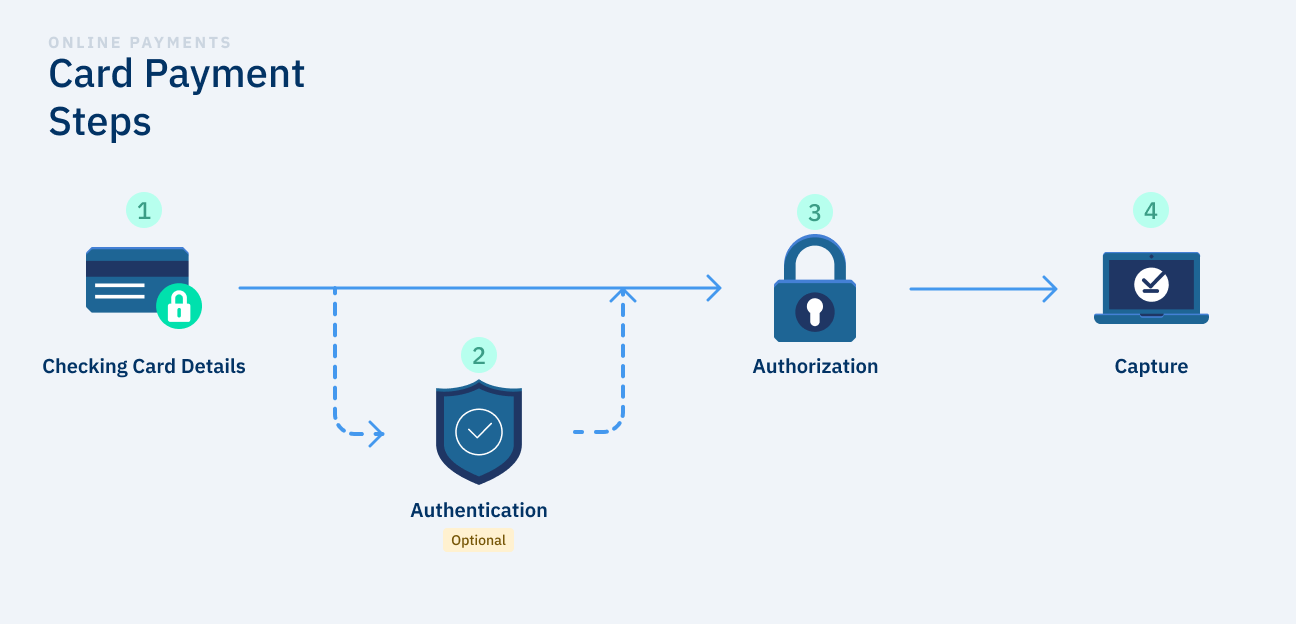
A payment process usually consists of 4 stages: Data verification, authentication, authorization, and capture.
Etapas de pago con tarjeta EN

1. Data Verification#

At this stage, the card details are verified to be correct (for example, that the expiration date is not expired, or that the number obeys the luhn's algorithm). In this step, it can not be yet warranted that the card is valid.

2. Authentication (optional)#

In some instances, depending on the country's regulations, bank requirements, or by choice of the merchant, the customer may be required to authenticate a purchase by entering a password. This may be a one-time authentication (via SMS, email, or a physical device that generates passwords) or another mechanism agreed with the card-issuing entity.

3. Authorization#

At this stage, the bank (or the card issuer) checks whether there are sufficient funds for the account associated with the card. If so, retains that amount in the customer account to guarantee it to the merchant.

4. Capture#

This is when money is moved from the issuing bank (or financial entity) to the merchant's account.

Accept card payments
Start your integration and accept online card payments securely
Modificado en 2026-10-14 19:49:30

Anterior
One-step Payments
Siguiente
Accept a Card Payment
Built with