Follow the step-by-step process in this article to use the money disbursement by means of transfer on the internet in your merchant.The funds or money distribution by wire transfer is a service that simplifies financial management. By using it, you will be able to make payments from a single bank account to the accounts of your users.This feature is only available on demand
The payment process#
Stages of the payment process#
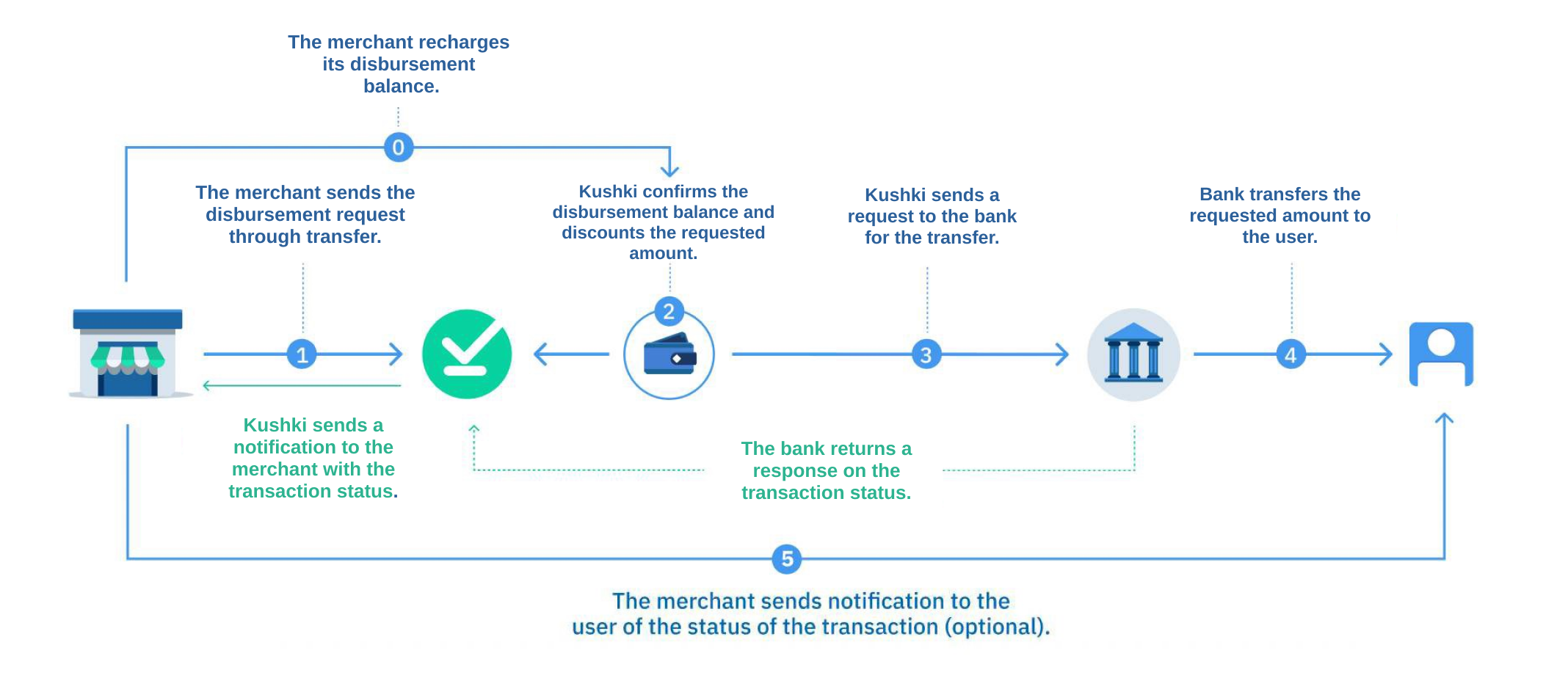
A funds’ distribution process usually consists of 5 stages:Funds top-up on the Kushki distribution account#
It is necessary to check the funds of your merchant in Kushki, because if you do not have funds, the distribution process cannot be carried out. We recommend you top-up your account to distribute the money to the different accounts of your customers without any complications.You can check your available balance for dispersals in your Console or through the API using the Balance for Payouts endpoint. | Bank | Account Details |
|---|
| Banco de Chile | Business name: Kushki Chile SpA
RUT: 76.693.142-1
Currency: Chilean Peso (CLP)
Current Account number: 4080676803 |
Once the transfer has been made, it is necessary to send the receipt to the support area at finopsch@kushkipagos.com. The time for the funds to be available in the account will be 3 hours from the time the mail was received.In this article you can check the recharge times, depending on currency and time. 1. Data request#
At this stage, the bank account details and name of the user who will receive the money are collected. These are submitted to Kushki to be validated and processed.2. Funds verification#
Kushki receives the data that you submitted and validates that your merchant account has enough funds to process the payment distribution. The balance will be immediately deducted from your Kushki distribution account.3. Authorization#
Once we have verified that you have sufficient funds in your distribution account, we provide a transaction reference. At this stage, the distribution process is initiated and will be credited in a few minutes to the user’s bank account.4. Funds delivery#
All transactions generated will be sent in real time to the bank and the bank will deliver the funds to the users’ accounts.Merchant notification#
The bank will notify us of the result of each transaction, and we will notify you immediately.If once the transaction is approved, the client notifies you that the dispersion has not arrived, send us an email to track the transaction and give you a timely response. 5. Notification to the user#
This step is optional, but very useful, since, once we notify you the result of the transaction, you can share it with your users.
Payment Distribution to Bank Accounts
Safely disperse your money through bank transfers.