
Receive Wire Transfers
Web
iOS
Android
Allow your customers to use the available balance in their bank account to purchase your products or services from your website via a wire transfer. To do so, you must obtain the basic data of your paying customers and redirect them to the Wire Transfer System (which can be configured from the administration console) to authorize the debit to their bank account.The payment flow that you will integrate is as shown below: 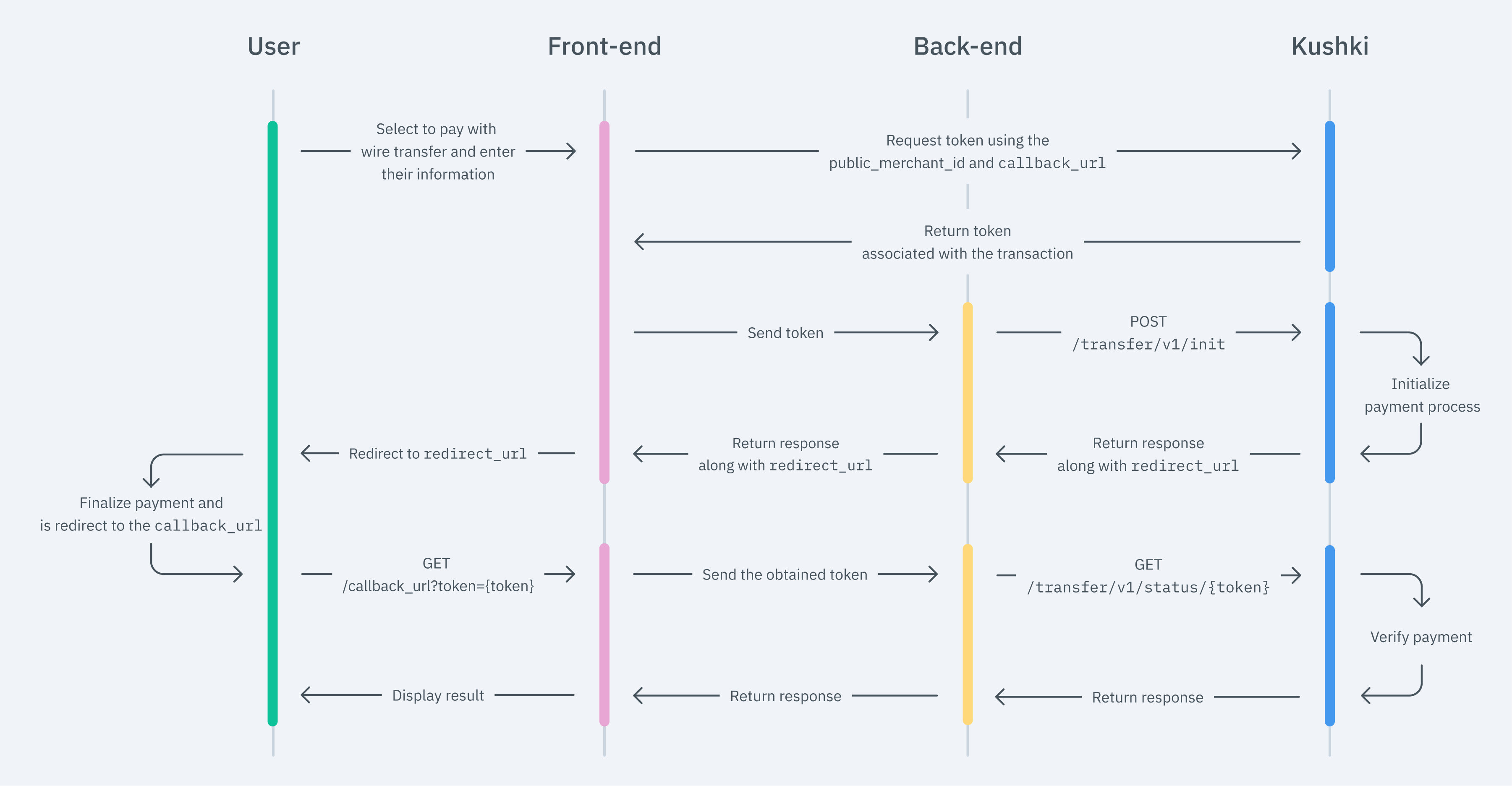
Due to our risk policies, the available payment methods and the integration type may vary once you complete the affiliation. We will tell you how to proceed if this process applies to your merchant. The front end is responsible for collecting the user's main data, generating a token for such information through Kushki's servers, and sending that information to the back end to start the payment process. You have two options to integrate: Kajita and Kushki.js. Kushki has payment forms ready to collect payment information securely. You can use any of our versions: Cajita: the first version of the predefined payment form. Not customizable. Kajita: the second version. It allows you to customize your payment forms from your Administration Console and even have several versions of Kajita, for example, one for each payment method. With Kushki you can create your Kajitas from the Administration Console. Click here to learn how to do this. Include the Kajita needs a space within your page. Enter the following code in your website's For Kajita (v.2): For Cajita (v.1): Remember to configure the action of the Then, add the For Kajita (v.2) you can obtain such script from your Administration Console, as explained in Create and customize your Kajitas. For v.1 (Cajita), add the following script, making sure the form has loaded: This will create a predesigned form on your website to accept payments. Use Kushki.js if you need more control over the "look & feel" or appearance of your payment form. Use the following Install the package from npm. Then import it into your code using the following code. Set up the
Add the following code to your application Before generating the token, you can load the full list of available banks, so that the paying customer can select the entity to make the transfer: This is an optional step. In the event that you do not include it in your integration, the paying customer will select their bank when redirected to the wire transfer portal. If you want the customer to pay at a specific bank of your choice, this must be indicated in the body of the request method of the wire transfer token. First, embed the form in your payment page adding the required fields. You can design it as you prefer. For example: If you want your customers to be notified of their transactions, make sure to capture your customer's email address in the payment form. In addition to this, remember to enable the notification option from your administration console. Then, for the moment when the user submits the form, add a token request and send it to your back end. Check the full reference on our Kushki.js reference The back end is responsible for receiving the token obtained from your front end and starting the payment process with Kushki. When the user submits the form, your front end sends a token to an endpoint that you specified previously. Using this token, you must make a call to our charge endpoint to start the charge process. The transaction init requires the According to the consumption response of the method to initiate the transaction, redirect the user to the URL that Kushki returns from the Wire Transfer System so that they can authenticate in their bank entity and authorize the transaction amount to be debited from the balance of their bank account. Once the payment is completed, the customer will be returned with a Along with the return URL, we will send the transaction token in the path, with which you can check the status of the transaction using this endpoint. In addition, you will obtain the necessary information for your customer's payment voucher. For example, for where According to the response that you receive from the transaction status, show the user a success or failure screen to inform the customer whether the payment was made correctly or if there was an error. The final result of this test data depends on your merchant's configuration: it requires the test environment (sandbox) to be active for your merchant and the assigned processor to support simulating certain statuses. If you don't get the expected result, contact your Kushki account manager or support. To test your integration, we have a test environment where you can simulate transactions from the Bank Transfer System. The first step is to select "Test Bank" from the list of banks. Use the following data to make a test transfer payment to ensure that your integration is ready. Approved Transaction RUT: Password: Account: Select the first account Activation with code: Coordinates: Code by SMS or mail: Verification: Declined Transaction RUT: Password: Account: Select the first account Coordinates: Verification: Below is an example of the bank transfer payment process. Remember that the actual payment process for your customers may vary depending on the bank selected. Kushki gives you the possibility to customize the Wire Transfer System from your administration console. Click here for more information. Read the following guidelines for technical certification approval (required to obtain productive account credentials): The calculation of taxes and the total amount must be the correct amount. Messages displayed on the screen should be aligned with Kushki's responses. All Kushki responses must be saved and recorded (required in case you need support). In the event of successful receipt of the Webhook notification, respond to the request with a The "Pay" button is disabled after the first click. If the result of the transaction is Kushki's logo must be visible for the customer. You can find our logo in several formats here. Make sure to send all the variables required, specified in the API reference.
Important
1. Set up your Front-end
Kajita
Create and customize your Kajitas
Set up Kajita
kushki-checkout.js script in your payment page by adding it to the <head> of your HTML file. Always load kushki-checkout directly from cdn.kushkipagos.com. Do not include the script in a bundle or package or host a copy of it.Add Kajita to your website
<body>, where you want the payment form to be displayed.action form according to the corresponding endpoint in your back end, to obtain the token.script tag.Kushki.js
Set up Kushki.js
Option 1 - CDN
script tag at the end of the <body> of your payment page.Option 2 - NPM
Set up the Kushki object
Request the list of banks
Collect user information and send it to your back-end
Send notifications to your customers
2. Set up your Back-end
API Reference for Chile
Always authenticate from your server
Private-Merchant-Id header. Never expose your Private Key in front-end code: this call must always be made from your back end.JavaScript
Python
PHP
Display the result of the transaction
GET call to the callbackUrl you specified when requesting the token.callbackUrl = 'http://www.example.com' the customer will return to:GET https://www.example.com/?token=26735cbb653a421ba7138eb515e0ab1dtoken is equal to 26735cbb653a421ba7138eb515e0ab1d3. Test your Integration
11111111-11111111111111111 11 111111111144444444-444444444 44 4444Customize the transfer portal
4. Prepare your Certification
statusCode 200, and inform your customer.Initialized, a new transaction must not be allowed until approved or rejected.Modificado en 2026-10-14 19:51:50