1. One-step Payments
Kushki Docs
English
  • Español
  • English
  • Home
  • Quick Start
    • Frequently Asked Questions
    • Moving to Production
    • Policy for Important API Changes
    • Test Data
    • Error Codes
    • Latest Features
  • Payment Glossary
    • Payments Glossary
  • One-time card payments (Online)
    • Supported card brands
    • Introduction to 3DS
    • Functionalities by business model
    • How do third party commissions work?
    • Integration guide Third Party Commissions
    • One-step Payments
      • How do Card Payments Work?
      • Accept a Card Payment
      • Accept One-Time Payments with OTP
      • OTP Authentication Error Codes
      • Error codes for single card payments
    • Scheduled payments
      • How do Credit or Debit Card Payment Recurring Charges Work?
      • Create a recurring charge
      • Manage your Scheduled Charges
    • Refunds
      • Returns, cancellations, and refunds
    • 3DS Authentication
      • 3DS API integration
      • 3DS integration with kushki.js library
      • 3DS API integration plus kushki.js library
      • 3DS Error Codes
  • Recurring Card Payments (Online)
    • Functionalities by business model
    • Error codes in recurring charges
    • Authenticate your subscriptions with 3DS
    • External subscriptions to Kushki
    • OneClick Payments
      • Accepting One-Click Payments
  • Wire Transfers
    • How do Payments by Wire Transfers Work?
    • Banks and transaction details for bank transfer payments
    • Receive Wire Transfers
    • Check the Status of a Transaction
  • Cash Payments
    • How do Cash Payments Work?
    • Accept a Cash Payment
    • Authorized locations
    • Error Codes for declined cash transaction
  • Plugins
    • Shopify
      • Shopify
      • Plugin Operation
    • VTEX
      • VTEX Integration Guide
  • Payment Links
    • Smartlinks
  • Payment forms and buttons
    • Kajita
      • How Does it Work?
      • Payment Kajitas
    • Payment Button
      • Overview
      • Generate a payment button
  • Branch Offices Management
    • How to Onboard Submerchants via API
  • Notifications
    • Good Practices
    • Check your Webhooks
    • One-time Payments Webhooks
      • Webhook for One-Time Payments made with a card
      • Webhook for One-Time Payments by Wire Transfer
      • Webhook for One-Time Payments in Cash
    • Recurring Payments Webhooks
      • Webhook for Recurring Payments Made with Card
    • Payment button Webhooks
      • Webhooks with Payment Button
    • Smartlinks Webhooks
      • Webhooks with Smartlinks
    • Refunds Webhooks
      • Webhook for Voids and Refunds
      • Chargeback Webhooks
HomeMexico 🇲🇽Ecuador 🇪🇨
Chile 🇨🇱Colombia 🇨🇴Peru 🇵🇪
HomeMexico 🇲🇽Ecuador 🇪🇨
Chile 🇨🇱Colombia 🇨🇴Peru 🇵🇪
Status
Soporte / Support
English
  • Español
  • English
  1. One-step Payments

OTP Authentication Error Codes

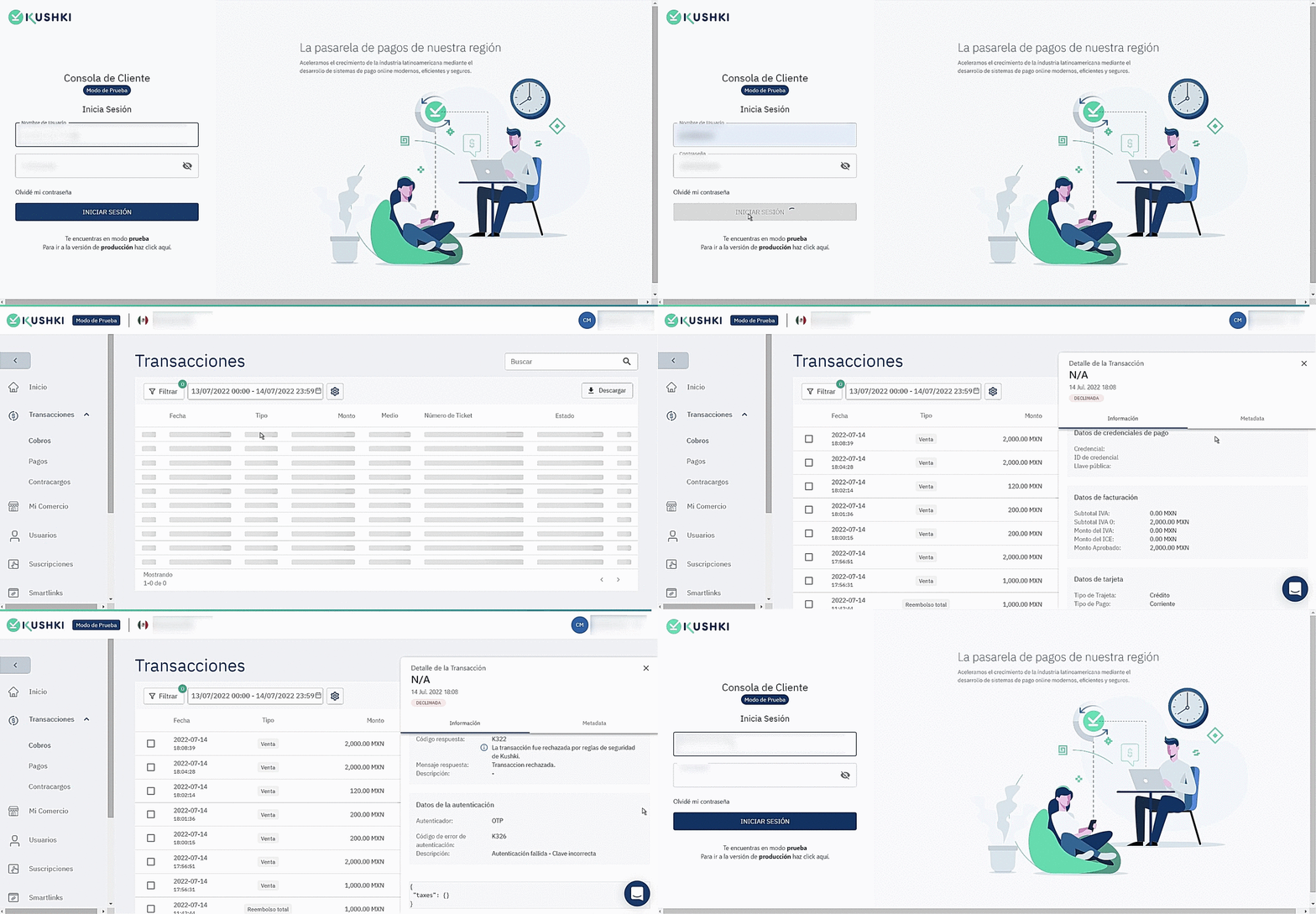
Transactions declined by security rules in Kushki will have a K322 code as a generic response. In case the OTP authentication fails, in your Console you will be able to check in the transaction module the reason for declination by opening the transaction detail which will have a declination subcode K326.
Follow the instructions below to view the OTP authentication details:
1.
Login to your console with a Reader User or Master User.
2.
Go to the Transactions>>Cashouts module.
3.
Use the available filters to search for the desired transaction.
4.
Click on the transaction. The Transaction Detail window will open.
5.
The Authentication details section will appear at the bottom of the detail. From there you will be able to view the reason for the declination.
The following GIF will guide you through the authentication detail review process:
Códigos de error OTP
| Authentication error code | Description |
| -- | -- | -- |
| K326 | Authentication failed - Incorrect Key |
| K326 | Authentication failed - Attempts Exceeded |
| K326 | Authentication failed - Abort |
| K326 | Authentication failed - Authentication Error|
Modificado en 2026-09-24 15:33:34
Anterior
Accept One-Time Payments with OTP
Siguiente
Error codes for single card payments
Built with