1. Refunds
Kushki Docs
English
  • Español
  • English
  • Home
  • Quick Start
    • Frequently Asked Questions
    • Moving to Production
    • Policy for Important API Changes
    • Test Data
    • Error Codes
    • Latest Features
  • Payment Glossary
    • Payments Glossary
  • One-time card payments (Online)
    • Supported card brands
    • Introduction to 3DS
    • Functionalities by business model
    • How do third party commissions work?
    • Integration guide Third Party Commissions
    • One-step Payments
      • How do Card Payments Work?
      • Accept a Card Payment
      • Accept One-Time Payments with OTP
      • OTP Authentication Error Codes
      • Error codes for single card payments
    • Scheduled payments
      • How do Credit or Debit Card Payment Recurring Charges Work?
      • Create a recurring charge
      • Manage your Scheduled Charges
    • Refunds
      • Returns, cancellations, and refunds
    • 3DS Authentication
      • 3DS API integration
      • 3DS integration with kushki.js library
      • 3DS API integration plus kushki.js library
      • 3DS Error Codes
  • Recurring Card Payments (Online)
    • Functionalities by business model
    • Error codes in recurring charges
    • Authenticate your subscriptions with 3DS
    • External subscriptions to Kushki
    • OneClick Payments
      • Accepting One-Click Payments
  • Wire Transfers
    • How do Payments by Wire Transfers Work?
    • Banks and transaction details for bank transfer payments
    • Receive Wire Transfers
    • Check the Status of a Transaction
  • Cash Payments
    • How do Cash Payments Work?
    • Accept a Cash Payment
    • Authorized locations
    • Error Codes for declined cash transaction
  • Plugins
    • Shopify
      • Shopify
      • Plugin Operation
    • VTEX
      • VTEX Integration Guide
  • Payment Links
    • Smartlinks
  • Payment forms and buttons
    • Kajita
      • How Does it Work?
      • Payment Kajitas
    • Payment Button
      • Overview
      • Generate a payment button
  • Branch Offices Management
    • How to Onboard Submerchants via API
  • Notifications
    • Good Practices
    • Check your Webhooks
    • One-time Payments Webhooks
      • Webhook for One-Time Payments made with a card
      • Webhook for One-Time Payments by Wire Transfer
      • Webhook for One-Time Payments in Cash
    • Recurring Payments Webhooks
      • Webhook for Recurring Payments Made with Card
    • Payment button Webhooks
      • Webhooks with Payment Button
    • Smartlinks Webhooks
      • Webhooks with Smartlinks
    • Refunds Webhooks
      • Webhook for Voids and Refunds
      • Chargeback Webhooks
HomeMexico 🇲🇽Ecuador 🇪🇨
Chile 🇨🇱Colombia 🇨🇴Peru 🇵🇪
HomeMexico 🇲🇽Ecuador 🇪🇨
Chile 🇨🇱Colombia 🇨🇴Peru 🇵🇪
Status
Soporte / Support
English
  • Español
  • English
  1. Refunds

Returns, cancellations, and refunds

Learn how to cancel a payment or request a refund for your customers
This functionality is available for the following models:
☐ Acquirer

☑ Aggregator
With Kushki you can process debit and credit card payment returns with an approved status. Once a return is approved, the funds will be returned to your customer's card.
Important
Kushki only supports returns in card payments. To manage returns of payments made by wire transfer or cash, you must carry out the process manually, in agreement with your customer.
Returns can be of two types, according to the day and the time the original transaction and the cancellation request are processed:

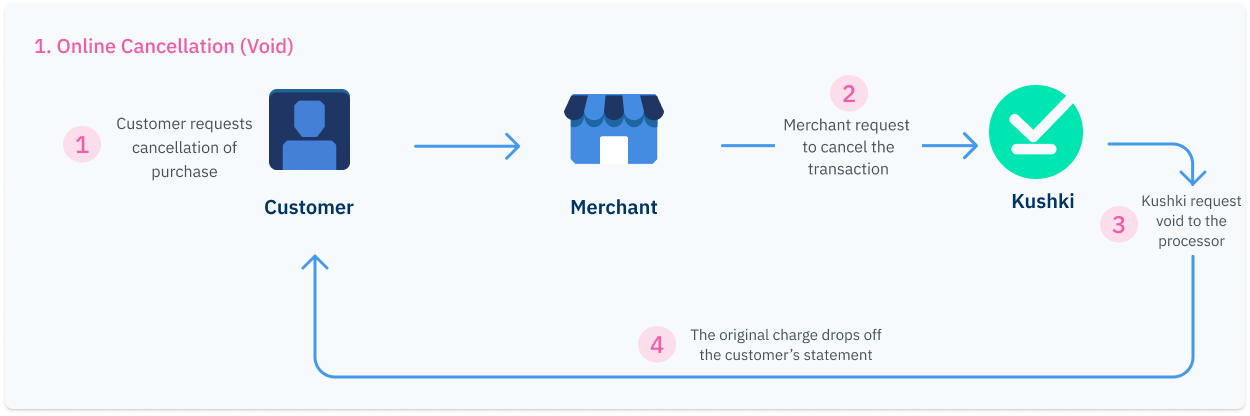
1. Online cancellation (Void)#

It occurs when the return request is processed during the same day of the transaction, before 21:00 . We will make up to three return attempts with the processor and if successful, the purchase will be removed from your customer's bank statement and the purchase amount will be returned to their account.
Online Cancellation Void EN

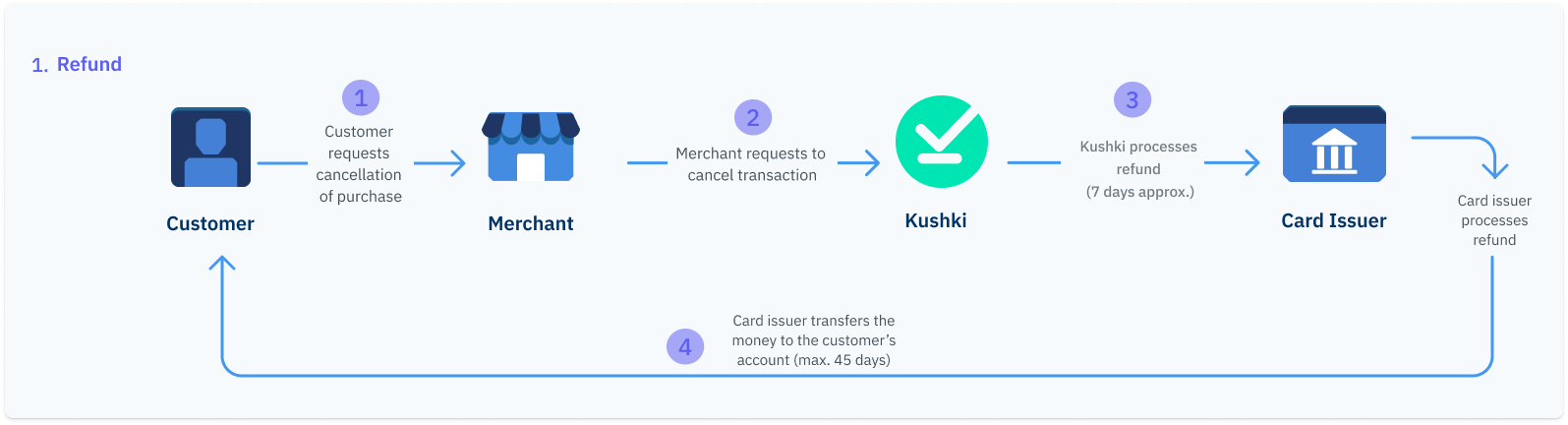
2. Refund#

When an online cancellation is not possible, a refund will be required. This type of refund can take up to 7 business days to processed and up to 45 business days to appear on your customer's bank statement, depending on the card issuing bank.
Manual Refund EN
Refund can occur in the following scenarios:
When the return request is processed after on the day on which the customer's payment took place.
When the three online cancellation attempts fail.
When the cancellation request is made on a day other than that of the original transaction.

How to process a return?#

The return process can have two outcomes: Void or Refund. The return will be done as void if it is requested until 21:00 hours on the day of the transaction. If it exceeds that time, then it will be processed as a refund. Refunds can take up to 7 business days to process and up to 45 business days to reflect on your customer's statement, depending on the card issuing bank.
You can process returns from your Administration Console as explained here or integrate our cancellations request API method into your application, so that your buyers can request the return of a purchase from your website.
If you integrate returns via API, you only need to use the cancellation request method. In case it is not possible to complete an automatic cancellation of the transaction, Kushki will process it as a manual return.
Once a return request is approved, this action will not be reversed.
In order to request the cancellation of a payment, it is necessary to use the ticketNumber of the original transaction as path parameter and send your private credential, as shown in the example below:
JavaScript
Python
PHP
Check our API reference for more information.

Partial refunds#

In Ecuador, you can perform partial refunds on your transactions. Keep in mind that partial refunds are only processed as refunds.
Warning
Only one (1) partial refund is allowed per transaction. If a second partial refund is attempted on the same charge, the request will be automatically denied, even if there is a remaining balance on the original transaction.
The maximum period to submit a refund ranges from 30 days to 6 months from the date of the original transaction, depending on the processor. Requests submitted after this period will be automatically rejected.

Partial refunds via API#

To request a partial return, use the void charge endpoint by sending the amount object with the specific amount to be returned.
JavaScript
Python

What is the time limit to request a refund?#

The time limit for your customers to request a refund varies is up to 6 months after a payment has been made.

How to check the status of a return?#

You can check the status of a cancellation from your Administration Console as explained here or set up a Webhook for returns, in which Kushki will notify you when a return request, either a cancellation (void) or a refund, is successfully completed.

Recommended
Check the status of your returns

Modificado en 2026-10-14 19:47:14
Anterior
Refunds
Siguiente
3DS Authentication
Built with