1. One-time card payments (Online)
Kushki Docs
English
  • Español
  • English
  • Home
  • Quick Start
    • Frequently Asked Questions
    • Moving to Production
    • Policy for Important API Changes
    • Test Data
    • Error Codes
    • Latest Features
  • Payment Glossary
    • Payments Glossary
  • One-time card payments (Online)
    • Supported card brands
    • Introduction to 3DS
    • Functionalities by business model
    • How do third party commissions work?
    • Integration guide Third Party Commissions
    • One-step Payments
      • How do Card Payments Work?
      • Accept a Card Payment
      • Accept One-Time Payments with OTP
      • OTP Authentication Error Codes
      • Error codes for single card payments
    • Scheduled payments
      • How do Credit or Debit Card Payment Recurring Charges Work?
      • Create a recurring charge
      • Manage your Scheduled Charges
    • Refunds
      • Returns, cancellations, and refunds
    • 3DS Authentication
      • 3DS API integration
      • 3DS integration with kushki.js library
      • 3DS API integration plus kushki.js library
      • 3DS Error Codes
  • Recurring Card Payments (Online)
    • Functionalities by business model
    • Error codes in recurring charges
    • Authenticate your subscriptions with 3DS
    • External subscriptions to Kushki
    • OneClick Payments
      • Accepting One-Click Payments
  • Wire Transfers
    • How do Payments by Wire Transfers Work?
    • Banks and transaction details for bank transfer payments
    • Receive Wire Transfers
    • Check the Status of a Transaction
  • Cash Payments
    • How do Cash Payments Work?
    • Accept a Cash Payment
    • Authorized locations
    • Error Codes for declined cash transaction
  • Plugins
    • Shopify
      • Shopify
      • Plugin Operation
    • VTEX
      • VTEX Integration Guide
  • Payment Links
    • Smartlinks
  • Payment forms and buttons
    • Kajita
      • How Does it Work?
      • Payment Kajitas
    • Payment Button
      • Overview
      • Generate a payment button
  • Branch Offices Management
    • How to Onboard Submerchants via API
  • Notifications
    • Good Practices
    • Check your Webhooks
    • One-time Payments Webhooks
      • Webhook for One-Time Payments made with a card
      • Webhook for One-Time Payments by Wire Transfer
      • Webhook for One-Time Payments in Cash
    • Recurring Payments Webhooks
      • Webhook for Recurring Payments Made with Card
    • Payment button Webhooks
      • Webhooks with Payment Button
    • Smartlinks Webhooks
      • Webhooks with Smartlinks
    • Refunds Webhooks
      • Webhook for Voids and Refunds
      • Chargeback Webhooks
HomeMexico 🇲🇽Ecuador 🇪🇨
Chile 🇨🇱Colombia 🇨🇴Peru 🇵🇪
HomeMexico 🇲🇽Ecuador 🇪🇨
Chile 🇨🇱Colombia 🇨🇴Peru 🇵🇪
Status
Soporte / Support
English
  • Español
  • English
  1. One-time card payments (Online)

How do third party commissions work?
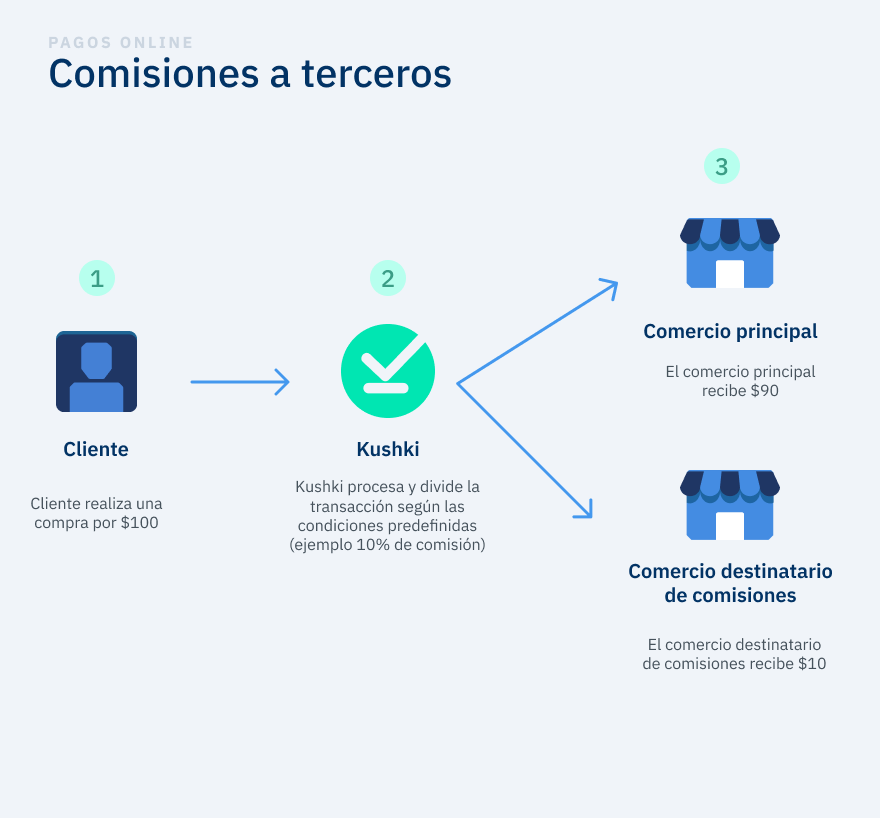
Discover how the Third Party Commissions modality works to divide the commissions when making a payment with a credit card
The Third Party Commissions modality allows the division and dispersal of a transaction in two different accounts with a single charge by using a predefined percentage, a fixed amount or a combination of both.
Split payments
In this model, payments can be split between two types of merchants:
🔹 Main merchant: Responsible for selling the product or service.
🔹 Commission recipient merchant: Receives a commission for each completed transaction.
Product in beta version 🔐👨‍
We are working on our beta version. Stay tuned for its official release! You can also contact your account manager for more information.

🔄 How Are Commissions Managed?#

When a merchant needs to separate the commission from the total sale amount (due to regulations or convenience), they can implement Third-Party Commissions.

📌 Process:#

1.
The end customer makes a single payment using a debit or credit card.
2.
Kushki automatically splits the transaction into two accounts based on the predefined configuration.
3.
The main merchant receives the payment minus the commission.
4.
The commission is directly transferred to the commission recipient’s account.

📄 How Do Charges Appear on the Customer’s Account Statement?#

💳 The customer will see two separate charge details, each with its corresponding description.
📌 The transaction identifier on the statement may vary depending on the issuing bank, payment processor, or registered merchant name.

⚖️ Commission Split Options#

The transaction amount can be divided in three ways:
✔️ Percentage: Between 0% and 100% of the transaction.
✔️ Fixed amount: Example: $2 USD per transaction.
✔️ Combined: Example: 10% + $1 USD per transaction.

Considerations#

Currently, Third-Party Commissions are available only for credit and debit card transactions in Ecuador 🇪🇨 and Mexico 🇲🇽.
Once the Third-Party Commissions service is activated, all transactions for the merchant will be split according to the predefined conditions. It is not possible to select which transactions follow this flow and which will use the standard card payment flow.
To activate or deactivate the Third-Party Commissions model, please submit a request through our support center.
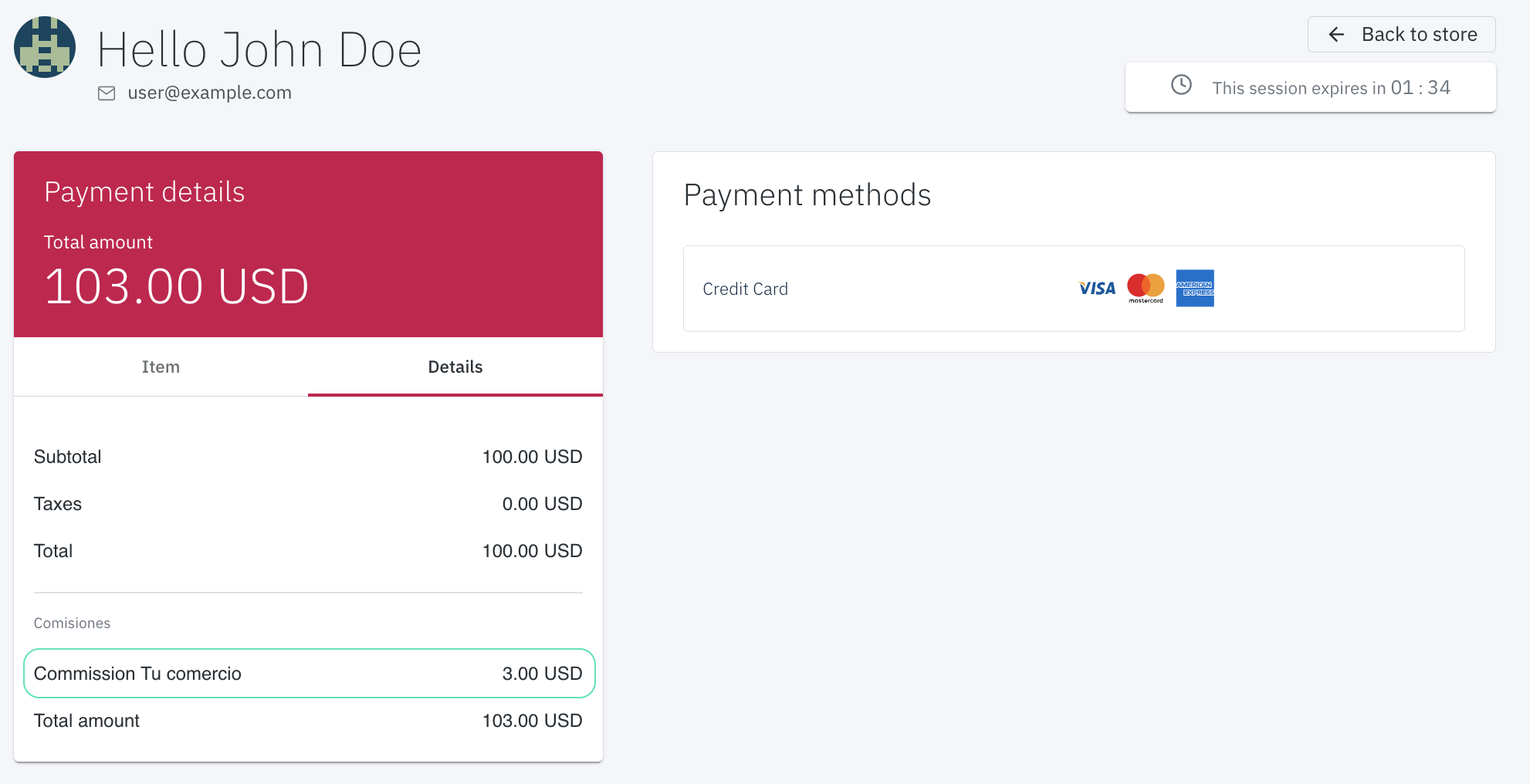
The commission breakdown is shown in the following products:
PRODUCTCOMMISSION BREAKDOWN
KAJITA✅
KUSHKI.JS✅
BOTÓN DE PAGOS✅
SMARTLINKS-
INTEGRACIÓN 100% API- (the breakdown of the commission charged is not returned in the response)
Third Party Commissions breakdown
Modificado en 2026-09-24 15:32:21
Anterior
Functionalities by business model
Siguiente
Integration guide Third Party Commissions
Built with