1. Recurring Card Payments (Online)
Kushki Docs
English
  • Español
  • English
  • Home
  • Quick Start
    • Frequently Asked Questions
    • Moving to Production
    • Policy for Important API Changes
    • Test Data
    • Error Codes
    • Latest Features
  • Payment Glossary
    • Payments Glossary
  • One-time card payments (Online)
    • Supported card brands
    • Introduction to 3DS
    • Functionalities by business model
    • How do third party commissions work?
    • Integration guide Third Party Commissions
    • One-step Payments
      • How do Card Payments Work?
      • Accept a Card Payment
      • Accept One-Time Payments with OTP
      • OTP Authentication Error Codes
      • Error codes for single card payments
    • Scheduled payments
      • How do Credit or Debit Card Payment Recurring Charges Work?
      • Create a recurring charge
      • Manage your Scheduled Charges
    • Refunds
      • Returns, cancellations, and refunds
    • 3DS Authentication
      • 3DS API integration
      • 3DS integration with kushki.js library
      • 3DS API integration plus kushki.js library
      • 3DS Error Codes
  • Recurring Card Payments (Online)
    • Functionalities by business model
    • Error codes in recurring charges
    • Authenticate your subscriptions with 3DS
    • External subscriptions to Kushki
    • OneClick Payments
      • Accepting One-Click Payments
  • Wire Transfers
    • How do Payments by Wire Transfers Work?
    • Banks and transaction details for bank transfer payments
    • Receive Wire Transfers
    • Check the Status of a Transaction
  • Cash Payments
    • How do Cash Payments Work?
    • Accept a Cash Payment
    • Authorized locations
    • Error Codes for declined cash transaction
  • Plugins
    • Shopify
      • Shopify
      • Plugin Operation
    • VTEX
      • VTEX Integration Guide
  • Payment Links
    • Smartlinks
  • Payment forms and buttons
    • Kajita
      • How Does it Work?
      • Payment Kajitas
    • Payment Button
      • Overview
      • Generate a payment button
  • Branch Offices Management
    • How to Onboard Submerchants via API
  • Notifications
    • Good Practices
    • Check your Webhooks
    • One-time Payments Webhooks
      • Webhook for One-Time Payments made with a card
      • Webhook for One-Time Payments by Wire Transfer
      • Webhook for One-Time Payments in Cash
    • Recurring Payments Webhooks
      • Webhook for Recurring Payments Made with Card
    • Payment button Webhooks
      • Webhooks with Payment Button
    • Smartlinks Webhooks
      • Webhooks with Smartlinks
    • Refunds Webhooks
      • Webhook for Voids and Refunds
      • Chargeback Webhooks
HomeMexico 🇲🇽Ecuador 🇪🇨
Chile 🇨🇱Colombia 🇨🇴Peru 🇵🇪
HomeMexico 🇲🇽Ecuador 🇪🇨
Chile 🇨🇱Colombia 🇨🇴Peru 🇵🇪
Status
Soporte / Support
English
  • Español
  • English
  1. Recurring Card Payments (Online)

Authenticate your subscriptions with 3DS

Get to know how to authenticate card tokenization with 3DS
This functionality is available for the following models:
☐ Aggregator

☑ Gateway
Product in beta version 🔐👨‍💻
We are working on our beta version. Stay tuned for its official release! You can also contact your account manager for more information.
Do you have your own 3DS authentication engine?
If so, please make sure to send the threeDomainSecure object when you save the card details.
Important
3DS authentication is only performed at the time of card tokenization.
To guarantee the security of your merchant, Kushki fraud prevention team will request you to activate the 3DS authentication when tokenizing cards to receive recurring payments, either one click or scheduled payments.
By having the 3DS authentication service active, your customers will be requested to complete an extra verification step (from now on, challenge) with the card issuer to complete certain transactions. This challenge usually consists of an OTP sent by the bank to your customer’s e-mail address or telephone number.
Important
Please note that this authentication takes place at the time a subscription is completed and not at the time of payment.
Check below for the availability of 3DS validation with subscriptions according to the affiliation and integration models available on Kushki.

3DS validation availability with subscriptions#

By affiliation models#

3DS validation for subscriptions is available with the following card brands:

Aggregation#

Credit card and debit card#
            VISA        MasterCardAmerican Express
      Available Yes          Available Yes        -

By integration methods#

3DS validation for subscriptions is available in the following integration methods:
                       Available Yes             Not available ⛔️
Smartlink integration (scheduled payments)
Kajita
Android (SDK)
iOS (SDK)
Payment button
Kushki.js
Integración Kushki.js Hosted Fields
API integration
Shopify

How does the 3DS authentication work?#

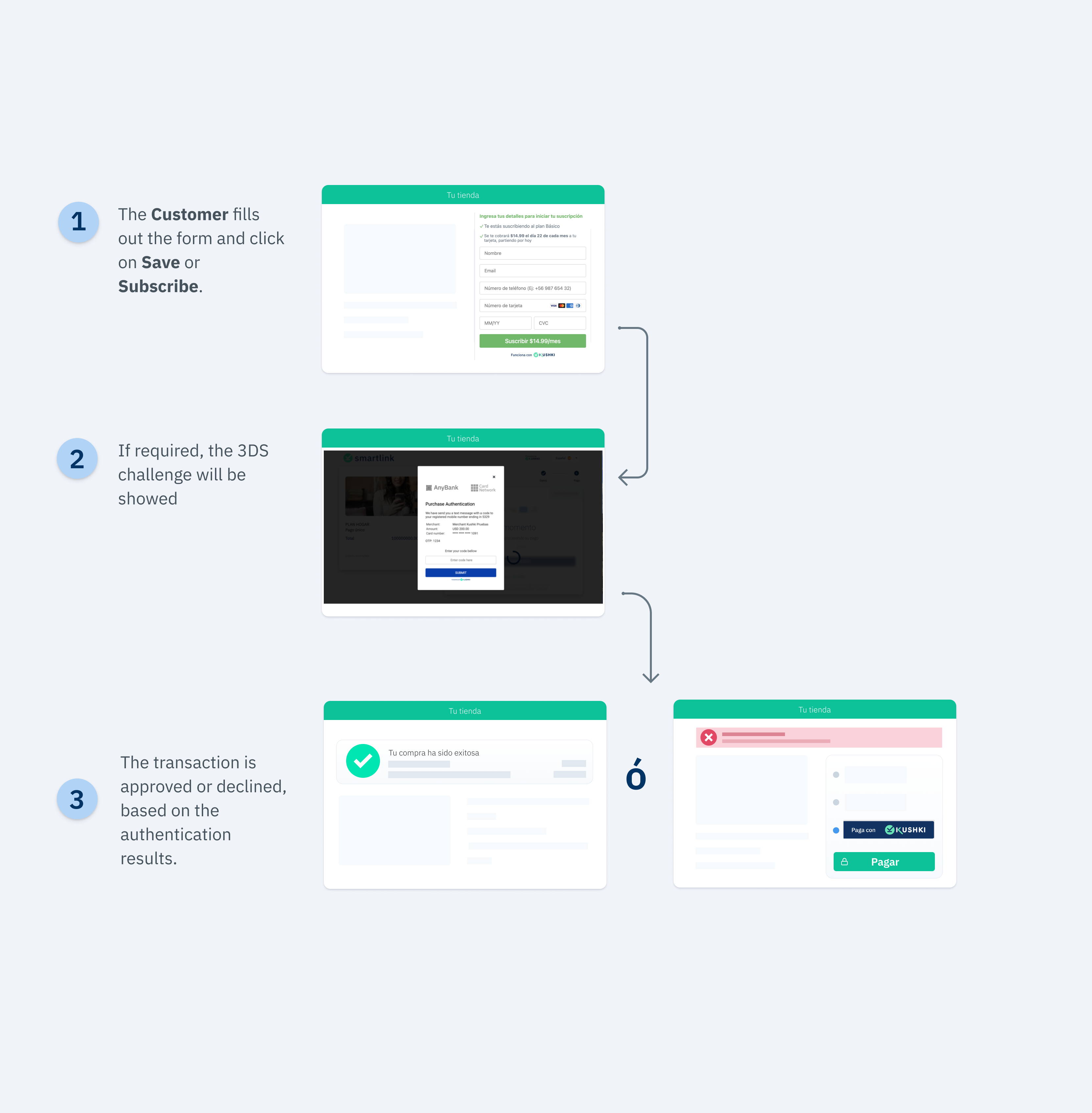
Once the customer fills out the form and clicks on Save Card, Kushki will validate if 3DS authentication is required for the transaction. If this validation is required, your customer will be displayed a challenge whose experience may vary depending on the brand and the issuing bank. When your customer completes the challenge, they will be able to finalize the card registration.
The 3DS authentication flow (recurring charge creation) with Kushki is shown below:
3DS Cargos recurrentesEN

3DS Supported Brands#

Marcas de tarjetas soportadas México - Crédito
Do you want to receive payments with 3DS?
Contact us to activate 3DS in your merchant.

1. Configure your front-end#

Configure your front-end according to your integration.

Kushki.js#

Follow our instructions for Kushki.js described in our guide to accept recurring payments.
Now, before sending the data to the end-point in your back-end, we must perform the 3DS validation with the card issuer.
When 3DS is enabled, the response from the requestSubscriptionToken() method will be as shown below:
You can find the description of these variables below:
ParameterTypeDescription
authRequiredBooleanThis field indicates whether a 3DS challenge is required or not.
acsURLURLRefers to the URL of the challenge page that the user must pass (Access Control System).
specificationVersionStringRefers to the applicable 3DS version.
authenticationTransactionIdStringTransaction ID verified from brands.
paReqStringStands for the Payer Authentication Request. It is a base64 encoded field containing your merchant and cardholder information that is sent to the issuer for authentication.
Note: In case of testing in UAT environment, sandbox must be sent.
Do you get the token from your back-end?
In case you use the Request a recurring charge token
method in your integration, you should follow steps below:
1.
Implement Kushki.js in your front-end.
2.
Use the requestSecureInit() method to get the jwt.
3.
Request the Recurring charge token
by sending the jwt obtained in step 2.
4.
You will receive the token and the variables secureService, secureId and the security object (specified in the table above).
5.
Use the requestValidate3DS method to do the 3DS validation, as explained below.
Once you receive the Token response with the structure above, you must send the security object to Kushki by using the requestValidate3DS method:
If the value of the authRequired variable is equal to true, the 3DS validation modal will be presented and your customer will then receive the value to enter by email or text message.
If the value of the authRequired variable is equal to false, the 3DS validation modal will not be presented.
The response you will receive in the callback function will be:
{
  "code":"3DS000",
  "message":"ok"
}
In case of error, the response of the callback function will be something like:
{ 
  "message":"error-message", 
  "code":"error-code",
  "error": "error-message" 
}
You will receive the authentication response in the charge. If the authentication is declined, you will receive a 322 code and any of the other subcodes specified in the Error codes guide.
The cardholder will have up to a maximum of 3 retries to complete the 3DS authentication.

Kushki.js Hosted Fields#

When calling the requestToken() method to request a token, if a 3DS rule exists and the condition is met, the requestToken() method will display the modal so that the client can enter the 3DS validation data.
Note: Remember to set the isSubscription property with the value of true to generate a subscription. If the initCardToken() method was configured as a subscription, you will need to call the create a recurring charge endpoint from your backend, rather than making a one-time payment with the token.
If the validation was incorrect, you may receive one of the following error codes:
CODEMESSAGEEXAMPLEDESCRIPTION
E004Error en solicitud de JWT{ code: "E004", message: "Error en solicitud de JWT" }If the merchant has a 3DS rule enabled and there was an error requesting the JWT, code E004 will be returned. Please try again; If the error persists, contact Kushki support.
E005Campos 3DS inválidos{ code: "E005", message: "Campos 3DS inválidos" }If the merchant has a 3DS rule enabled and there was an error in 3DS authentication, the code E005 will be returned. Please try again making sure you enter the data correctly for 3DS validation.
E006Error en solicitud de validación de token{ code: "E006", message: "Error en solicitud de validación de token" }If the merchant has a 3DS rule enabled and there was an error in the 3DS validation session, code E006 will be returned. Please try again making sure you enter the data correctly for 3DS validation; If the error persists, contact Kushki support.
See the reference for more information on 3DS validation.

2. Configure your back-end#

Follow the instructions in our guide to accept recurring card payments.

3. Test your integration#

Below you will find some test cards that you can use in test mode (UAT) to make sure your integration is ready. Use them with any CVV, enter any future expiration date and once the 3DS modal appears, enter 1234 as the validation code.
Transaction approved with 3DS authentication required:
4456528080389860
4456529267234200
4456529165328302
4456524869770255
4456523340069956
Transaction approved without 3DS validation:
4456540000000063
4456543371713314
4456541982068615
4456541249811088
Important
To enable 3DS in test mode in your merchant, it is required to have an additionalconfiguration performed by Kushki.

4. Prepare your certification#

Follow the guidelines described in our guide to accept recurring card payments.
Modificado en 2026-10-14 19:47:34
Anterior
Error codes in recurring charges
Siguiente
External subscriptions to Kushki
Built with