1. Card-present payments
Kushki Docs
English
  • Español
  • English
  • Home
  • Quick Start
    • Frequently Asked Questions
    • Moving to Production
    • Policy for Important API Changes
    • Test Data
    • Error Codes
    • Latest Features
  • Payment Glossary
    • Payments Glossary
  • One-time card payments (Online)
    • Supported card brands
    • Functionalities by business model
    • Network Tokens
    • One-step Payments
      • How do Card Payments Work?
      • Accept a Card Payment
      • Direct charge (without token)
      • Accept One-Time Payments with OTP
      • OTP Authentication Error Codes
      • Error codes for single card payments
    • Two-steps Payments
      • How do one-time payments with authorization and capture work?
      • Receive payments with authorization and capture
    • Refunds
      • Returns, cancellations, and refunds
    • 3DS Authentication
      • Introduction to 3DS
      • 3DS API integration
      • 3DS integration with kushki.js library
      • 3DS API integration plus kushki.js library
      • 3DS Error Codes
    • Apple Pay Payments
      • Apple Pay Configuration
      • Apple Pay Sandbox testing
  • Recurring Card Payments (Online)
    • Functionalities by business model
    • External subscriptions to Kushki
    • Authenticate your subscriptions with 3DS
    • Accept one-click payments with 3DS
    • Error codes in recurring charges
    • Apple Pay for Subscriptions
    • Scheduled payments
      • How do Credit or Debit Card Payment Recurring Charges Work?
      • Create a recurring charge
      • Manage your Scheduled Charges
    • OneClick Payments
      • Accepting One-Click Payments
      • How does authorization and capture work in OneClick payments?
      • Receive OneClick payments with authorization and capture
  • Card-present payments
    • Accept card present payments
    • Test data
    • Webhooks for card present
    • Raw card-present API
      • Raw card-present API overview
      • Cryptographic key exchange
      • Sample script to encrypt information
      • Take Payments
      • Frequently Asked Questions
      • Error codes for card-present transactions
    • Transactions
      • Transactions
      • Cancel payments
    • Kushki One
      • First Steps
      • Autenticación y Cifrado de Requests
      • Accept payments with Kushki One
      • Amount Format
      • Async services and webhooks
      • Printing on SmartPOS terminal
      • Unified Error Catalog — Kushki ONE Connect
    • Kushki One Payment App
      • Overview
      • Process a payment
      • Split payment on the terminal
      • Refunds and PreAuth & Capture
      • Review Your Transactions
      • Terminal Setup
  • Wire Transfers
    • Shopping experiences and transaction details for bank transfer payments
    • Receive Wire Transfers
    • Check the Status of a Transaction
  • Cash Payments
    • Accept a Cash Payment
    • Authorized locations
    • Error Codes for declined cash transaction
  • Alternative payment methods (APM)
    • How do APM payments work?
    • Accept Yape payments
  • Money Disbursement
    • Wire Transfer
      • How does the disbursement through bank transfer work?
      • Payment disbursement to bank accounts
      • Error codes for transfer disbursements
    • Card
      • How does sending funds to cards work?
      • Send money to a card
      • Error Codes
  • Plugins
    • Shopify
      • Shopify
      • Plugin Operation
    • VTEX
      • VTEX Integration Guide
  • Payment Links
    • Smartlinks
  • Payment forms and buttons
    • Kajita
      • How Does it Work?
      • Payment Kajitas
    • Payment Button
      • Overview
      • Generate a payment button
  • Branch Offices Management
    • How to Onboard Submerchants via API
  • Notifications
    • Good Practices
    • Check your Webhooks
    • One-time Payments Webhooks
      • Webhook for One-Time Payments made with a card
      • Webhook for One-Time Payments by Wire Transfer
      • Webhook for One-Time Payments in Cash
    • Recurring Payments Webhooks
      • Webhook for Recurring Payments Made with Card
    • Payment Distribution Webhooks
      • Webhook for payment disbursement through wire transfer
      • Webhook for card disbursement
    • Payment button Webhooks
      • Webhooks with Payment Button
    • Smartlinks Webhooks
      • Webhooks with Smartlinks
    • Refunds Webhooks
      • Webhook for Voids and Refunds
      • Chargeback Webhooks
HomeMexico 🇲🇽Ecuador 🇪🇨Chile 🇨🇱Colombia 🇨🇴Peru 🇵🇪
Status
Soporte / Support
English
  • Español
  • English
  1. Card-present payments

Raw card-present API

This functionality is available for the following models:
☑ Acquirer

☐ Aggregator
Raw card-present API allows you to integrate a certified POS terminal to our payment network to process transactions quickly and securely. You can perform different operations with this integration.

Features#

Operations#

These are the operations available for integrations through Raw card-present API:

Supported card brands#

The following card networks and brands are accepted through Raw card-present API integrations:
Visa
Mastercard

Requirements#

Before you can perform an integration, you must meet the following requirements:
Complete your merchant’s affiliation process with Kushki.
Have a test account.
Have POS terminals certified with PCI PTS V6.0, EMV Contactless L1, EMV L1 and EMV L2.
Receive the public keys and private keys with which you can authenticate, validate, and authorize transactions from your merchant.
Sign a Non-Disclosure Agreement (NDA) for the HSM (Hardware Security Module) service, which will upload the shared cryptographic key information. This process will ensure key protection, allowing your merchant to access the MYHSM portal.
Create and maintain Security Officer (SO) information, including contact details and appropriate SO groups within the portal. These people will be responsible for the security key exchange process.
Have a Hardware Security Module for secure storage of encryption keys.

Brand Certification (Visa and Mastercard)#

Certification with Visa and Mastercard brands is required in the following cases:
1.
When a new integration with Kushki is performed due to the incorporation of a new acquirer or card network (Visa, Mastercard, Amex, Diners).
2.
Before launching a new terminal model or updating its firmware.
3.
If the EMV kernel or transaction logic that impacts the payment flow is modified.
4.
If required by any of the brand schemes (Visa, Mastercard, etc.).

Types of Certification#

Each brand has a specific process:
Visa: Requires certification with the ADVT (Acquirer Device Validation Toolkit) and CDET (Contactless Device Evaluation Toolkit) protocols.
Mastercard: Requires passing M-TIP (Mastercard Terminal Integration Process) certification.
These certifications validate that the hardware and software involved comply with the technical and security standards required by each brand.

Support During Certification#

Kushki accompanies merchants in this process with the support of its Engineering and Integrations teams, ensuring that the covered scenarios reflect the merchant's real operations.
There are also certifying houses authorized by the brands that can provide direct assistance in the validation and execution of the process. The merchant can decide which entity to contract for this support.

Certification Environment#

Certification is not carried out in the traditional testing environment, but in a dedicated environment:
https://api-qa-acq.orizaba.kushki.dev
This environment is specifically enabled to execute the test cases required by Visa and Mastercard.

What Scenarios Must Be Certified?#

Only the real scenarios that will be operated with Kushki need to be certified. It is not mandatory to validate cases that will not be used.
Some examples of scenarios that may be part of the certification include:
Debit or credit card payments.
Contactless transactions.
Payments for low amounts (below the floor limit) or high amounts.
Transactions with installments option.
Combinations of the above for each brand.
The exact number and nature of the cases to be certified will depend on the merchant's operating model and needs.
Important
Certification must be performed only for the flows that will actually be operated with Kushki and that the chosen terminal supports.

Environments#

Make any adjustments to your system by testing in a dev development environment.
When ready, you can switch to the live environment to process real transactions.
Please note that no real transactions will be processed in this environment, so you can use any valid card you have.
EnvironmentBase Url
devhttps://api-uat.kushkipagos.com
livehttps://api.kushkipagos.com

Process a payment#

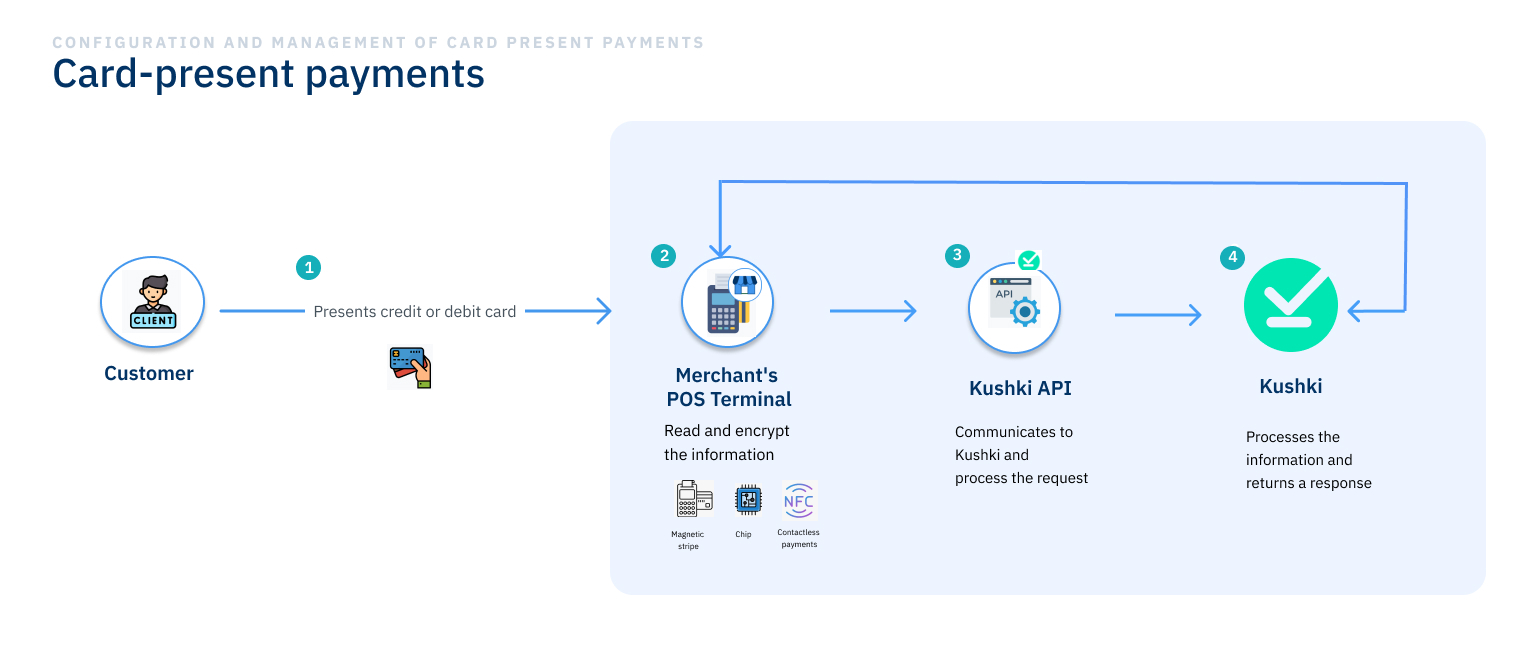
Here is the general process of how card-present payments work:
INTEGRATION
The integration between Kushki and your merchant will be established through a REST API, which employs a cryptographic key system that allows the secure exchange of information by encrypting the sensitive information read from your customers’ cards to process their requests quickly and under strict security and confidentiality standards.
CUSTOMER PAYMENT PROCESS
Your customer presents their physical or digital credit card or debit card at your point of sale. Your merchant’s POS terminal, which may be connected via USB, bluetooth or other connection types, performs the following actions:
Reads the data received from your customer by means of magnetic stripe, chip or contactless payment (NFC).
Sends the read data in encrypted form to your backend so that it can send the data to Kushki via the REST API.
Kushki’s API processes the request and returns a response to your backend with the approval or denial of the received request. In case of a successful transaction, Kushki debits the transaction amount from your customer’s account.
overview card present en

Encryption keys#

A cryptographic key exchange ceremony is required between Kushki and your merchant via hardware security modules (HSM) to ensure the integrity and security of the information. You will need to encrypt the information read from the customers' card using the DUKPT process using the keys received. Learn more about cryptographic key exchange and review the test data to cover the different scenarios.
You will need to load the encryption keys into the terminals according to the environment.

Credentials#

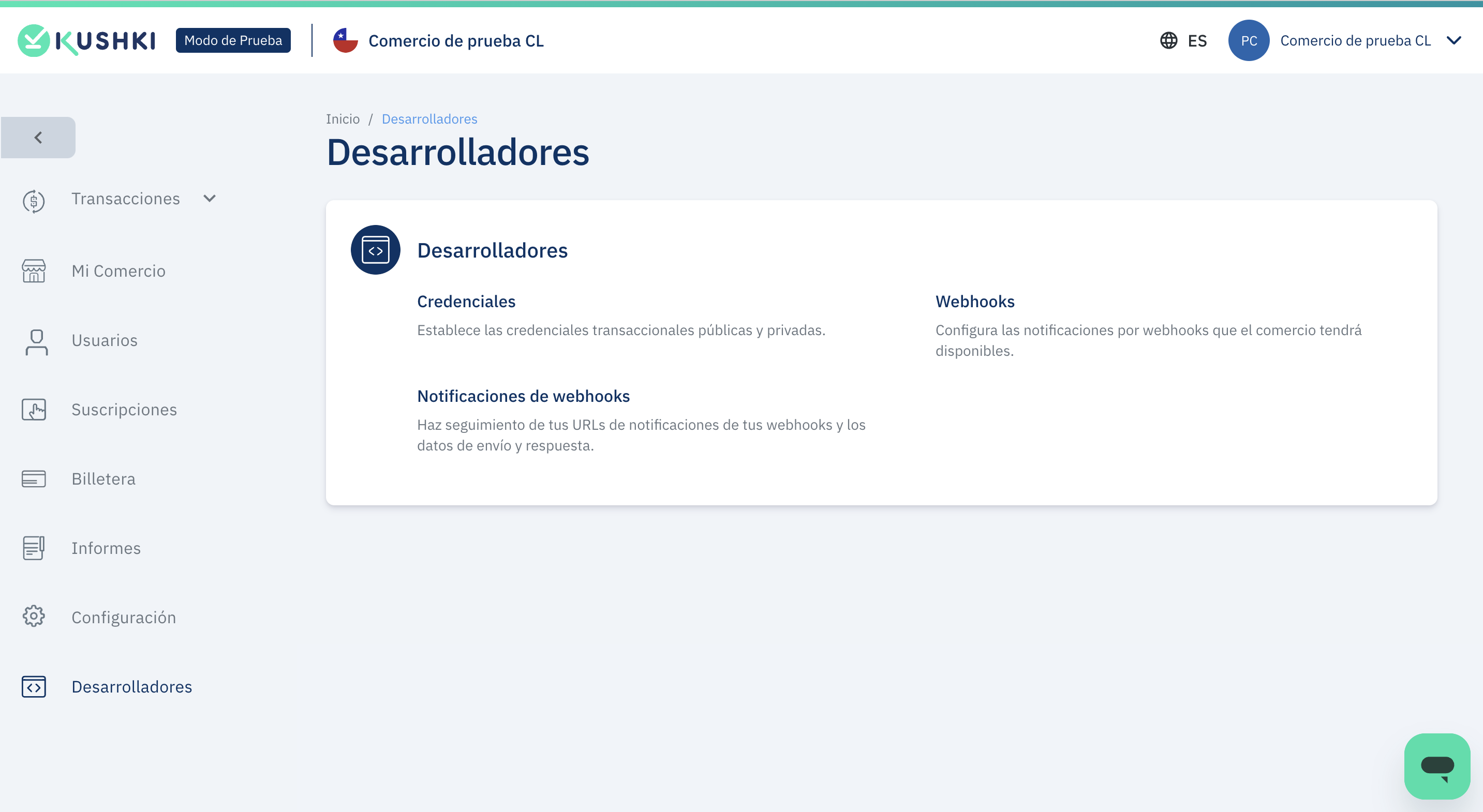
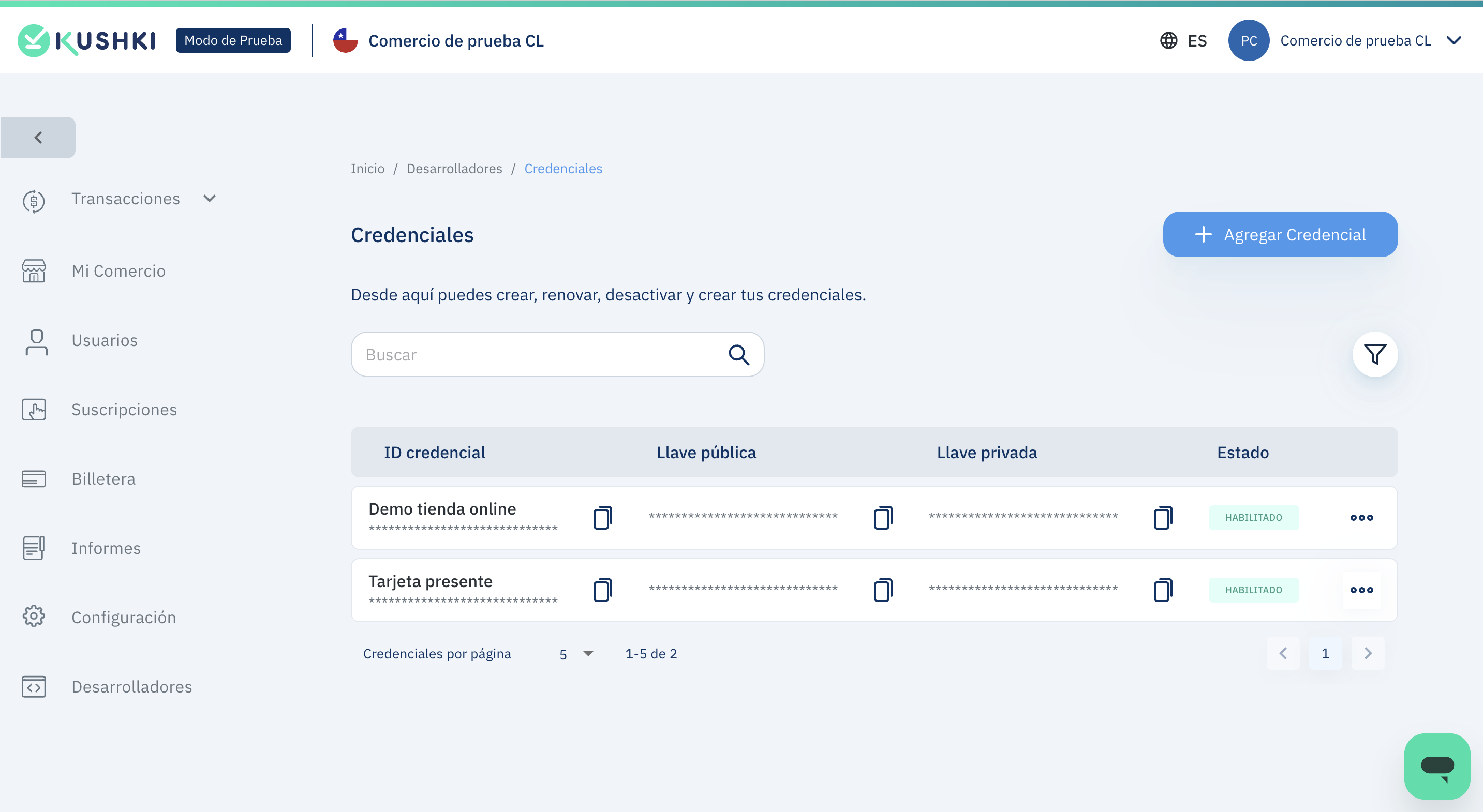
To send requests to the API, you will need to have valid credentials. To obtain your credentials, log in to the administration panel according to the environment (dev or live), select the Developers module in the side menu and select the Credentials option.
Módulo de desarrolladores
You can add a new credential or use a previously created one.
Credenciales de desarrollo

Accept a payment#

Consume the Single payment endpoint by sending the information required to process a transaction. You must generate the payload according to the data read from the card through the POS terminal.
Example of a payment request:
{
  "card": {
    "card_holder_name": "John Doe"
  },
  "amount": {
    "iva": 0,
    "tip": 0,
    "currency": "CLP",
    "subtotal_iva": 0,
    "subtotal_iva0": 2000
  },
  "country": "CHL",
  "pos_details": {
    "brand": "SUNMI",
    "model": "P2-EU",
    "version": "Kushki SunmiV1.1.13",
    "location": {
      "latitude": -0.1842214,
      "longitude": -78.4212761
    },
    "has_print": true,
    "terminal_id": "PB04209860189"
  },
  "card_details": {
    "tracks": {
      "track_ksn": "FFFF4357486333600002",
      "enc_track2": "283587285CE10278E7FA50AD5C97CFFE87F472C9FE6406F8"
    },
    "enc_tlv": "CE447A062C49774934E42A7F826668C0A53CE9AF633A510E66C8031171AAFCF8CE29857B19101326ED67512533B86C51ED16C5E624DA97EDA72864A39763822418FCAC5439D2F1F72F6FC0BAA6EED37630767D9D161612654E49944FC435525C6C356177B1BD0A545C19FF5E47685E35B02B20B307BDE2A26FAD2F42D7CB00BE9C53FD05BECE71110919ADE3158398B8B02003F682374B942C4B6D7FD54DE2B65A9C66125DF28A80",
    "pin_ksn": "FFFF4357486333600002",
    "reading_type": "NFC"
  },
  "contact_details": {
    "email": "",
    "last_name": "",
    "first_name": "",
    "phone_number": "",
    "document_type": "0",
    "document_number": "123666",
    "second_last_name": ""
  },
  "transaction_mode": "Authorization",
  "transaction_type": "charge",
  "client_transaction_id": "ae6dd91a-9173-4ec7-8934-3178454ef341"
}
Please review Take Payments for more information.

Take payments
Accept payments with a POS terminal from your point of sale through Raw Card-Present API.
Webhooks
Receive notifications in your system with the events of the operations carried out. Discover all the available events.

Explore this section#

Cryptographic key exchangeGet keys for secure data exchangeRead article →
Sample script to encrypt informationTest keys if you don't have an HSMRead article →
Take PaymentsCharge with POS via Raw card-present APIRead article →
Frequently Asked QuestionsAnswers to the most common questionsRead article →
Error codes for card-present transactionsCommon card-present errorsRead article →
Modificado en 2026-10-15 15:31:14
Anterior
Webhooks for card present
Siguiente
Raw card-present API overview
Built with