1. Wire Transfer
Kushki Docs
English
  • Español
  • English
  • Home
  • Quick Start
    • Frequently Asked Questions
    • Moving to Production
    • Policy for Important API Changes
    • Test Data
    • Error Codes
    • Latest Features
  • Payment Glossary
    • Payments Glossary
  • One-time card payments (Online)
    • Supported card brands
    • Functionalities by business model
    • Network Tokens
    • One-step Payments
      • How do Card Payments Work?
      • Accept a Card Payment
      • Direct charge (without token)
      • Accept One-Time Payments with OTP
      • OTP Authentication Error Codes
      • Error codes for single card payments
    • Two-steps Payments
      • How do one-time payments with authorization and capture work?
      • Receive payments with authorization and capture
    • Refunds
      • Returns, cancellations, and refunds
    • 3DS Authentication
      • Introduction to 3DS
      • 3DS API integration
      • 3DS integration with kushki.js library
      • 3DS API integration plus kushki.js library
      • 3DS Error Codes
    • Apple Pay Payments
      • Apple Pay Configuration
      • Apple Pay Sandbox testing
  • Recurring Card Payments (Online)
    • Functionalities by business model
    • External subscriptions to Kushki
    • Authenticate your subscriptions with 3DS
    • Accept one-click payments with 3DS
    • Error codes in recurring charges
    • Apple Pay for Subscriptions
    • Scheduled payments
      • How do Credit or Debit Card Payment Recurring Charges Work?
      • Create a recurring charge
      • Manage your Scheduled Charges
    • OneClick Payments
      • Accepting One-Click Payments
      • How does authorization and capture work in OneClick payments?
      • Receive OneClick payments with authorization and capture
  • Card-present payments
    • Accept card present payments
    • Test data
    • Webhooks for card present
    • Raw card-present API
      • Raw card-present API overview
      • Cryptographic key exchange
      • Sample script to encrypt information
      • Take Payments
      • Frequently Asked Questions
      • Error codes for card-present transactions
    • Transactions
      • Transactions
      • Cancel payments
    • Kushki One
      • First Steps
      • Autenticación y Cifrado de Requests
      • Accept payments with Kushki One
      • Amount Format
      • Async services and webhooks
      • Printing on SmartPOS terminal
      • Unified Error Catalog — Kushki ONE Connect
    • Kushki One Payment App
      • Overview
      • Process a payment
      • Split payment on the terminal
      • Refunds and PreAuth & Capture
      • Review Your Transactions
      • Terminal Setup
  • Wire Transfers
    • Shopping experiences and transaction details for bank transfer payments
    • Receive Wire Transfers
    • Check the Status of a Transaction
  • Cash Payments
    • Accept a Cash Payment
    • Authorized locations
    • Error Codes for declined cash transaction
  • Alternative payment methods (APM)
    • How do APM payments work?
    • Accept Yape payments
  • Money Disbursement
    • Wire Transfer
      • How does the disbursement through bank transfer work?
      • Payment disbursement to bank accounts
      • Error codes for transfer disbursements
    • Card
      • How does sending funds to cards work?
      • Send money to a card
      • Error Codes
  • Plugins
    • Shopify
      • Shopify
      • Plugin Operation
    • VTEX
      • VTEX Integration Guide
  • Payment Links
    • Smartlinks
  • Payment forms and buttons
    • Kajita
      • How Does it Work?
      • Payment Kajitas
    • Payment Button
      • Overview
      • Generate a payment button
  • Branch Offices Management
    • How to Onboard Submerchants via API
  • Notifications
    • Good Practices
    • Check your Webhooks
    • One-time Payments Webhooks
      • Webhook for One-Time Payments made with a card
      • Webhook for One-Time Payments by Wire Transfer
      • Webhook for One-Time Payments in Cash
    • Recurring Payments Webhooks
      • Webhook for Recurring Payments Made with Card
    • Payment Distribution Webhooks
      • Webhook for payment disbursement through wire transfer
      • Webhook for card disbursement
    • Payment button Webhooks
      • Webhooks with Payment Button
    • Smartlinks Webhooks
      • Webhooks with Smartlinks
    • Refunds Webhooks
      • Webhook for Voids and Refunds
      • Chargeback Webhooks
HomeMexico 🇲🇽Ecuador 🇪🇨Chile 🇨🇱Colombia 🇨🇴Peru 🇵🇪
Status
Soporte / Support
English
  • Español
  • English
  1. Wire Transfer

Payment disbursement to bank accounts

Disburse payments to your customers' or vendor's bank accounts
Payment disbursement by wire transfer consists of sending money to your customers’ accounts. In other words, if you have their bank details, you can use your Kushki disbursement account and send the money to their accounts by wire transfer, using whatever logic you prefer.
This is ideal for:
Payments for suppliers or sellers
Marketplaces
Delivery applications
To keep in mind
Due to our risk policies, the available payment methods and the integration type may vary once you complete the affiliation. We will tell you how to proceed if this process applies to your merchant.

Operation Details#

The payout process in Peru follows this flow: Merchant > Kushki > Processor > Recipient.
ParameterDetail
Processing hoursMonday–Friday, 7:00 a.m. – 8:00 p.m.; Saturdays, 7:00 a.m. – 2:30 p.m.; Sundays and holidays: no processing.
Processing daysMonday–Saturday
Time to credit BCP accountUp to 40 minutes after BCP processes the payment.
Time to credit other banks- Amount < S/. 420 000:
• Sent before 12:00 p.m.: credited same day.
• Sent after 12:00 p.m.: credited next business day.
- Amount ≥ S/. 420 000:
• Sent before 12:30 p.m.: credited same day.
• Sent after 12:30 p.m.: credited next business day.
Final status notificationThe bank notifies when funds have been credited (max. 40 minutes after processing).
Minimum transaction amountS/. 1.00
Maximum transaction amountTo BCP accounts: no limit
To other banks: S/. 420 000
Recipient account typesIndividual and corporate accounts

Supported currencies#

The transfer out service in Peru is available in local currency (PEN).

Flow#

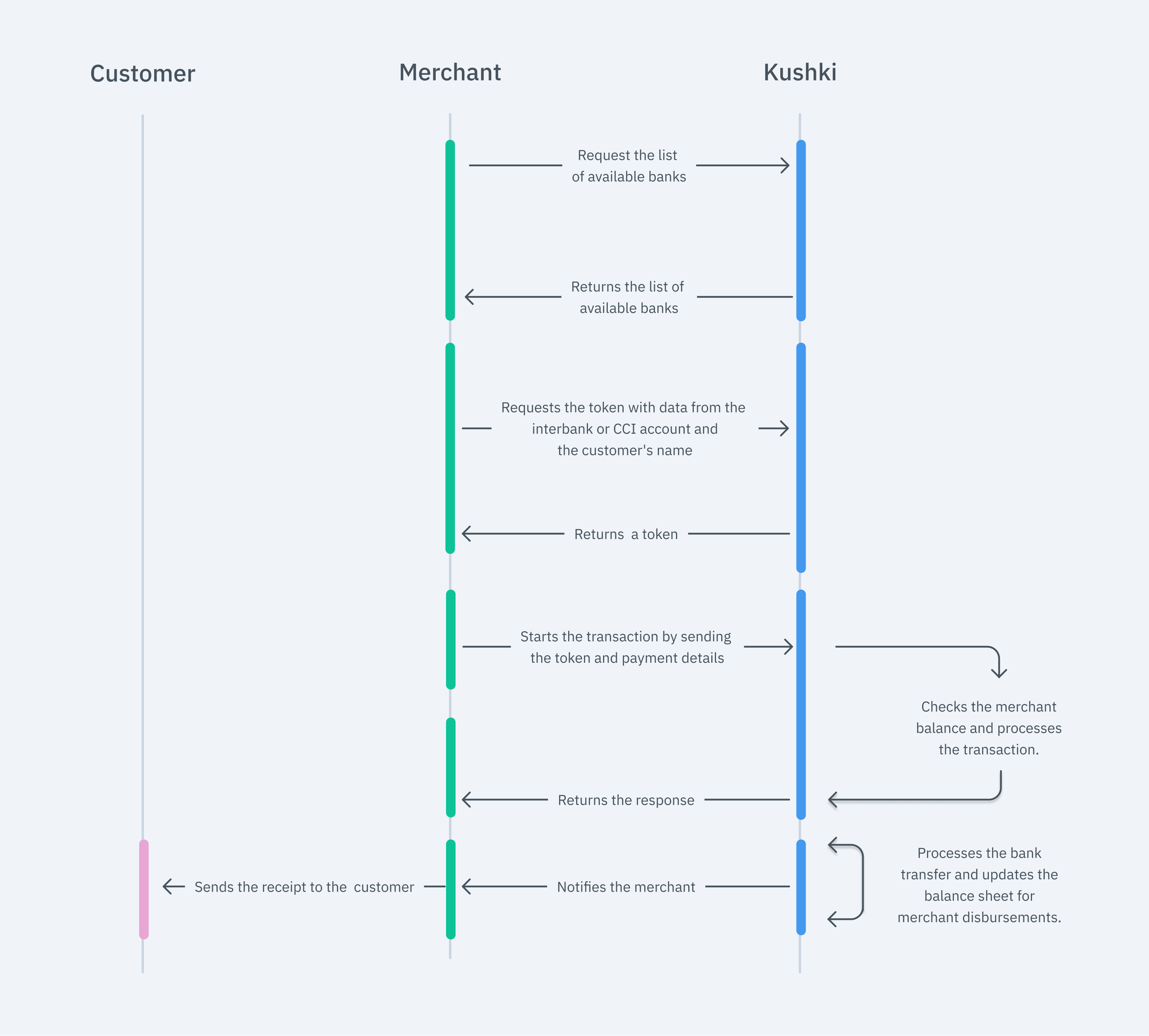
The flow that you will integrate is shown below:
Flujo transfer out Peru
Here you will learn how to integrate money distributions by wire transfer.

1. Obtain the list of partner banks#

The first step is to check the list of banks available to make the wire transfer. To do so, you must use this endpoint, which will show you the banking institutions available to make the transaction.
JavaScript
Python
PHP
In response to this call, you will receive the name and code of the available banks. The latter must be sent in the transfer out token request.
Below is an example of the response to this call:
[
  {
    "code": "093",
    "name": "FINANCIERA QAPAQ"
  },
  {
    "code": "023",
    "name": "BANCO DE COMERCIO"
  },
  {
    "code": "011",
    "name": "BBVA PERÚ"
  },
  {
    "code": "007",
    "name": "CITIBANK DEL PERÚ S.A."
  },
  {
    "code": "058",
    "name": "ALFIN BANCO S.A."
  },
  {
    "code": "808",
    "name": "CMAC HUANCAYO"
  },
  {
    "code": "038",
    "name": "BANCO INTERAMERICANO DE FINANZAS"
  },
  {
    "code": "096",
    "name": "FINANCIERA EFECTIVA"
  },
  {
    "code": "094",
    "name": "FINANCIERA OH"
  },
  {
    "code": "003",
    "name": "INTERBANK"
  },
  {
    "code": "009",
    "name": "SCOTIABANK PERÚ S.A.A."
  },
  {
    "code": "803",
    "name": "CMAC AREQUIPA"
  },
  {
    "code": "809",
    "name": "CMAC ICA"
  },
  {
    "code": "836",
    "name": "CAJA RAIZ"
  },
  {
    "code": "091",
    "name": "COMPARTAMOS FINANCIERA S.A."
  },
  {
    "code": "056",
    "name": "BANCO SANTANDER PERU"
  },
  {
    "code": "055",
    "name": "BANCO RIPLEY"
  },
  {
    "code": "062",
    "name": "BANK OF CHINA"
  },
  {
    "code": "805",
    "name": "CMAC SULLANA"
  },
  {
    "code": "049",
    "name": "MIBANCO, BANCO DE LA MICROEMPRESA S.A."
  },
  {
    "code": "002",
    "name": "BANCO DE CRÉDITO DEL PERÚ"
  },
  {
    "code": "800",
    "name": "CAJA METROPOLITANA"
  },
  {
    "code": "060",
    "name": "ICBC PERÚ BANK"
  },
  {
    "code": "813",
    "name": "CMAC TACNA"
  },
  {
    "code": "801",
    "name": "CMAC PIURA"
  },
  {
    "code": "806",
    "name": "CMAC CUSCO"
  },
  {
    "code": "035",
    "name": "BANCO PICHINCHA"
  },
  {
    "code": "099",
    "name": "FINANCIERA CONFIANZA"
  },
  {
    "code": "802",
    "name": "CMAC TRUJILLO"
  },
  {
    "code": "811",
    "name": "CMAC MAYNAS"
  },
  {
    "code": "043",
    "name": "CREDISCOTIA FINANCIERA S.A."
  },
  {
    "code": "053",
    "name": "BANCO GNB PERU"
  },
  {
    "code": "018",
    "name": "BANCO DE LA NACIÓN"
  },
  {
    "code": "054",
    "name": "BANCO FALABELLA PERÙ S.A."
  },
  {
    "code": "063",
    "name": "BANCO BCI PERU S.A."
  }
]

2. Tokenize the information#

After obtaining the bank code of the account where the transfer will be received, you have to request a token by using our transfer out token request endpoint.

Document Type and Number#

In this token request, you must include, among other details, the type (documentType) and number (documentNumber) of the recipient:
CE: Foreign Identification Card. Up to 12 characters.
DNI: Peruvian National Identity Document, 8 characters.
PAS: Passport. Up to 12 characters.
RUC: Tax ID. Up to 11 characters.

Account Type and Number#

You must also include the account type (accountType) and account number (accountNumber):
CC: checking account.
CA: savings account.
CM: master account.

Disbursement to BCP#

If the BankId (the code, received in the previous step) is 002, which corresponds to BCP or Banco de Crédito del Perú, the following specifications must be considered:
If BankId is 002 and accountType is CC, the accountNumber must have 13 digits.
If BankId is 002 and accountType is CA, the accountNumber must have 14 digits.

Disbursement to Banks Other Than BCP#

If the BankId value is different from 002, you are required to provide the CCI (Código de Cuenta Interbancaria). This must contain exactly 20 digits and be presented without spaces, hyphens, or special characters.
Do you want to send multiple payments?
If you need to send a large volume of transfer out transactions, we recommend you tokenize them using multiple threads, save the tokens and then perform the initialization of these in queue using the initialization endpoint. Remember that each token has a duration of 30 minutes.
JavaScript
Python
PHP

3. Initialize the transaction#

In this step, you should have obtained a token, and then you will be able to start the distribution process with Kushki. You will need to make a call to our initialization endpoint to process the payment.
JavaScript
Python
PHP
See our API Reference for more information.
In the response, a ticket number and a status are issued for the transaction.
Important
Once a distribution by wire transfer has been started, it will not be possible to cancel it.

4. Track the transaction status (optional)#

Now that the transfer is close to being processed, you can check the transaction status via webhooks or manually, by using our API.

Webhook#

The transaction status is automatically notified when the money has been deposited in the bank account.
To configure a webhook in your test merchant site, you need to notify our agents by indicating the URL and the payment method via email to email address.

API#

In our API, you can use our Get Status endpoint to manually track the status of a specific transaction.
In case the transaction has the status of "Initialized", you should consult again the transaction status 10 minutes after it was started.

5. Test your integration#

The final result of this test data depends on your merchant's configuration: it requires the test environment (sandbox) to be active for your merchant and the assigned processor to support simulating certain statuses. If you don't get the expected result, contact your Kushki account manager or support.
There are test ID numbers that you can use in the UAT environment to ensure that your integration is ready.
Account number: 00316301312597216937
Identification number: 70015100
Identification type: DNI
Account type: CA
Bank identification number:003
Important
To top up funds for the testing phase, email us and for the production phase, you must make a fund transfer as follows:
Top up funds to bank account in Peruvian soles (PEN)
Open current account, BCP bank, currency (PEN) No. 191-9413468-0-33.
Please send us the payment proof of the top-up through email.

6. Prepare your certification#

Read the following guidelines for technical certification approval (required to obtain productive account credentials):
Display messages on screen according to Kushki's answers.
Save and log all Kushki responses (required in case support is needed).
If webhook notifications are received successfully, respond to the request with a status 200.
Make sure that in the body of the request all the fields required in the API reference are included.

Accept webhooks
Handle postpaid events the right way.
Modificado en 2026-10-14 20:00:50
Anterior
How does the disbursement through bank transfer work?
Siguiente
Error codes for transfer disbursements
Built with