1. Peru 🇵🇪
Kushki Docs
English
  • Español
  • English
  • Home
  • Quick Start
    • Frequently Asked Questions
    • Moving to Production
    • Policy for Important API Changes
    • Test Data
    • Error Codes
    • Latest Features
  • Payment Glossary
    • Payments Glossary
  • One-time card payments (Online)
    • Supported card brands
    • Functionalities by business model
    • Network Tokens
    • One-step Payments
      • How do Card Payments Work?
      • Accept a Card Payment
      • Direct charge (without token)
      • Accept One-Time Payments with OTP
      • OTP Authentication Error Codes
      • Error codes for single card payments
    • Two-steps Payments
      • How do one-time payments with authorization and capture work?
      • Receive payments with authorization and capture
    • Refunds
      • Returns, cancellations, and refunds
    • 3DS Authentication
      • Introduction to 3DS
      • 3DS API integration
      • 3DS integration with kushki.js library
      • 3DS API integration plus kushki.js library
      • 3DS Error Codes
    • Apple Pay Payments
      • Apple Pay Configuration
      • Apple Pay Sandbox testing
  • Recurring Card Payments (Online)
    • Functionalities by business model
    • External subscriptions to Kushki
    • Authenticate your subscriptions with 3DS
    • Accept one-click payments with 3DS
    • Error codes in recurring charges
    • Apple Pay for Subscriptions
    • Scheduled payments
      • How do Credit or Debit Card Payment Recurring Charges Work?
      • Create a recurring charge
      • Manage your Scheduled Charges
    • OneClick Payments
      • Accepting One-Click Payments
      • How does authorization and capture work in OneClick payments?
      • Receive OneClick payments with authorization and capture
  • Card-present payments
    • Accept card present payments
    • Test data
    • Webhooks for card present
    • Raw card-present API
      • Raw card-present API overview
      • Cryptographic key exchange
      • Sample script to encrypt information
      • Take Payments
      • Frequently Asked Questions
      • Error codes for card-present transactions
    • Transactions
      • Transactions
      • Cancel payments
    • Kushki One
      • First Steps
      • Autenticación y Cifrado de Requests
      • Accept payments with Kushki One
      • Amount Format
      • Async services and webhooks
      • Printing on SmartPOS terminal
      • Unified Error Catalog — Kushki ONE Connect
    • Kushki One Payment App
      • Overview
      • Process a payment
      • Split payment on the terminal
      • Refunds and PreAuth & Capture
      • Review Your Transactions
      • Terminal Setup
  • Wire Transfers
    • Shopping experiences and transaction details for bank transfer payments
    • Receive Wire Transfers
    • Check the Status of a Transaction
  • Cash Payments
    • Accept a Cash Payment
    • Authorized locations
    • Error Codes for declined cash transaction
  • Alternative payment methods (APM)
    • How do APM payments work?
    • Accept Yape payments
  • Money Disbursement
    • Wire Transfer
      • How does the disbursement through bank transfer work?
      • Payment disbursement to bank accounts
      • Error codes for transfer disbursements
    • Card
      • How does sending funds to cards work?
      • Send money to a card
      • Error Codes
  • Plugins
    • Shopify
      • Shopify
      • Plugin Operation
    • VTEX
      • VTEX Integration Guide
  • Payment Links
    • Smartlinks
  • Payment forms and buttons
    • Kajita
      • How Does it Work?
      • Payment Kajitas
    • Payment Button
      • Overview
      • Generate a payment button
  • Branch Offices Management
    • How to Onboard Submerchants via API
  • Notifications
    • Good Practices
    • Check your Webhooks
    • One-time Payments Webhooks
      • Webhook for One-Time Payments made with a card
      • Webhook for One-Time Payments by Wire Transfer
      • Webhook for One-Time Payments in Cash
    • Recurring Payments Webhooks
      • Webhook for Recurring Payments Made with Card
    • Payment Distribution Webhooks
      • Webhook for payment disbursement through wire transfer
      • Webhook for card disbursement
    • Payment button Webhooks
      • Webhooks with Payment Button
    • Smartlinks Webhooks
      • Webhooks with Smartlinks
    • Refunds Webhooks
      • Webhook for Voids and Refunds
      • Chargeback Webhooks
HomeMexico 🇲🇽Ecuador 🇪🇨Chile 🇨🇱Colombia 🇨🇴Peru 🇵🇪
Status
Soporte / Support
English
  • Español
  • English
  1. Peru 🇵🇪

Wire Transfers

How do Payments by Wire Transfers Work?#

We explain how a payment by wire transfer works in Kushki
If your users do not have a credit card or wish to use the available balance in their bank accounts to make an online purchase, the account debit (wire transfer) is the ideal and fast payment option.
Want to accept Yape payments?
Yape payments are integrated from the Alternative payment methods (APM) section. See How do APM payments work?.

Payment process#

The payment process by wire transfer consists of allowing your customer to use the available balance in their bank account to pay for a purchase on your website or app. To do so, you must redirect your customer to the website of the bank entity of their choice at checkout to authorize the transaction amount to be debited from their account.

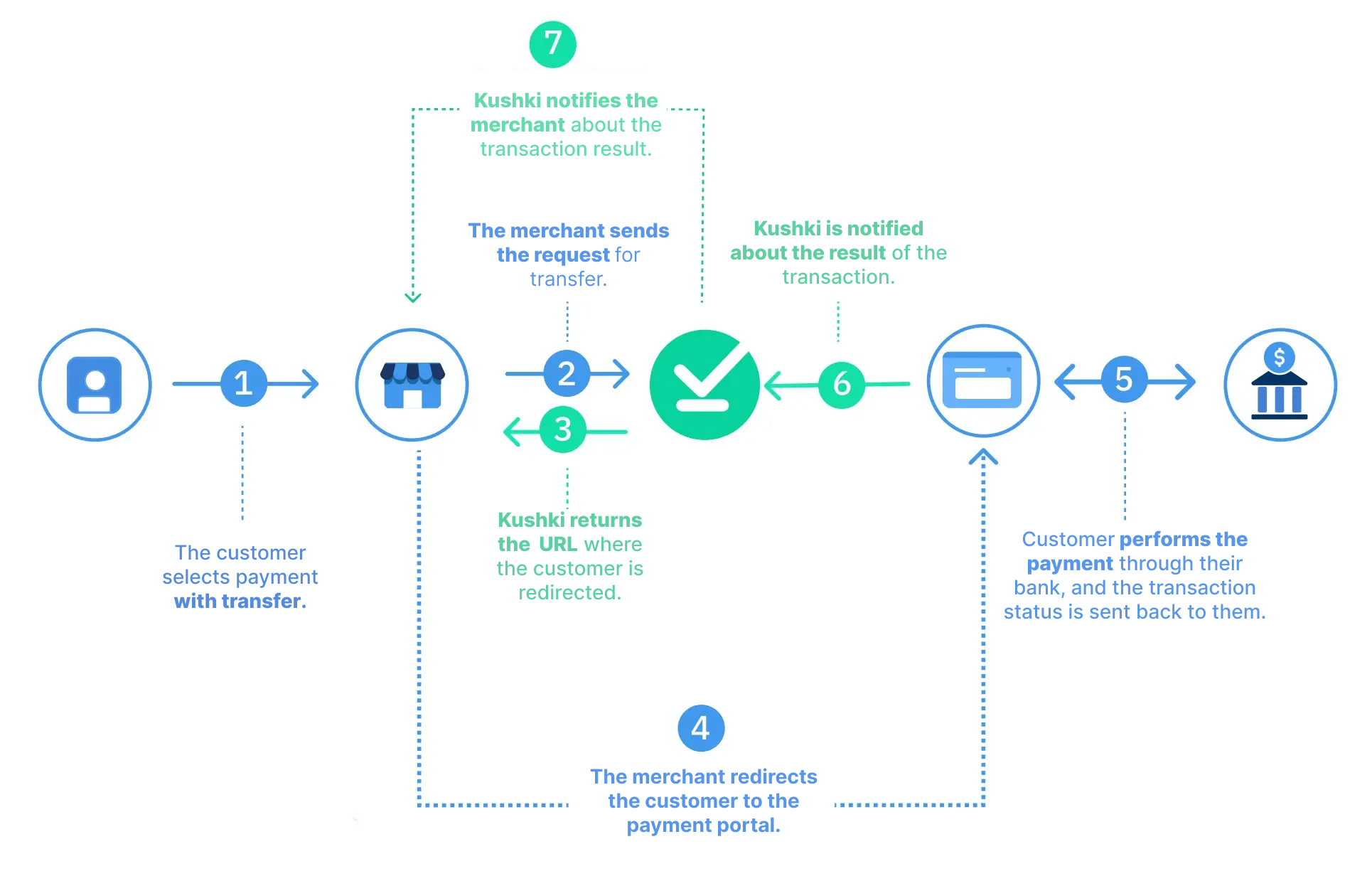
The Flow#

Flujo Transfer in general actualizado
1. Selection of the payment method
Within your app or website, the user must select transfer as payment method and fill in the payment form.
2. Sending the request
Your merchant sends the transfer request to Kushki to initiate the transaction.
3. Sending of URL
Kushki confirms the creation of the transaction and returns the URL to which you must redirect the user.
4. Redirection for bank selection
Your merchant redirects the user to the indicated URL, where they must copy the payment code and select their bank, in order to make the transfer.
5. Bank Portal Login and Authorization
When the user enters the bank's website, they authenticates and goes to Payments and services > Payment of services, where they searches for Kushki and enters the payment code. Verifies the transaction data (description of the transaction, amount and account to be debited) and accepts that the amount of the transaction will be debited from theie account balance.
6. Confirmation of the debit
When the user authorizes the transfer, the bank confirms to Kushki the result of the operation.
7. Notification from Kushki
Kushki notifies you of the final status of the transaction.


Explore this section#

Receive wire transfersStart accepting wire transfersRead article →
Receive Wire TransfersLet customers pay from their bank accountRead article →
Check the Status of a TransactionCheck the status of a transferRead article →
Modificado en 2026-10-16 22:03:51
Anterior
Terminal Setup
Siguiente
Shopping experiences and transaction details for bank transfer payments
Built with