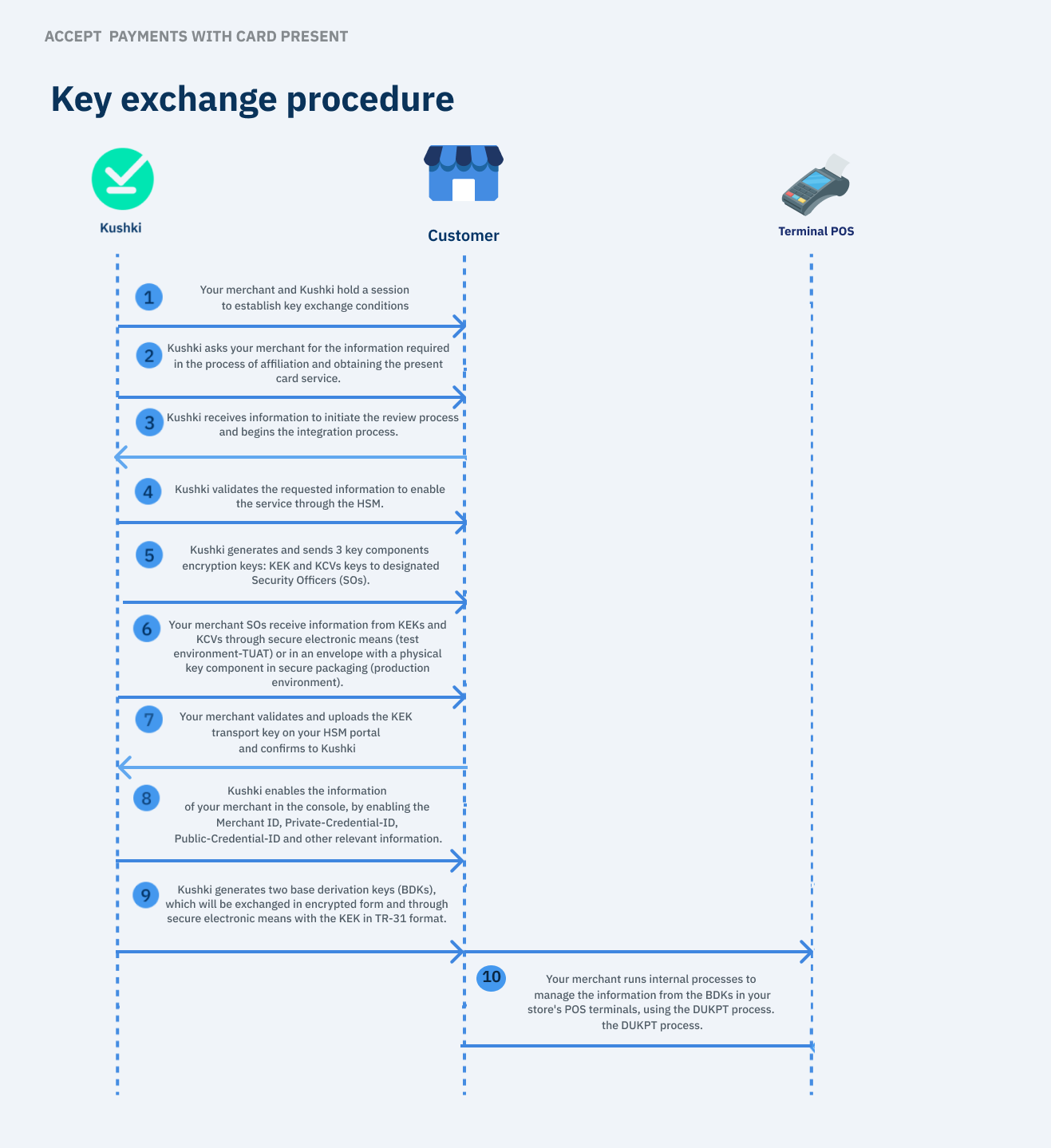
Learn how you can obtain cryptographic keys to enable secure information exchange between Kushki and your business.How can I obtain cryptographic keys?#
You need to make requests from your back end over HTTPS, using the credentials we will provide you. Remember that this information is confidential and you should not share sensitive data in public places.
This functionality is available for the following models:
☑ Acquirer
☐ Aggregator1. Definition of agreements and operational conditions#
As the first step, a session will be conducted between your merchant and Kushki to establish the course of the following actions:1.1. Review and approval of the conditions of the key exchange ceremony#
The HSM is a hardware security module that generates, protects, and manages the keys that will be used to encrypt and decrypt transaction processing data in your merchant.
Your HSM provider must agree to the conditions of the cryptographic key exchange ceremony.
This process will ensure the safeguarding of the keys, allowing your merchant to access the HSM portal.
Create and maintain information for Security Officers (SOs), including contact details and the correct SO groups within the portal. These individuals will be responsible for security in the key exchange process.
Follow the step-by-step process outlined in this article to complete the key exchange process.If you are in the testing phase and don't have an HSM yet 💡
If you want to test the Kushki API while managing an HSM provider you can request Kushki to receive the test BDK keys in advance without needing to have the transport key (KEK) which is stored in the HSM.
Upon receiving the test keys you will be able to encrypt the transaction data using some library. This article guides you step by step through an example of how to encrypt this data and start testing.
1.2. Establishment of work mechanisms and secure channels#
Work mechanisms and secure channels will be established through which sensitive information will be shared between your merchant and Kushki.
At least two (2) security custodians (known as Security Officers) will be defined, who will be responsible for executing the key exchange on your merchant's POS terminals. These security custodians should not report to the same person.To initiate the cryptographic key exchange process:We will request required information from you in the affiliation process and obtaining the card-present service. This process will be carried out to enable Kushki's HSM service and make your merchant information available in the Kushki console.
5. Kushki generates and sends KEK and KCV#
Kushki will generate and send the following key components for encryption:The KEK (Key Encryption Key) corresponds to a transport key, which is shared by Kushki through secure packaging (production environment) or secure electronic means (testing environment). This key will allow encryption and decryption of other keys that will be shared in the future between Kushki and your merchant; therefore, this information must be stored under strict confidentiality standards in your merchant's Hardware Security Module(HSM).
The KCVs (Key Checksum Value) corresponding to verify the integrity of the generated keys. This information will be sent directly via email to the security custodians (Security officer/s) defined in step 1.1.1. When the components are sent, these individuals will receive the following information:
Reference information of the generated key (Key reference information).
Contact information (excluding address) of the Security Officer who sends the cryptographic key component.
Shipment details and the serial number of the security bag (TEA bag)
A link to the HSM Portal page where the verification checklist must be completed after receipt.
Please note that for Kushki to proceed with the key exchange, the assigned Security Officers (SOs) must meet the following requirements:They must be registered in the Kushki HSM service portal.
They must have an active account to participate in the cryptographic key exchange.
They must be included in the correct SO groups (1, 2, or 3)
They must ensure that the shipping address for physical components is updated when required.
| KEY ID | DESCRIPTION | ALGORITHM | LENGTH | CLEAR TEXT KEY/COMPONENT | KCV |
|---|
| ZMK | component 1 | 3DES | double | A2F2 9E20 4515 D531 6B2C 32BC 3E58 612F | EF0F99 |
| Double-len | component 2 | 3DES | double | BA1F 23CD 8529 2C7A 51EC 07A2 EA8A C11F | F23EFF |
| component 3 | 3DES | double | F70D 38D6 E557 A176 BC4F 1002 3D4C 01E9 | C41DBB |
Kushki will send three envelopes with a physical key component sent via secure packaging, exchanged to at least two of the security custodians who do not report to the same person.This process may take approximately two weeks , depending on the Security Officers (SO) locations.
7. Your merchant validates and loads the components into your HSM.#
Receive the components and checksums of each key to upload and validate them in your HSM. If the verification was successful, you need to perform the following steps:Your merchants' Security Officers (SOs) must complete the verification checklist to confirm the receipt of the key components through Kushki's HSM service provider portal. This information will be received via email, following the instructions included therein.
It is required that your business's Security Officers (SOs) perform the destruction of the component once it has been activated in the Kushki HSM service portal.
Please note that for Kushki to enable your merchant information in the console, your affiliation process must have been completed successfully. This is necessary, considering that for the generation of the BDK, we need to know the information mentioned in this section. Merchant_id: identifier of your merchant in Kushki's platforms.
Private-Credential-Id (private key): private security key to validate and authorize all transactions of your merchant.
Other relevant information, such as the Public-Credential-Id (public key), which is an exclusive alphanumeric key from Kushki that allows you to authenticate executed transactions.
To consult this information in your merchat's Kushki console, we recommend following the step-by-step process outlined in our public and private key guide.. 9. Generation and Sending of the BDK#
Kushki will generate two (Base Derivation Key, BDK) keys. These keys will allow you to perform the corresponding derivation to continue with the DUKPT process.The first Base Derivation Key will be created for the data field.
The second Base Derivation Key will be created for the pin (pin_block) field.
| Sending KEKs in UAT environment | Sending KEKs in production environment | Sending BDKs in UAT and production environments |
|---|
| 1 business day | 2 weeks | 1 business day |
An example of the BDK information encrypted with a KEK in TR-31 format is as follows:RD0112B0TX00N00004FD842D565C0BDD9741A3EAB5106A78087A4D0729A56319F32AF9FBFC6FAE0A184DA40D08FA279FBB50E7598936AD18F
Please note that the BDKs in the production environment will be shared through secure electronic means. For example, through 1password.
10. Your merchant executes internal processes for POS terminal management#
Now that your merchant's Security Officers (SOs) have received the BDKs, it is time for you to execute internal processes to manage this information on the POS terminals using the DUKPT process.Take payments
Accept payments with a POS terminal from your point of sale through Raw Card-Present API.Encrypt card data using script
Encrypt transaction data and make test requests in Postman to the Kushki API.