
Accept a Card Payment
Web
iOS
Android
This functionality is available for the following models:
☑ Acquirer☑ Aggregator
Are you looking for a plugin?
To keep in mind
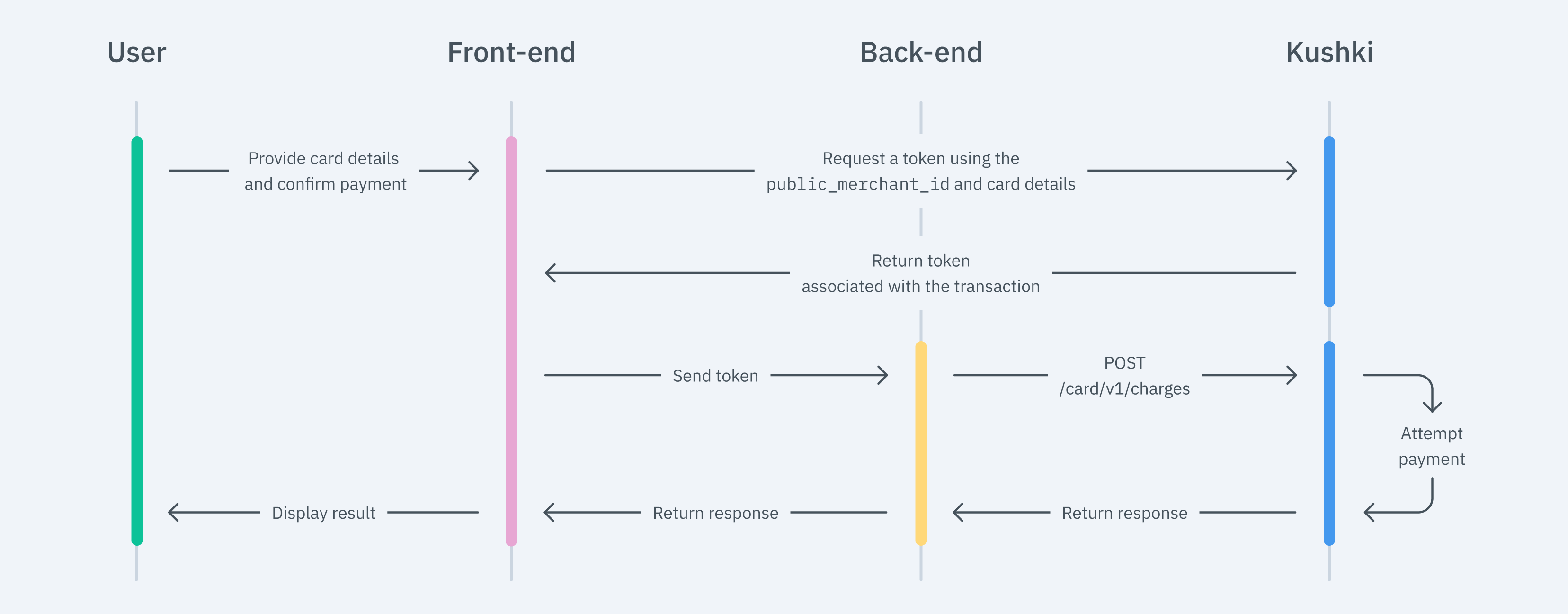
1. Set up your Front-end
Kajita
Create and customize your Kajita
Set up Kajita
kushki-checkout.js script in your payment page by adding it to the <head> of your HTML file. Always load kushki-checkout directly from cdn.kushkipagos.com. Do not include the script in a bundle or package or host a copy of it.Add Kajita to your Website
<body>, where you want the payment form to be displayed.action form according to the corresponding endpoint in your back end.script tag.Kushki.js
Set up Kushki.js
Option 1 - CDN
script tag at the end of the <body> of your payment page.Option 2 - npm
Set up Kushki object
Collect User Information and Send it to your Back-end
Show the deferred options according to the BIN of your customer's card (Optional)
type, the available months and the months of grace, as shown in the following example response. To execute the charge you should use only months. {
type: "all",
months: ["2", "3", "4", "5", "6", "7"],
monthsOfGrace: []
}months parameter along with the transaction information."months": 3,deferred object containing the months. graceMonths, and creditType parameters along with the transaction information. The graceMonths field must be set to 00 and the creditType to 01"deferred": {
"graceMonths": "00",
"creditType": "01",
"months": 3
}Important
deferred object (or in the months paremeter) when you start the payment process with Kushki.Kushki.js Hosted Fields
Import Kushki.js Hosted Fields into your app
Option 1 - CDN
<script> tag inside the <body> tag. Once imported, you will be able to access the resources described below to create a payment flow with Kushki.kushki.min.js (which brings the necessary code to store your merchant's credentials) and card.min.js (the module that brings the necessary functionalities for the flow with card payments).Option 2 - NPM
Option 3 - YARN
Create an instance of KushkiOptions
KushkiOptions which allows you to set the public key of the work environment (test or production) through the init() method.Initialize the form on the front-end
Step 1. Define containers for hosted fields.
initCardToken() method, it is required to place the necessary elements to be able to render each hosted field.Step 2. Create an instance of CardOptions
CardOptions with the transaction information, such as the amount, currency, among other parameters.Step 3. Render hosted fields with the initCardToken() method
CardOptions, you need to call the initCardToken() function to initialize an instance of ICard.Request a token to continue the payment flow
requestToken() method on the previously initialized card instance. This method performs 3DS, OTP and Sift Science validations automatically. Also, validate that all the fields are correct; otherwise it will throw an exception.deferred object will be returned along with the token. In order to select the non-interest-bearing months to defer the purchase, a div tag must be placed with the id of deferred_id (<div id="deferred_id"></div>) and define within the CardOptions instance in the fields object the id deferred_id. The fields available within deferred vary depending on the country. Consult the reference for more information on deferred.2. Set up your Back-end
JavaScript
Python
PHP
Send notifications to your customers
Perform an anti-fraud validation (Optional)
How does an Anti-Fraud Validation work?
Submit card details
ignoreWarnings parameter to false, include the type and number of the document, first name, last name, and second last name in the contactDetails object, and set the fullResponse parameter to true. If you decide to skip this validation, set the ignoreWarnings parameter to true value.JavaScript
Python
PHP
Receiving the Validation Result
rules object, and there are three possible responses:| Response | Parameters Received | What to do? |
|---|---|---|
| Approved Transation | {"code": "000","message": "TransUnion Approval"} | No further action will be necessary, the transaction will be sent to the processor and according to the response, it redirects the user to a success or failure page to inform the customer whether the transaction was approved or declined. |
| Failed Transaction:(Validation was not possible) | {"code": "006","message": "TransUnion Unavailable"} | Verify that the parameters documentNumber and documentType have been sent in the object contactDetails and try again. |
| Failed Transaction:(The validation was performed and the result was negative) | {"code": "322","message": "TransUnion Declined"} | In case the transaction has been declined by the validation system, you will have two options: __1)Ignore the warning and continue with the payment: __ In this case, you should go back to the previous step, ensuring that you set the ignoreWarnings parameter to true and the same token already generated 2)Acknowledge the warning and reject the transaction. |
ignoreWarnings parameter with value of true and get a negative response from the validation service (code 322), the transaction will be declined.For more information, see our article Error Codes.
3. Test your Integration
545195157492548045744412151903354349003000047015contactDetails object:564256981649759580004393CC56425698164975958000000CCdocumentNumber, nor documentType in the contactDetails object.4. Prepare your Certification
productDetails), as well as your customer-payer contact details (contactDetails), along with billing ( "orderDetails". "billingDetails") and shipping details (if your business model requires it: "orderDetails". "shippingDetails"), within the request to make the charge.email parameter of the object contactDetails is required.Modificado en 2026-10-14 19:54:06