
Disburse with Bre-B
Important
Operation details
| Parameter | Detail |
|---|---|
| Minimum amount per transaction | 1 COP |
| Maximum amount per transaction | Equivalent to 1,000 UVT (Tax Value Units, updated annually by the DIAN). Each financial institution or user may set lower daily or per-transaction limits. |
| Currency | COP |
| Available banks | All Colombian banks (Banco de la República regulation) |
| API processing hours | 24/7 |
| Settlement time | Real-time (maximum 30 seconds from initiation) |
| Response type | Asynchronous — the final result is delivered via webhook or by querying the Get Status endpoint |
Important note: The Kushki API accepts and processes requests 24/7. Unlike ACH, Bre-B does not use banking cycles — processing is real-time through the SPBVI of the Banco de la República. You do not need to query the bank list before tokenizing.
Flow
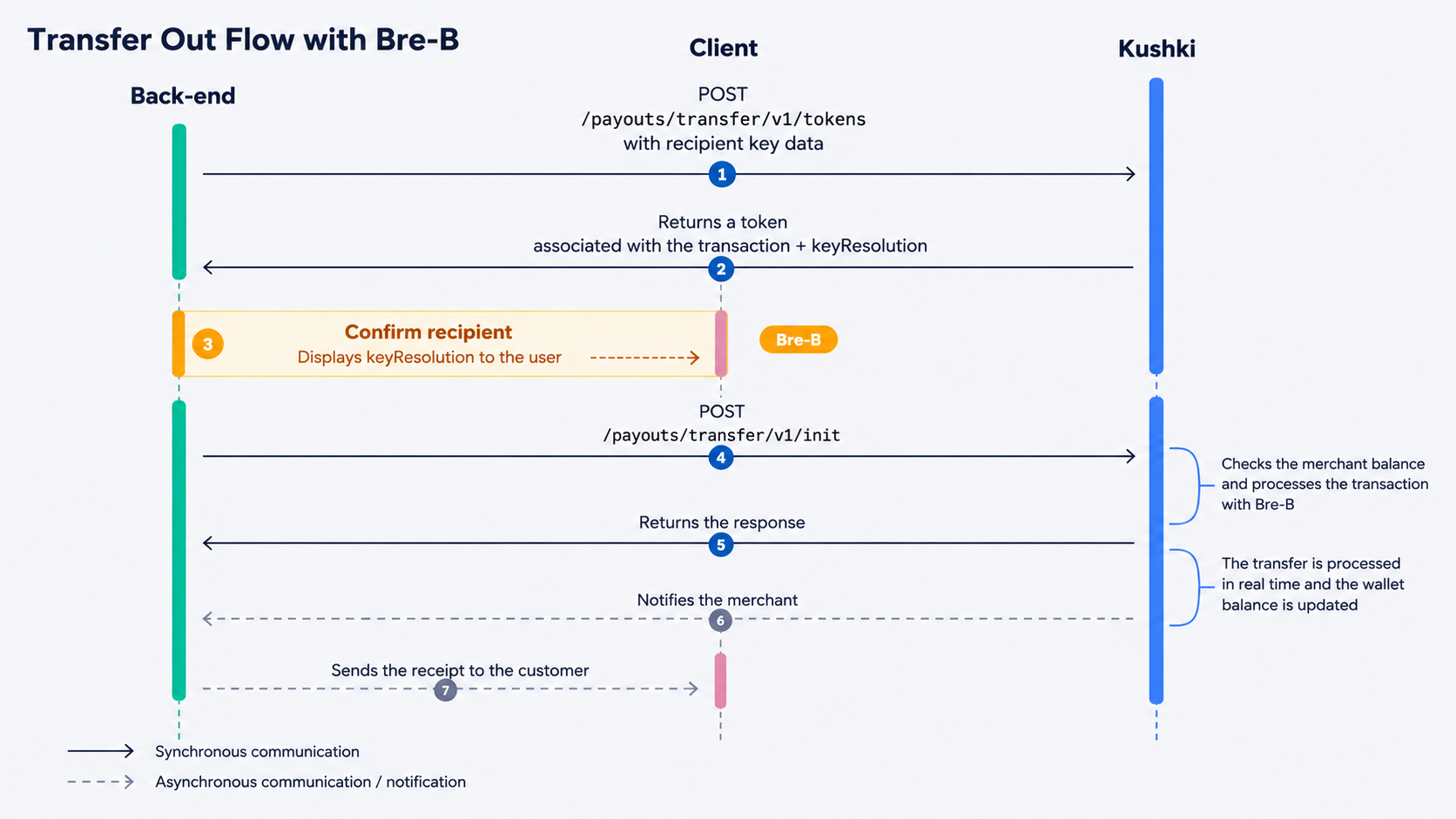
1. Tokenize the information
Required fields to obtain the token
Disbursement with Bre-B key (accountType = KI, KP, KE, KA, KM) |
|---|
- accountType - accountNumber - totalAmount - currency |
documentType, documentNumber, bankId, and name are optional for Bre-B in Colombia.Key types (accountType)
accountType | Key type |
|---|---|
KI | National identification number |
KP | Mobile phone number |
KE | Email address |
KA | Alphanumeric alias |
KM | Merchant code |
Valid formats for accountNumber
accountNumber format is validated before sending any request to the payment network (fail-fast). An invalid format returns HTTP 400 immediately, without reaching the network.accountType | Required format for accountNumber |
|---|---|
KI | Uppercase alphanumeric characters. Minimum 1 character. No spaces or special characters. |
KP | Exactly 10 digits. Must start with 3, followed by 9 digits. |
KE | Valid email address. Maximum 30 characters before @ and 61 after. Must include a valid domain. |
KA | Must start with @. Uppercase alphanumeric characters only. No spaces or special characters. |
KM | Exactly 10 digits. Must start with 00, followed by 8 digits. |
JavaScript
Python
PHP
keyResolution object with the recipient's data resolved by the payment network:{
"token": "53de1cb6bbb54011a0a98053d48677e0",
"keyResolution": {
"keyValue": "3001234567",
"ownerName": "M**** G**** L****"
}
}| Field | Description |
|---|---|
token | Transaction token. Expires in 30 minutes. Single-use, regardless of the transaction result. |
keyResolution.keyValue | Exact value of the key, without any transformations. |
keyResolution.ownerName | Account holder name, returned masked by the payment network (e.g. M**** G**** L****). |
2. Confirm the recipient
keyResolution object, you must show the operator or end user the recipient's information to confirm it is correct before initializing the transaction. This step is required by the Banco de la República.keyResolution.keyValuekeyResolution.ownerName (masked, e.g. M**** G**** L****)3. Initialize the transaction
Check your balance before initializing
webhooks field in the Init request body must be sent as an array. Wrap your configuration object in square brackets [ ].JavaScript
Python
PHP
fullResponse V2 where the keyResolution object is included inside details.{
"status": "INITIALIZED",
"ticketNumber": "1234567890",
"transactionReference": "a1b2c3d4-e5f6-7890-abcd-ef1234567890"
}4. Query the transaction status
Webhook
keyResolution object with keyValue and ownerName.HTTP 200.API
JavaScript
Python
PHP
bankId, documentNumber, and documentType return empty or null in the response. Recipient information will only be available in the keyResolution object.5. Test your integration
api-uat.kushkipagos.com). Do not use them in production.Successful key resolution
keyResolution. All of them return an approved transaction.accountType | Test accountNumber | Simulated keyResolution.ownerName |
|---|---|---|
KP | 3001234567 | JUAN PEREZ |
KE | USUARIO@CORREO.COM | MARIA LOPEZ |
KA | @COLOMBIA | ANA MARTINEZ |
KM | 0012345678 | COMERCIO PRINCIPAL SAS |
KI | CC12345678 | LUIS GOMEZ |
ownerName in UAT
keyResolution.ownerName is returned unmasked to make verification easier during development. In production, the name always arrives masked (e.g. J*** P****).Tokenization errors (PT060)
PT060 before the transaction is initiated.accountType | Test accountNumber | Simulated scenario |
|---|---|---|
KE | BLOCKED@TEST.COM | Suspended key |
KM | 0011111111 | Key suspended by the participant |
KP | 3000005001 | Error during key resolution |
KI | ERRDICE9994 | Unexpected error during resolution |
Payment scenario simulation by amount
totalAmount field of the tokenization request. If the amount does not match any value in the table, the transaction will result in approved.These are simulations only
/init endpoint response, without waiting for the webhook:totalAmount | Kushki responseCode | Description |
|---|---|---|
4001 | 002 | An unexpected error occurred |
4002 | 068 | Invalid amount |
5001 | 073 | Transaction not permitted |
5003 | 074 | Bank or account not registered |
/init returns INITIALIZED:totalAmount | Kushki responseCode | Description |
|---|---|---|
6001 | 076 | Error processing the payment |
4016 | 045 | Insufficient funds |
4017 | 077 | Pending response from other banks |
4019 | 077 | Pending response from other banks |
4020 | 041 | A system error occurred. Please try again |
9999 | 002 | An unexpected error occurred |
4006 | 080 | Invalid destination account |
4007 | 052 | Invalid account number |
4010 | 088 | Account does not exist |
4011 | 091 | Account with transaction block |
4012 | 071 | Invalid transfer amount |
4013 | 071 | Invalid transfer amount |
6. Prepare your certification
subtotalIva, subtotalIva0, iva).keyResolution object is shown to the operator or user and explicit confirmation is required before initializing the transaction.Modificado en 2026-10-14 19:56:21