This functionality is available for the following models:
☑ Acquirer
☑ Aggregator
To ensure the security of your merchant, the Kushki fraud prevention team will ask you to activate 3DS validation, either at the time of saving the card or at the time of executing the payment, as it is explained below.By having the 3DS validation service active, your customers will be asked to complete an extra verification step (hereinafter challenge) with the card issuer to complete certain transactions. In general, said challenge consists of an OTP sent by the bank to your customer's email or telephone.
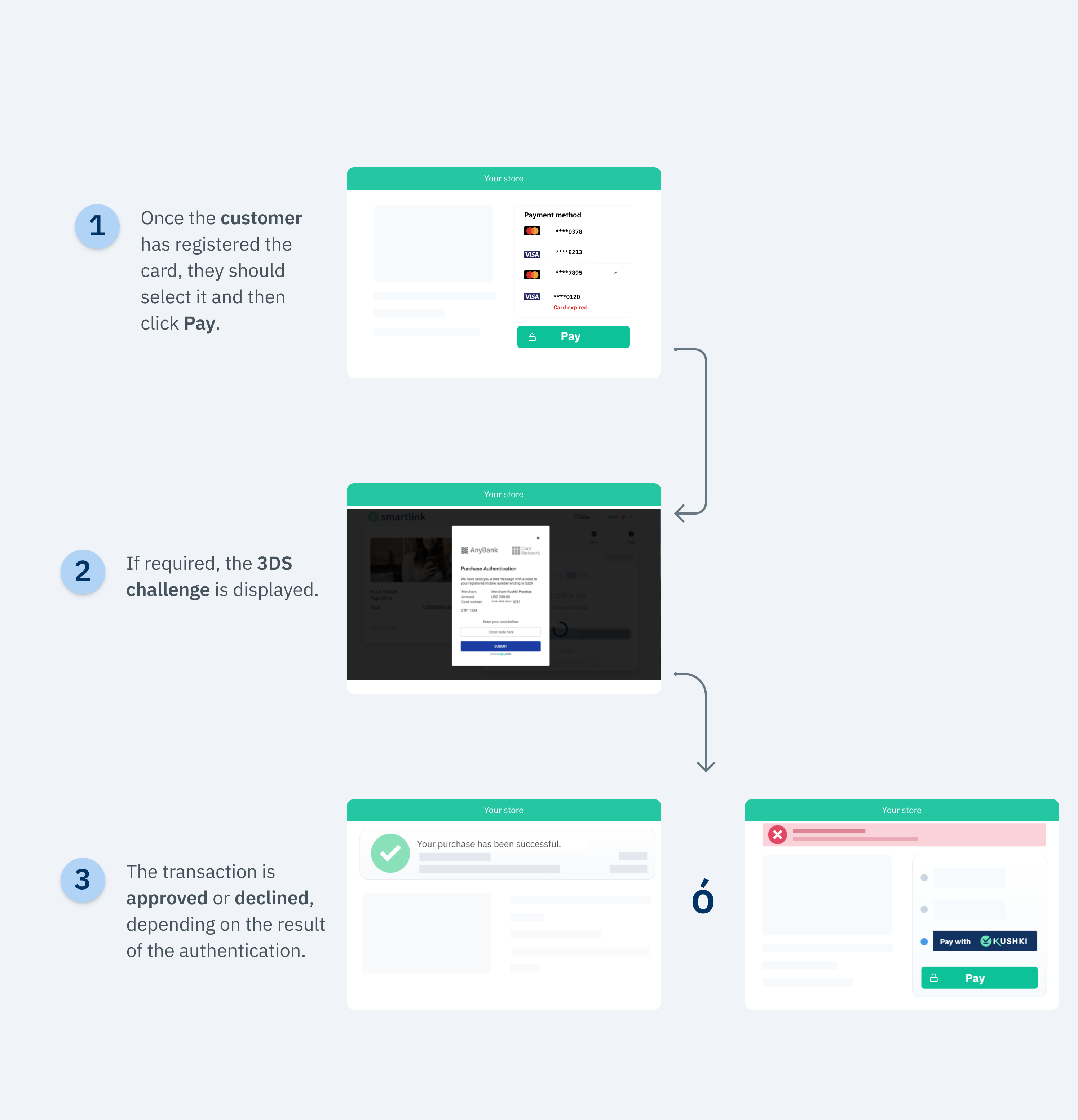
Once the user saves the card, they can make one-click payments. When they click the pay button, Kushki will validate if 3DS authentication is required for the transaction. If such validation is required, your customer will be presented with a challenge whose experience could vary depending on the brand and the issuing bank. When the user completes the challenge, they will be able to finalize the transaction.The 3DS authentication flow with Kushki for one-click payments is as follows:
Important
Keep in mind that, due to our risk policies, the payment methods available and the type of integration may vary at the time you complete the affiliation process. We will tell you how to proceed if this process applies to your merchant.
Follow the instructions described in our Accepting One-click Payments guide to request the card registration token from your front-end and execute the registration or tokenization of the card from the back-end. As a result, you will get a subscriptionId, which you can use to execute one-click payments. To perform 3DS authentication at card enrollment, follow the instructions in our Accept Recurring Payments with 3DS guide.
We will take advantage of the fact that our Kushki.js library has been imported and set up previously to use a method that will be very helpful to verify the reliability of the charge.First, it is necessary to obtain the subscription ID of the card that will be charged.Then, request the charge token, and send it to your back-end.
Check the full reference on our Kushki.js referenceRemember to include the amount and the currency object in this request, these will be necessary to display the 3DS validation modal.
When 3DS is enabled, the response from the requestDeviceToken() method will look like this:
Below is the description of these variables:
Parameter
Type
Description
authRequired
Boolean
This field tells you whether a 3DS challenge is required or not.
acsURL
urls
It refers to the URL of the challenge page that the user must go through (Access Control System).
specificationVersion
String
It refers to the applicable 3DS version.
authenticationTransactionId
String
ID of the verified transaction from the brands.
paReq
String
It stands for Payer Authentication Request. It is a field encoded in base64 that contains information about your merchant and the cardholder and that is sent to the issuer for authentication purposes. Note: If you are testing in a UAT environment, you must send sandbox.
Once you receive the Token response with the above structure, you must send the security object to Kushki by consuming the requestValidate3DS method:
If the value of the authRequired variable is equal to true, the 3DS validation modal will be presented, and your client will then receive the value to enter via email or text message.If the value of the authRequired variable is equal to false, the modal will not be presented for 3DS validation.Successful response you will receive in the callback function will be:
{
isValid:true}
In case of error, the response of the callback function will be something like:
{"message":"error-message","code":"error-code"}
If the transaction is declined for the authentication, its result will be included as part of the response of the charge with 322 and any of the subcodes specified in the Error codes guide.
The cardholder will have up to a maximum of 3 retries to complete the 3DS authentication.
Once the payment token has been received and the transaction has been authenticated, follow the instructions in our guide Accepting One-click Payments.
Important ❗️⛔️
Be sure to send the CVV of your customer's card when executing the charge request.
Below you will find some test cards that you can use in test mode (UAT) to make sure your integration is ready. Use them with any CVV, enter a future expiration date and once the 3DS modal appears, enter 1234 as the validation code.
Transaction approved with 3DS authentication required:
4456528080389860
4456529267234200
4456529165328302
4456524869770255
4456523340069956
Transaction approved without 3DS validation:
4456540000000063
4456543371713314
4456541982068615
4456541249811088
Important
To enable 3DS in test mode in your merchant, it is required to have an additional configuration by Kushki.