1. Cash Payments
Kushki Docs
English
  • Español
  • English
  • Home
  • Quick Start
    • Frequently Asked Questions
    • Moving to Production
    • Policy for Important API Changes
    • Test Data
    • Error Codes
    • Latest Features
  • Payment Glossary
    • Payments Glossary
  • One-time card payments (Online)
    • Supported card brands
    • Functionalities by business model
    • Network Tokens
    • One-step Payments
      • How do Card Payments Work?
      • Accept a Card Payment
      • Direct charge (without token)
      • Accept One-Time Payments with OTP
      • OTP Authentication Error Codes
      • Error codes for single card payments
    • Two-steps Payments
      • How do one-time payments with authorization and capture work?
      • Receive payments with authorization and capture
    • Refunds
      • Returns, cancellations, and refunds
    • 3DS Authentication
      • Introduction to 3DS
      • 3DS API integration
      • 3DS integration with kushki.js library
      • 3DS API integration plus kushki.js library
      • 3DS Error Codes
    • Apple Pay Payments
      • Apple Pay Configuration
      • Apple Pay Sandbox testing
  • Recurring Card Payments (Online)
    • Functionalities by business model
    • External subscriptions to Kushki
    • Authenticate your subscriptions with 3DS
    • Accept one-click payments with 3DS
    • Error codes in recurring charges
    • Scheduled payments
      • How do Credit or Debit Card Payment Recurring Charges Work?
      • Schedule a recurring charge
      • Manage your Scheduled Charges
    • OneClick Payments
      • Accepting One-Click Payments
      • How does authorization and capture work in OneClick payments?
      • Receive OneClick payments with authorization and capture
  • Card-present payments
    • Accept card present payments
    • Test data
    • Webhooks for card present
    • Raw card-present API
      • Raw card-present API overview
      • Cryptographic key exchange
      • Sample script to encrypt information
      • Take Payments
      • Frequently Asked Questions
      • Error codes for card-present transactions
    • Kushki One
      • First Steps
      • Autenticación y Cifrado de Requests
      • Accept payments with Kushki One
      • Amount Format
      • Async services and webhooks
      • Printing on SmartPOS terminal
      • Unified Error Catalog — Kushki ONE Connect
    • Kushki One Payment App
      • Overview
      • Process a payment
      • Split payment on the terminal
      • Refunds and PreAuth & Capture
      • Review Your Transactions
      • Terminal Setup
    • Transactions
      • Transactions
      • Cancel payments
  • Wire Transfers
    • Banks and transaction details for bank transfer payments
    • Receive Wire Transfers
    • Check the Status of a Transaction
    • Error Codes for Transfers
  • Cash Payments
    • How do Cash Payments Work?
    • Accept a Cash Payment
    • Authorized locations
    • Error Codes for declined cash transaction
  • Alternative payment methods (APM)
    • How do APM payments work?
    • Accept Bre-B payments
  • Money Disbursement
    • Payment Distribution
    • Recharge your balance for dispersions
    • Wire Transfer
      • How Does a Payment Distribution by Wire Transfer Work?
      • Payment Distribution to Bank Accounts
      • Disburse with Bre-B
      • Error codes for transfer dispersions
    • Cash
      • How does payment distribution in cash work?
      • Distribute Payments in Cash
      • Manage your Payment Distribution Transactions
  • Plugins
    • Shopify
      • Shopify
      • Plugin Operation
    • VTEX
      • VTEX Integration Guide
  • Payment Links
    • Smartlinks
  • Payment forms and buttons
    • Kajita
      • How Does it Work?
      • Payment Kajitas
    • Payment Button
      • Overview
      • Generate a payment button
  • Branch Offices Management
    • How to Onboard Submerchants via API
  • Notifications
    • Good Practices
    • Check your Webhooks
    • One-time Payments Webhooks
      • Webhook for One-Time Payments made with a card
      • Webhook for One-Time Payments by Wire Transfer
      • Webhook for One-Time Payments in Cash
    • Recurring Payments Webhooks
      • Webhook for Recurring Payments Made with Card
    • Payment Distribution Webhooks
      • Webhook for payment disbursement through wire transfer
      • Webhook for Payment Distribution in Cash
    • Payment button Webhooks
      • Webhooks with Payment Button
    • Smartlinks Webhooks
      • Webhooks with Smartlinks
    • Refunds Webhooks
      • Webhook for Voids and Refunds
      • Chargeback Webhooks
HomeMexico 🇲🇽Ecuador 🇪🇨Chile 🇨🇱Colombia 🇨🇴
Peru 🇵🇪
HomeMexico 🇲🇽Ecuador 🇪🇨Chile 🇨🇱Colombia 🇨🇴
Peru 🇵🇪
Status
Soporte / Support
English
  • Español
  • English
  1. Cash Payments

Error Codes for declined cash transaction

Learn how to resolve the different error types messages received during declined cash transactions; Kushki API validation.

What types of response codes does Kushki return?#

Kushki will return two different response codes to indicate the success or failure of a transaction: processorError and code. The code field returns generic messages. On the other side, the field processorError indicates that the transaction has passed through the processor and has probably been mapped by Kushki in order to provide a specific explanation of the reason why your transaction could not be completed.

Codes returned by Kushki for cash payments#

Kushki's API will perform validations before sending a transaction to the processors. If this is the case, the processorError field will not appear in the response and you will only see the code field.
An example of a message returned by Kushki's API is shown below:
{
    "code": "C001",
    "message": "Cuerpo de la petición inválido."
}
In the table below, generic error codes returned through the code field are summarized.
codemessageWhat to do?
C001Invalid request bodyCheck request body
C002An unexpected error has occurredRetry the transaction; in case the error persists, get in touch with Kushki's support team so that we can review your case.
C003Invalid tokenFill in the data again and retry
C004Invalid merchant IDCheck public merchant ID or private merchant ID and retry
C005Invalid transaction IDFill in the data again and retry
C006Invalid transaction amountCheck amount to capture and retry
C007Pin submitted does not existCheck pin and retry
C008Transaction is in an invalid statusVerify that the transaction has not been previously paid or voided
C010Third party integration errorContact Kushki's support team, so we can review your case
C011Error. No attachments in the emailTry another card
C012Invalid transaction statusCheck amount to capture and retry
C017The expiration date is not validContact Kushki's support team, so we can review your case
C018Transaction does not exist or has been deletedContact Kushki's support team, so we can review your case
C019Merchant has no businessIdContact Kushki's support team, so we can review your case
C021No records were found for the search criteria.Retry the transaction; in case the error persists, contact Kushki's support team so that we can review your case.
C022Unable to delete this transactionContact Kushki's support team so that we can review your case
C023Unable to update the transactionThis message is displayed when trying to make a partial void, but the amount is higher than the sale amount
C025The merchant does not have any processors availableContact Kushki's support team so that we can review your case
C026Request signature validation failedRetry transaction
C032No payment networks existContact Kushki's support team, so we can review your case
C033Transaction previously cancelledTransaction already cancelled
C034Stone webhook validation error-
C035Pin generated by the processor duplicatedPin is duplicated, try to generate a new pin
C036Transaction can no longer be reversedThe transaction is in a status in which it cannot be reversed
C037The transaction went into timeout, please try againRetry the transaction
C038Processor does not existContact Kushki's support team, so we can review your case
C040The merchant ID does not match the credential submittedAn amount greater than 0 must be submitted in the amount property.
C041The merchant does not have any processors availableContact Kushki's support team so that we can review your case

HTTP status codes#

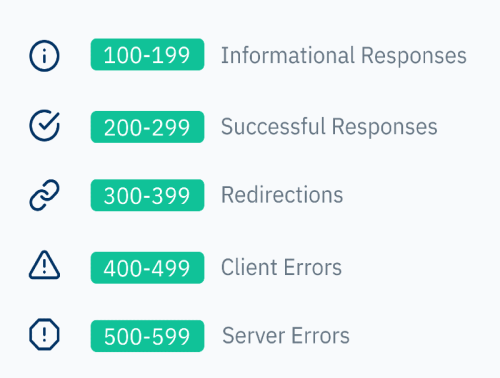
Kushki will be able to return different HTTP status codes depending on the requests made. There are five categories of standard responses, described in the following image:
HTTP status codes en 800
Below are the most common HTTP status codes, their associated standard message, as well as a more detailed description of the response.
CodeMessageDetail
200OKThe process was successful. Everything worked as expected, according to the HTTP method
400Bad RequestThe server cannot interpret the request (incorrect syntax, too large size, missing parameters)
401Authorization RequiredCredentials must be authenticated, or authentication has failed
403ForbiddenDo not have the necessary permissions to perform this action
404Not FoundResource or page not found
409ConflictThe request cannot be processed because of a conflict with the resource (e.g., multiple simultaneous updates)
410GoneThe requested resource has been deleted from the server, and will no longer be available
429Too Many RequestsToo many requests have been sent in a short period of time
430Request Header Fields Too LargeUnofficial code, applies only to Shopify. Similar to code 429
500Internal Server ErrorAn unexpected server-side error occurred
502Bad GatewayThe server (acting as a proxy or gateway) received an invalid response from another server
503Service Temporarily UnavailableThe server is unavailable (usually because it is under maintenance, or because it is overloaded)
504Gateway TimeoutThe server (acting as a proxy or gateway) has not received a response from the other server in time
Modificado en 2026-09-25 15:16:13
Anterior
Authorized locations
Siguiente
Alternative payment methods (APM)
Built with