1. Cash
Kushki Docs
English
  • Español
  • English
  • Home
  • Quick Start
    • Frequently Asked Questions
    • Moving to Production
    • Policy for Important API Changes
    • Test Data
    • Error Codes
    • Latest Features
  • Payment Glossary
    • Payments Glossary
  • One-time card payments (Online)
    • Supported card brands
    • Functionalities by business model
    • Network Tokens
    • One-step Payments
      • How do Card Payments Work?
      • Accept a Card Payment
      • Direct charge (without token)
      • Accept One-Time Payments with OTP
      • OTP Authentication Error Codes
      • Error codes for single card payments
    • Two-steps Payments
      • How do one-time payments with authorization and capture work?
      • Receive payments with authorization and capture
    • Refunds
      • Returns, cancellations, and refunds
    • 3DS Authentication
      • Introduction to 3DS
      • 3DS API integration
      • 3DS integration with kushki.js library
      • 3DS API integration plus kushki.js library
      • 3DS Error Codes
    • Apple Pay Payments
      • Apple Pay Configuration
      • Apple Pay Sandbox testing
  • Recurring Card Payments (Online)
    • Functionalities by business model
    • External subscriptions to Kushki
    • Authenticate your subscriptions with 3DS
    • Accept one-click payments with 3DS
    • Error codes in recurring charges
    • Scheduled payments
      • How do Credit or Debit Card Payment Recurring Charges Work?
      • Schedule a recurring charge
      • Manage your Scheduled Charges
    • OneClick Payments
      • Accepting One-Click Payments
      • How does authorization and capture work in OneClick payments?
      • Receive OneClick payments with authorization and capture
  • Card-present payments
    • Accept card present payments
    • Test data
    • Webhooks for card present
    • Raw card-present API
      • Raw card-present API overview
      • Cryptographic key exchange
      • Sample script to encrypt information
      • Take Payments
      • Frequently Asked Questions
      • Error codes for card-present transactions
    • Kushki One
      • First Steps
      • Autenticación y Cifrado de Requests
      • Accept payments with Kushki One
      • Amount Format
      • Async services and webhooks
      • Printing on SmartPOS terminal
      • Unified Error Catalog — Kushki ONE Connect
    • Kushki One Payment App
      • Overview
      • Process a payment
      • Split payment on the terminal
      • Refunds and PreAuth & Capture
      • Review Your Transactions
      • Terminal Setup
    • Transactions
      • Transactions
      • Cancel payments
  • Wire Transfers
    • Banks and transaction details for bank transfer payments
    • Receive Wire Transfers
    • Check the Status of a Transaction
    • Error Codes for Transfers
  • Cash Payments
    • How do Cash Payments Work?
    • Accept a Cash Payment
    • Authorized locations
    • Error Codes for declined cash transaction
  • Alternative payment methods (APM)
    • How do APM payments work?
    • Accept Bre-B payments
  • Money Disbursement
    • Payment Distribution
    • Recharge your balance for dispersions
    • Wire Transfer
      • How Does a Payment Distribution by Wire Transfer Work?
      • Payment Distribution to Bank Accounts
      • Disburse with Bre-B
      • Error codes for transfer dispersions
    • Cash
      • How does payment distribution in cash work?
      • Distribute Payments in Cash
      • Manage your Payment Distribution Transactions
  • Plugins
    • Shopify
      • Shopify
      • Plugin Operation
    • VTEX
      • VTEX Integration Guide
  • Payment Links
    • Smartlinks
  • Payment forms and buttons
    • Kajita
      • How Does it Work?
      • Payment Kajitas
    • Payment Button
      • Overview
      • Generate a payment button
  • Branch Offices Management
    • How to Onboard Submerchants via API
  • Notifications
    • Good Practices
    • Check your Webhooks
    • One-time Payments Webhooks
      • Webhook for One-Time Payments made with a card
      • Webhook for One-Time Payments by Wire Transfer
      • Webhook for One-Time Payments in Cash
    • Recurring Payments Webhooks
      • Webhook for Recurring Payments Made with Card
    • Payment Distribution Webhooks
      • Webhook for payment disbursement through wire transfer
      • Webhook for Payment Distribution in Cash
    • Payment button Webhooks
      • Webhooks with Payment Button
    • Smartlinks Webhooks
      • Webhooks with Smartlinks
    • Refunds Webhooks
      • Webhook for Voids and Refunds
      • Chargeback Webhooks
HomeMexico 🇲🇽Ecuador 🇪🇨Chile 🇨🇱Colombia 🇨🇴
Peru 🇵🇪
HomeMexico 🇲🇽Ecuador 🇪🇨Chile 🇨🇱Colombia 🇨🇴
Peru 🇵🇪
Status
Soporte / Support
English
  • Español
  • English
  1. Cash

Distribute Payments in Cash

Distribute payments in cash from your platform
Distributing cash payments means delivering money physically to your customers or assistants. In other words, imagine that you offer a service or a product and to deliver it, you need the help of a third party, who will charge you for this service. The money paid for the service provided by a third party through this method of payment distribution makes this process easier, because by using a reference, the service provider goes to his/her nearest cash point and withdraws the money.
This is ideal for:
Payments for suppliers or sellers
Marketplaces
Delivery applications
To keep in mind
Due to our risk policies, the available payment methods and the integration type may vary once you complete the affiliation. We will tell you how to proceed if this process applies to your merchant.
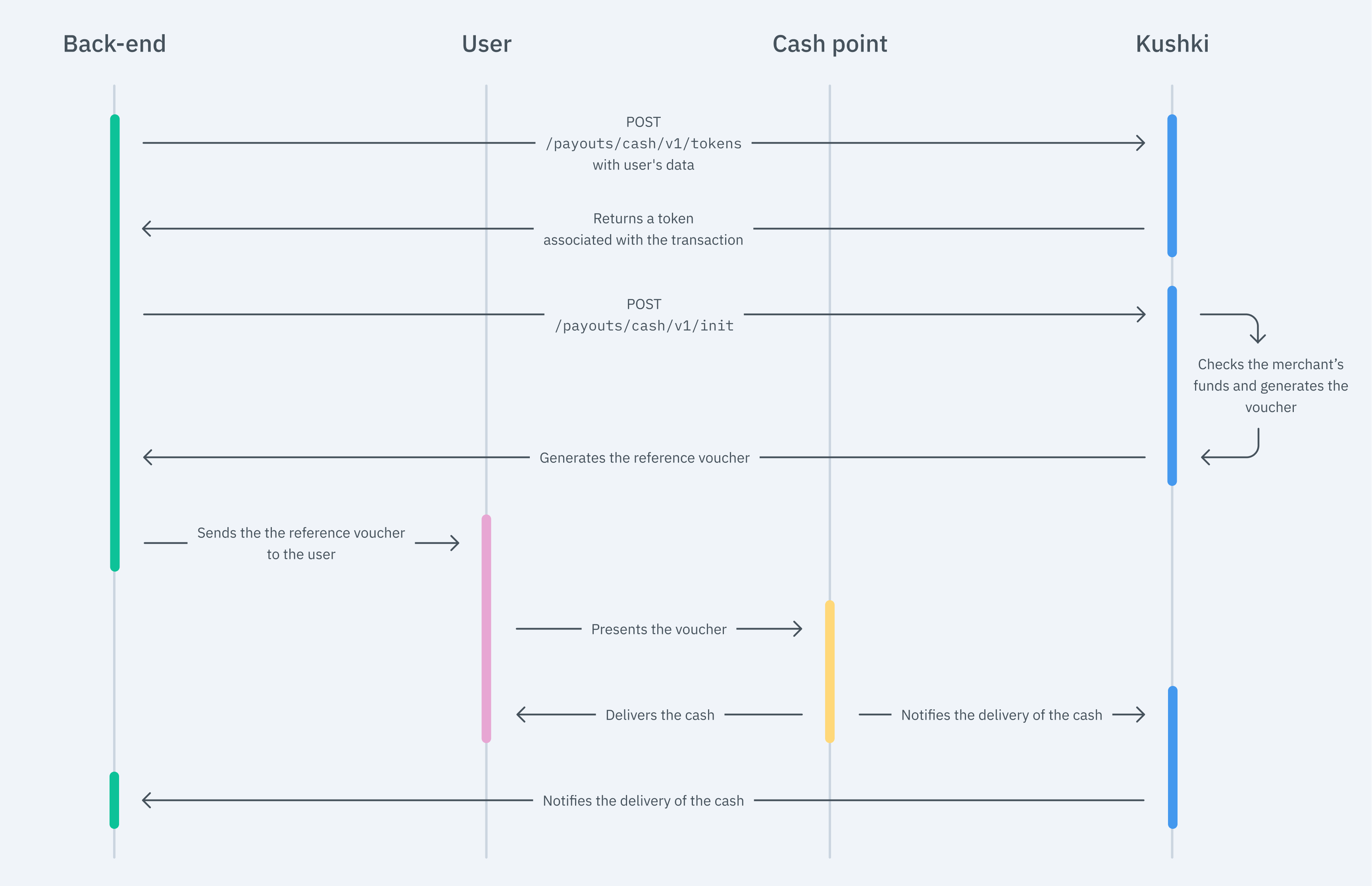
The flow that you will integrate is shown below:
Cash out flow
To issue a payment reference through Kushki, so that customers can withdraw their money, simply capture the user's data, create a token and submit the information to Kushki in order to be processed.

1. Tokenize Data#

In this step, it is essential to collect the user's data safely and generate a token for that information. You have to make a call to our tokenization endpoint.
Importante
Make sure of sending the user's full name and surnames in the name and lastName parameters, as detailed in the following example.
JavaScript
Python
PHP

2. Initialize the Transaction#

Now, you need to use the token obtained to start the payment distribution process with Kushki. With this token, you simply must make a call to our initialization endpoint.
JavaScript
Python
PHP
Check our API Reference for more information.
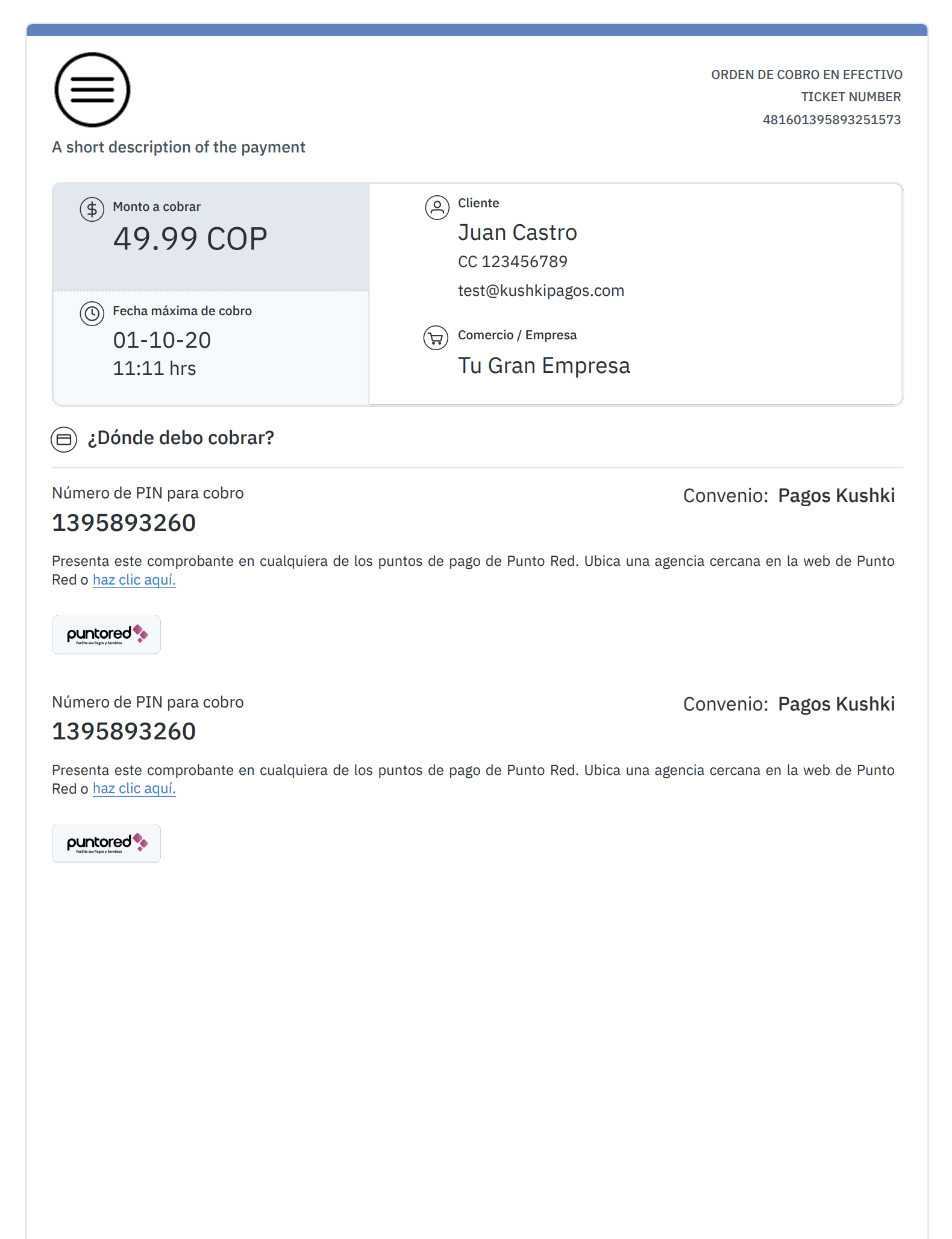
The response delivers a reference voucher that users can show at the nearest, or their preferred cash point, and withdraw their money.
We show you an example below:
Comprobante de dispersión en efectivo
Additionally, the data you need to generate a voucher using your design is also delivered.
Important!
Note that generating a voucher using your own design will involve stricter verification by our agents in the certification process.

3. Check the Transaction Status (Optional)#

Now that a voucher has been generated for the user to withdraw his/her money, you can track the transaction status either via Webhooks or manually, by using our API.

Webhooks#

The transaction status is automatically notified at the time when the money has been withdrawn.
To configure a webhook in your test merchant site, you need to notify our agents by indicating the URL and the payment method via email.

API#

You can use our Get Transaction Status, at our API to manually track the status of a specific transaction.

4. Test your Integration#

You may use a test identification document in test mode to ensure that your integration is ready.
Approved transaction: 123456789

5. Prepare your Certification#

Read the following guidelines for technical certification approval (required to obtain productive account credentials):
Tax calculations must be correct.
Messages displayed on the screen should be aligned with Kushki's responses.
Save and record all the responses delivered by Kushki (required if you need support).
If there's no requirement for sending a reference voucher to the customer's mail, you don't need to specify an email address in the token request.
If webhook notifications are received correctly, respond to the request with a status 200.
The payment button must be disabled after the first click.
Kushki's logo is visible. You may download these resources in this link.
Make sure that in the body of the request all the fields required in the API Reference are included.
If you design your own voucher, also consider the following:
The pin must be visible.
The agreement number must be visible. (only if the Init response contains it).
The voucher expiry date must be visible.
Cash points where the pin can be used to withdraw the money must be visible.
The total amount is visible.

Front End Solutions (Optional)#

Kushki also provides optional tools so that you can use to display a withdrawal form in your front end, optimizing the tokenization process. For example, this is useful when you don't want or don't need to save the transaction data of the users. We offer you two solutions for data tokenization: Cajita and Kushki.js_

Cajita#

Use Cajita to simplify your integration and provide a ready-to-use solution to collect user data safely.

Set up Cajita#

Embed kushki-checkout.js script in your payment page by adding it to the <head> of your HTML file. Always download kushki-checkout directly from cdn.kushkipagos.com to keep kushki-checkout.js always downloaded directly from cdn.kushkipagos.com. __Never embed a script in a bundle or a package, nor host a copy of it. __

Add Cajita to your Website#

Cajita needs a place to live on your page. Enter the following code in your site's <body>, where you want the payment form to be displayed.
Remember to configure the action in the action form, according to the corresponding endpoint in your back end.
Then, add the following script tag. Make sure that the form has been uploaded.
This will create a pre-designed form on your website to accept payments.

Kushki.js#

Use Kushki.js if you need more control over the "look & feel" or appearance of your payment form.
Set up Kushki.js#
Option 1 - CDN#
Use the following script tag at the end of the <body> of your payment page.
Option 2 - npm#
Install the package from npm.
Then import it in your code using the following code.
Set up Kushki Object.#
Add the following code to your application
Collect User Information and Send it to your Back End#
First, embed the form in your payment page adding the required fields. You can design it in the way that best suits you.
For example:
Then, for the moment when the user submits the form, add a token request and send it to your back end.
Check the complete details in our Kushki.js Reference

Manage your payment distributions
Modify or remove your payment distribution transactions.
Distribute payments by wire transfers
Distribute payments safely by wire transfers.

Modificado en 2026-10-14 19:56:31
Anterior
How does payment distribution in cash work?
Siguiente
Manage your Payment Distribution Transactions
Built with