1. Kushki One
Kushki Docs
English
  • Español
  • English
  • Home
  • Quick Start
    • Frequently Asked Questions
    • Moving to Production
    • Policy for Important API Changes
    • Test Data
    • Error Codes
    • Latest Features
  • Payment Glossary
    • Payments Glossary
  • One-time card payments (Online)
    • Supported card brands
    • Functionalities by business model
    • Network Tokens
    • One-step Payments
      • How do Card Payments Work?
      • Accept a Card Payment
      • Direct charge (without token)
      • Accept One-Time Payments with OTP
      • OTP Authentication Error Codes
      • Error codes for single card payments
    • Two-steps Payments
      • How do one-time payments with authorization and capture work?
      • Receive payments with authorization and capture
    • Refunds
      • Returns, cancellations, and refunds
    • 3DS Authentication
      • Introduction to 3DS
      • 3DS API integration
      • 3DS integration with kushki.js library
      • 3DS API integration plus kushki.js library
      • 3DS Error Codes
    • Apple Pay Payments
      • Apple Pay Configuration
      • Apple Pay Sandbox testing
  • Recurring Card Payments (Online)
    • Functionalities by business model
    • External subscriptions to Kushki
    • Authenticate your subscriptions with 3DS
    • Accept one-click payments with 3DS
    • Error codes in recurring charges
    • Scheduled payments
      • How do Credit or Debit Card Payment Recurring Charges Work?
      • Schedule a recurring charge
      • Manage your Scheduled Charges
    • OneClick Payments
      • Accepting One-Click Payments
      • How does authorization and capture work in OneClick payments?
      • Receive OneClick payments with authorization and capture
  • Card-present payments
    • Accept card present payments
    • Test data
    • Webhooks for card present
    • Raw card-present API
      • Raw card-present API overview
      • Cryptographic key exchange
      • Sample script to encrypt information
      • Take Payments
      • Frequently Asked Questions
      • Error codes for card-present transactions
    • Kushki One
      • First Steps
      • Autenticación y Cifrado de Requests
      • Accept payments with Kushki One
      • Amount Format
      • Async services and webhooks
      • Printing on SmartPOS terminal
      • Unified Error Catalog — Kushki ONE Connect
    • Kushki One Payment App
      • Overview
      • Process a payment
      • Split payment on the terminal
      • Refunds and PreAuth & Capture
      • Review Your Transactions
      • Terminal Setup
    • Transactions
      • Transactions
      • Cancel payments
  • Wire Transfers
    • Banks and transaction details for bank transfer payments
    • Receive Wire Transfers
    • Check the Status of a Transaction
    • Error Codes for Transfers
  • Cash Payments
    • How do Cash Payments Work?
    • Accept a Cash Payment
    • Authorized locations
    • Error Codes for declined cash transaction
  • Alternative payment methods (APM)
    • How do APM payments work?
    • Accept Bre-B payments
  • Money Disbursement
    • Payment Distribution
    • Recharge your balance for dispersions
    • Wire Transfer
      • How Does a Payment Distribution by Wire Transfer Work?
      • Payment Distribution to Bank Accounts
      • Disburse with Bre-B
      • Error codes for transfer dispersions
    • Cash
      • How does payment distribution in cash work?
      • Distribute Payments in Cash
      • Manage your Payment Distribution Transactions
  • Plugins
    • Shopify
      • Shopify
      • Plugin Operation
    • VTEX
      • VTEX Integration Guide
  • Payment Links
    • Smartlinks
  • Payment forms and buttons
    • Kajita
      • How Does it Work?
      • Payment Kajitas
    • Payment Button
      • Overview
      • Generate a payment button
  • Branch Offices Management
    • How to Onboard Submerchants via API
  • Notifications
    • Good Practices
    • Check your Webhooks
    • One-time Payments Webhooks
      • Webhook for One-Time Payments made with a card
      • Webhook for One-Time Payments by Wire Transfer
      • Webhook for One-Time Payments in Cash
    • Recurring Payments Webhooks
      • Webhook for Recurring Payments Made with Card
    • Payment Distribution Webhooks
      • Webhook for payment disbursement through wire transfer
      • Webhook for Payment Distribution in Cash
    • Payment button Webhooks
      • Webhooks with Payment Button
    • Smartlinks Webhooks
      • Webhooks with Smartlinks
    • Refunds Webhooks
      • Webhook for Voids and Refunds
      • Chargeback Webhooks
HomeMexico 🇲🇽Ecuador 🇪🇨Chile 🇨🇱Colombia 🇨🇴
Peru 🇵🇪
HomeMexico 🇲🇽Ecuador 🇪🇨Chile 🇨🇱Colombia 🇨🇴
Peru 🇵🇪
Status
Soporte / Support
English
  • Español
  • English
  1. Kushki One

Autenticación y Cifrado de Requests

🚧 Early Release — Beta
This product is in early access. Parameters, response structures and behaviors may change without prior notice. Do not use this version in production without coordinating with the Kushki integrations team first.
Every call to Kushki ONE Connect is authenticated with a signature you compute from your Business-Code, and the payload travels encrypted. There is one mechanism, and it is the same everywhere.
The mechanism does not change between topologies
Your signing and encryption logic is identical in Cloud, on the local network and on localhost. Write it once. The only difference is the encrypted_http_communication header, which you send only on the local network and localhost.
Always send the encrypted_http_communication header as true
In Local Network and Localhost integrations, send the header encrypted_http_communication: true on every request, in UAT and in production.
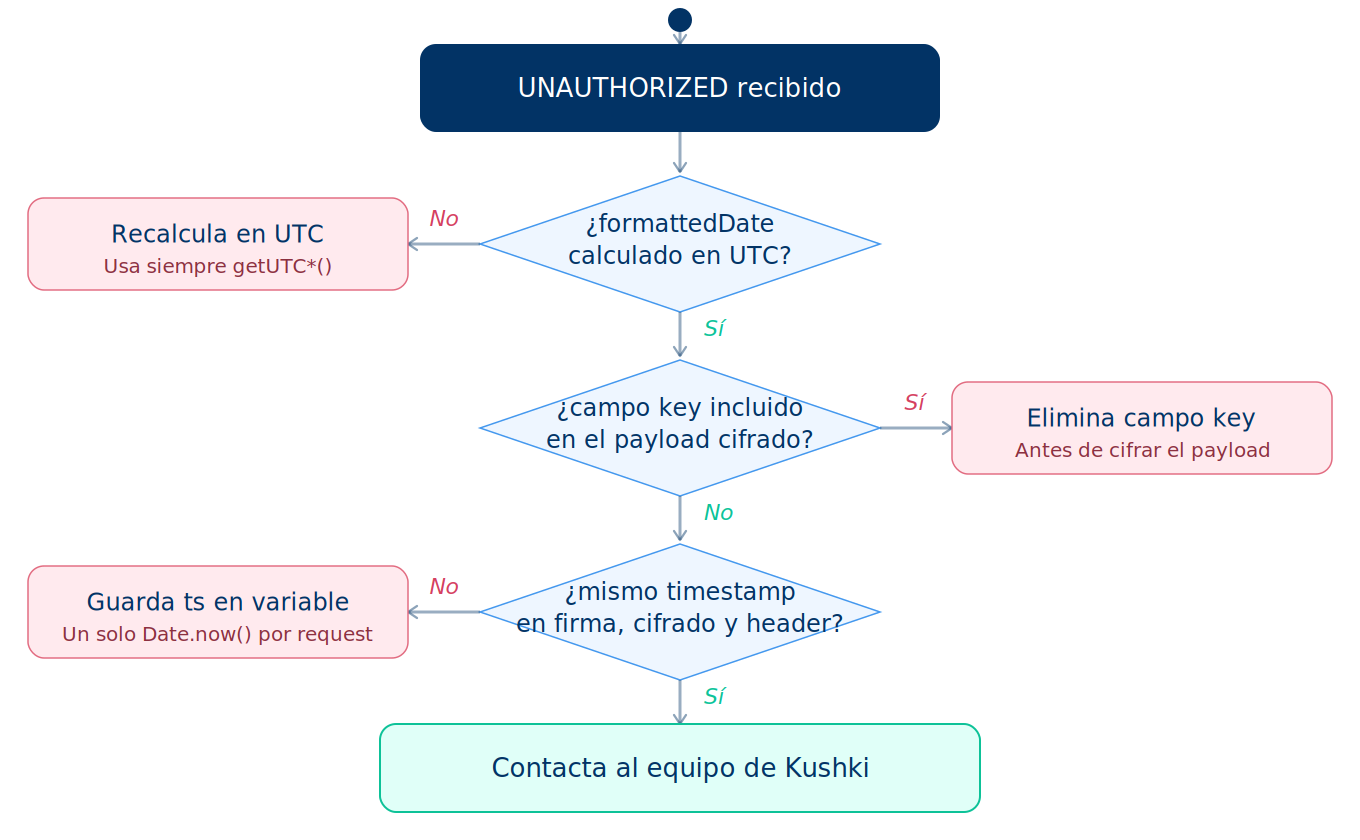
If you certify with the header set to false or without sending it, your requests are not signed or encrypted, and when you move to production every call fails with AUTH-001 ("Invalid or expired credentials").
Cloud integrations do not require this header.

Requirements#

Before you start:
Your Business-Code: the private key that authenticates your merchant account. The integrations team hands it over during onboarding.
The device's terminalSerial. The integrations team hands it over during onboarding as well.
Business-Code is not private_credential_id
The signing key is your Business-Code. The private_credential_id is a terminal configuration field and is never used to sign requests. Confusing the two returns an authentication error on every call.

What every request carries#

Two headers and an encrypted body:
ElementValue
AuthorizationBasic followed by the SHA-512 hash. The Basic prefix is required
timestampUnix timestamp in seconds, in UTC — must fall within ±5 minutes of server time
Body{"data": "<iv_hex>:<ciphertext_hex>"}
The original payload never travels in plain text. Everything documented as a request body across the Kushki ONE guides is the plaintext you encrypt, not what goes on the wire.

Variables you need#

VariableDescription
businessCodeThe private key that authenticates your merchant account
terminalSerialThe SmartPOS terminal serial number
timestampUnix timestamp in seconds, in UTC
requestDataThe original request payload

General flow#

Every request goes through two independent processes that both start from the same requestData. One produces the signature and the other produces the encrypted payload. Both are sent together.
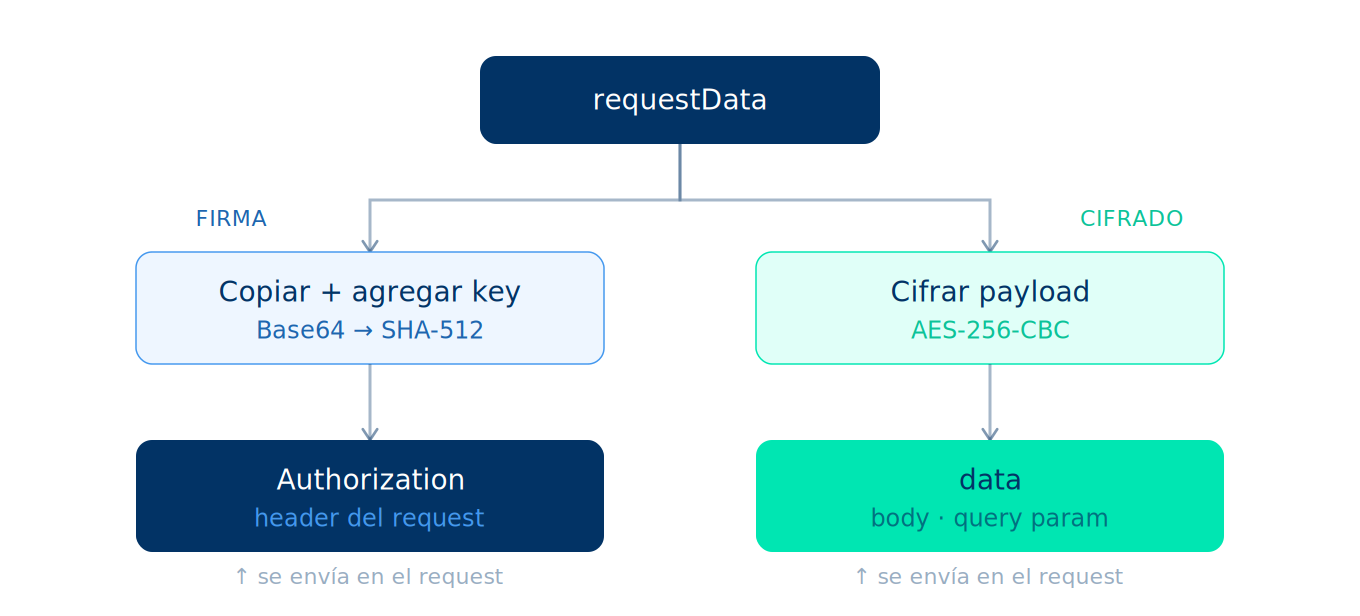
General sign-and-encrypt flow in Kushki ONE Connect
dataWithKey is never sent
dataWithKey exists only to generate the signature. It is neither encrypted nor transmitted. Including the key field inside the encrypted payload causes an authentication error.

Key derivation chain#

The three input variables produce exactly two outputs: aesKey for encryption and encodedKeyTimestamp for the signature. The password is the central value of this chain. It changes every minute because it depends on formattedDate, which makes any signed request expire automatically.
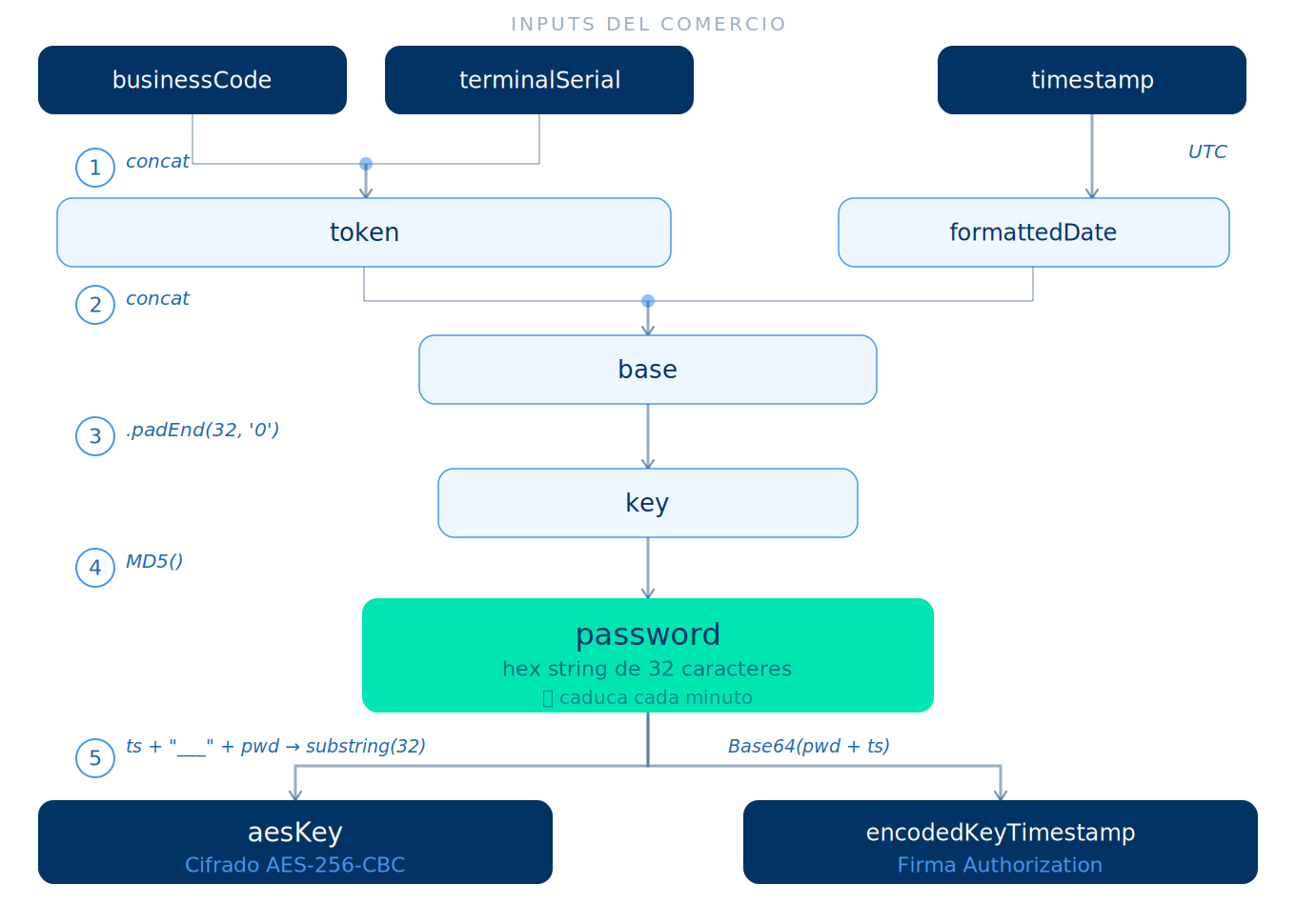
Kushki ONE Connect key derivation chain

Step 1: generate the timestamp#

Store this value in a variable at the start of the flow. You reuse it in steps 3, 4 and 6.
One timestamp per request
Never call Date.now() more than once in the same flow. A different timestamp between the signature, the encryption and the header is the quietest cause of authentication errors.

Step 2: generate formattedDate in UTC#

Always compute in UTC
A time zone offset is one of the most frequent causes of an invalid signature. Use the getUTC* methods, never their local-time counterparts.

Step 3: generate the temporary password#

Step 4: build dataWithKey#

This is a copy of requestData with the key field added. It is used only for signing.

Step 5: generate the signature#

Resulting headers:
Authorization: Basic <hash>
timestamp: <timestamp>

Step 6: encrypt the payload#

Only requestData is encrypted, without the key field.

Step 7: assemble the final request#

The headers are the same across methods. What changes is how you deliver the data field. In Local Network and Localhost, also add the header encrypted_http_communication: true on every request.
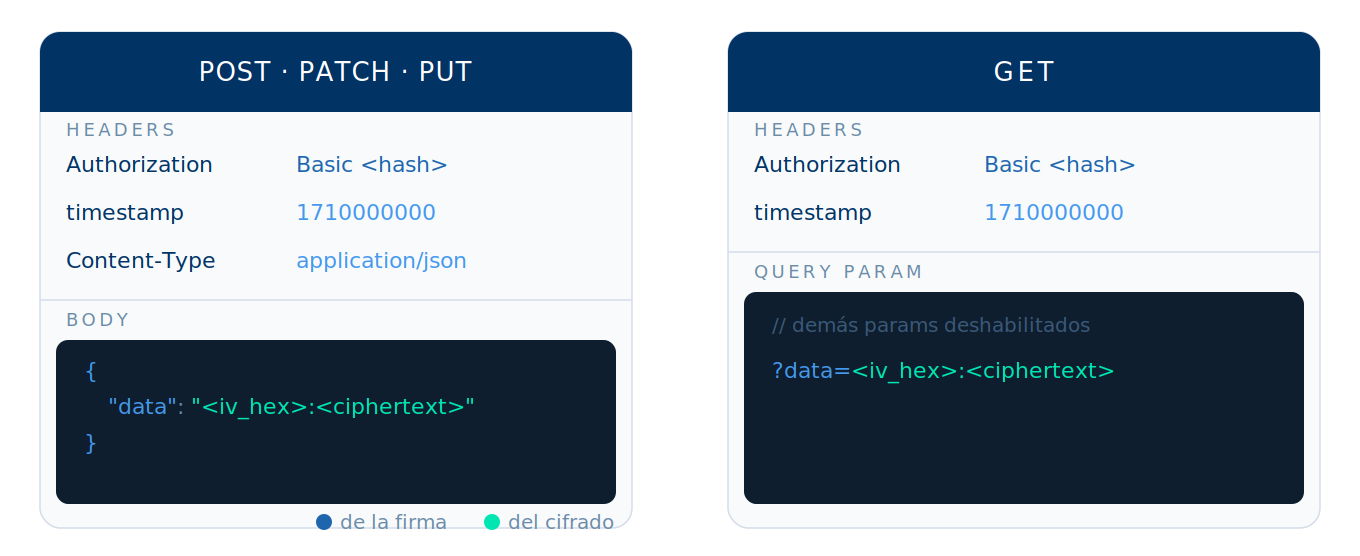
Anatomy of a signed and encrypted HTTP request
On POST, PATCH and PUT, the encrypted data goes in the body:
{ "data": "<iv_hex>:<ciphertext_hex>" }
On GET, it goes as a query parameter:
GET /endpoint?data=<iv_hex>:<ciphertext_hex>
Remove every other query parameter from the original request before sending it. This applies to /sync/abort and /async/abort on the local network, and to the print job status endpoint: the identifier they used to carry as a query parameter travels inside the encrypted payload instead.
Operations with no payload sign an empty object
On /abort there is no payload, so what you sign is the literal {} — not an empty string. Two bytes of difference, and the response gives you no hint.

Authentication errors#

An invalid signature always returns the same response, with no distinction between causes:
{
  "type": "AUTH",
  "code": "AUTH-001",
  "message": "Invalid or expired credentials"
}
Check these causes in order. They cover the vast majority of cases:
CauseHow you spot itFix
timestamp in the wrong unitThe value has 13 digits instead of 10Seconds, not milliseconds
Clock outside the tolerance windowFails consistently on one machine and works on anotherThe timestamp must fall within ±5 minutes of server time. Sync the clock with NTP
formattedDate in local timeThe signature fails intermittently depending on the time of dayCompute the date with UTC methods
key field included in the encrypted payloadFails every time, from the very first requestEncrypt requestData without key; dataWithKey is only for signing
encrypted_http_communication header missing or set to false (Local Network and Localhost)Passes certification in UAT and fails when you move to productionSend encrypted_http_communication: true on every request, in UAT too, and certify again
Empty string signed instead of {}Fails only on /abortSign the literal {}
Body re-serialized after signingFails every time, and the payload looks correctSerialize once, sign that string, send that same string
Authentication error diagnostic tree
Never log the full signature
Never write the full value of the Authorization header into your production logs. Log only its presence or absence for diagnostics.

Postman reference script#

Set this pre-request script at the collection level so the flow runs automatically on every request. Define the businessCode and terminalSerial variables in your environment.
Accept payments with Kushki ONE
With authentication sorted out, review the card-present payment flows and their sync and async variants.
Authentication errors
Look up the full catalog of error codes, including credentials and permissions.
Modificado en 2026-10-07 14:32:14
Anterior
First Steps
Siguiente
Accept payments with Kushki One
Built with