1. Transactions
Kushki Docs
English
  • Español
  • English
  • Home
  • Quick Start
    • Frequently Asked Questions
    • Moving to Production
    • Policy for Important API Changes
    • Test Data
    • Error Codes
    • Latest Features
  • Payment Glossary
    • Payments Glossary
  • One-time card payments (Online)
    • Supported card brands
    • Functionalities by business model
    • Network Tokens
    • One-step Payments
      • How do Card Payments Work?
      • Accept a Card Payment
      • Direct charge (without token)
      • Accept One-Time Payments with OTP
      • OTP Authentication Error Codes
      • Error codes for single card payments
    • Two-steps Payments
      • How do one-time payments with authorization and capture work?
      • Receive payments with authorization and capture
    • Refunds
      • Returns, cancellations, and refunds
    • 3DS Authentication
      • Introduction to 3DS
      • 3DS API integration
      • 3DS integration with kushki.js library
      • 3DS API integration plus kushki.js library
      • 3DS Error Codes
    • Apple Pay Payments
      • Apple Pay Configuration
      • Apple Pay Sandbox testing
  • Recurring Card Payments (Online)
    • Functionalities by business model
    • External subscriptions to Kushki
    • Authenticate your subscriptions with 3DS
    • Accept one-click payments with 3DS
    • Error codes in recurring charges
    • Scheduled payments
      • How do Credit or Debit Card Payment Recurring Charges Work?
      • Schedule a recurring charge
      • Manage your Scheduled Charges
    • OneClick Payments
      • Accepting One-Click Payments
      • How does authorization and capture work in OneClick payments?
      • Receive OneClick payments with authorization and capture
  • Card-present payments
    • Accept card present payments
    • Test data
    • Webhooks for card present
    • Raw card-present API
      • Raw card-present API overview
      • Cryptographic key exchange
      • Sample script to encrypt information
      • Take Payments
      • Frequently Asked Questions
      • Error codes for card-present transactions
    • Kushki One
      • First Steps
      • Autenticación y Cifrado de Requests
      • Accept payments with Kushki One
      • Amount Format
      • Async services and webhooks
      • Printing on SmartPOS terminal
      • Unified Error Catalog — Kushki ONE Connect
    • Kushki One Payment App
      • Overview
      • Process a payment
      • Split payment on the terminal
      • Refunds and PreAuth & Capture
      • Review Your Transactions
      • Terminal Setup
    • Transactions
      • Transactions
      • Cancel payments
  • Wire Transfers
    • Banks and transaction details for bank transfer payments
    • Receive Wire Transfers
    • Check the Status of a Transaction
    • Error Codes for Transfers
  • Cash Payments
    • How do Cash Payments Work?
    • Accept a Cash Payment
    • Authorized locations
    • Error Codes for declined cash transaction
  • Alternative payment methods (APM)
    • How do APM payments work?
    • Accept Bre-B payments
  • Money Disbursement
    • Payment Distribution
    • Recharge your balance for dispersions
    • Wire Transfer
      • How Does a Payment Distribution by Wire Transfer Work?
      • Payment Distribution to Bank Accounts
      • Disburse with Bre-B
      • Error codes for transfer dispersions
    • Cash
      • How does payment distribution in cash work?
      • Distribute Payments in Cash
      • Manage your Payment Distribution Transactions
  • Plugins
    • Shopify
      • Shopify
      • Plugin Operation
    • VTEX
      • VTEX Integration Guide
  • Payment Links
    • Smartlinks
  • Payment forms and buttons
    • Kajita
      • How Does it Work?
      • Payment Kajitas
    • Payment Button
      • Overview
      • Generate a payment button
  • Branch Offices Management
    • How to Onboard Submerchants via API
  • Notifications
    • Good Practices
    • Check your Webhooks
    • One-time Payments Webhooks
      • Webhook for One-Time Payments made with a card
      • Webhook for One-Time Payments by Wire Transfer
      • Webhook for One-Time Payments in Cash
    • Recurring Payments Webhooks
      • Webhook for Recurring Payments Made with Card
    • Payment Distribution Webhooks
      • Webhook for payment disbursement through wire transfer
      • Webhook for Payment Distribution in Cash
    • Payment button Webhooks
      • Webhooks with Payment Button
    • Smartlinks Webhooks
      • Webhooks with Smartlinks
    • Refunds Webhooks
      • Webhook for Voids and Refunds
      • Chargeback Webhooks
HomeMexico 🇲🇽Ecuador 🇪🇨Chile 🇨🇱Colombia 🇨🇴
Peru 🇵🇪
HomeMexico 🇲🇽Ecuador 🇪🇨Chile 🇨🇱Colombia 🇨🇴
Peru 🇵🇪
Status
Soporte / Support
English
  • Español
  • English
  1. Transactions

Cancel payments

This functionality is available for the following models:
☑ Acquirer

☐ Aggregator
Product in beta version in Colombia 🔐👨‍
We are working on our beta version. Stay tuned for its official launch! You can also contact your account manager for more information.
Important!
Keep in mind that, due to our risk policies, the available payment methods and the type of integration may vary at the time you formalize the affiliation. We will indicate how to proceed in case this process applies to your merchant.
When processing card-present payments with Kushki you can process refunds, voids, or reversals of payments with debit card and credit card in an approved status. When the refund, void, or reversal is approved, the funds will be returned to your client's bank account.

Environments#

Make all the adjustments to your system by testing in the development environment dev. Remember that no real transactions will be processed in this environment.
When you are ready, you can switch to the production environment live to process real transactions.
EnvironmentBase urlAvailability
devhttps://api-uat.kushkipagos.comRaw Card-Present API
livehttps://api.kushkipagos.comRaw Card-Present API

Raw card-present API#

How do voids and refunds work?#

Through the card-present service, you can perform any of the following services, according to your merchant's needs:
Service TypeDescription
ReversalIt is generated when there is a problem in the transaction processing and it is unknown if the charge was completed. This can be due to a timeout problem.
VoidIt is generated when it is known that the transaction was successfully processed, but a cancellation request is required.
The void is generated when the refund request is processed on the same day the transaction was made, before 23:59 (approximate time). This time depends on the cutoff performed by the processor. Up to 3 attempts for return are made with the processor and once the void is approved, the charge will be removed from your client's statement and the discounted value will be returned.
RefundIt is generated when it is known that the transaction was successfully processed, but a refund request is required.
The refund is generated when the return request:
- Is processed after 23:59 (approximate time) on the transaction approval day.
- When the void request exceeded the three attempts.
- When the return request was made on a different day than the original transaction.
- The maximum time allowed to perform a refund is 120 days.
The refunds generated are of two types (voids or refunds), according to the day and time the original transaction was processed and the time the void was generated. You can also request a transaction void (reversal) in case there are communication problems and you need to validate if the transaction was approved or rejected.
We explain the processing of these services below:

Perform reversals#

In case there are communication problems and you need to validate if a transaction was approved or rejected, you can perform an inverse operation to void a transaction.
To reverse a transaction, you need to consume the https://api-uat.kushkipagos.com/pos/v1/transaction endpoint and send Reverse in the transaction_mode field and the client_transaction_id of the transaction you are going to reverse as part of the request body. Please follow the steps in the guide available on the API.
Reversals are only available on the same day the transaction was made, before 23:59 (approximate time). Keep in mind that you must wait at least 1 minute after the transaction before initiating a reversal.
{
  "card": {
    "card_holder_name": "Jhon Doe"
  },
  "amount": {
    "iva": 0,
    "tip": 10000,
    "currency": "COP",
    "extra_taxes": {},
    "subtotal_iva": 0,
    "subtotal_iva0": 2000
  },
  "country": "COL",
  "isDeferred": false,
  "is_cashback": false,
  "pos_details": {
    "brand": "SUNMI",
    "model": "P2-EU",
    "version": "Kushki SunmiV1.1.18",
    "location": {
      "latitude": -1.2253600000000002,
      "longitude": -78.61997
    },
    "has_print": true,
    "terminal_id": "PB04209860189"
  },
  "card_details": {
    "tracks": {
      "track_ksn": "FFFF4357486333600003",
      "enc_track2": "2C5E3DC796759FAB00BB11163CC4B69B"
    },
    "enc_tlv": "E9BCEC77FACD77F942E433BE6CD27068F09ADFA082B6AE478D9BDA4EEEAFD3765300FD2EF030CD3A8DD9624E04CDFBC60B4206B9587A1A0DB5820D87D3ACAB9F8B14B35A8B8D7307AEBDCFD9D5DD8EB5DC7BFB729A1E6ABAC08D5C5A064F590F414D560C3EE964449B40D24B09703AE38FF45F328CC03A8A3ABCFBCDF0AFBCDAB674C87AC66CD842E7E9C36B6826ECAC8EB32E5E036787D4B50CD8C43F0C89918A23C396AEE4096805AE52DF13B343A6FDAC864CB27593C65B39B02239B707554357675ED96C3859",
    "pin_ksn": "FFFF4357486333600003",
    "reading_type": "ICC"
  },
  "contact_details": {
    "email": "",
    "last_name": "",
    "first_name": "",
    "phone_number": "",
    "document_type": "0",
    "document_number": "1111111",
    "second_last_name": ""
  },
  "transaction_mode": "Reverse",
  "transaction_type": "charge",
  "client_transaction_id": "cffd9e13-993d-4d8b-9862-3ac4c0f63dec"
}
The refund will always be processed for the total amount of the original transaction, regardless of the value indicated in the reversal request.
Operation available without card ⛔️ 💳
It is possible to perform reversals by omitting the card details. To do this, you must send the omit_card field with a value true. See the cardless transaction frame details.

Perform Voids#

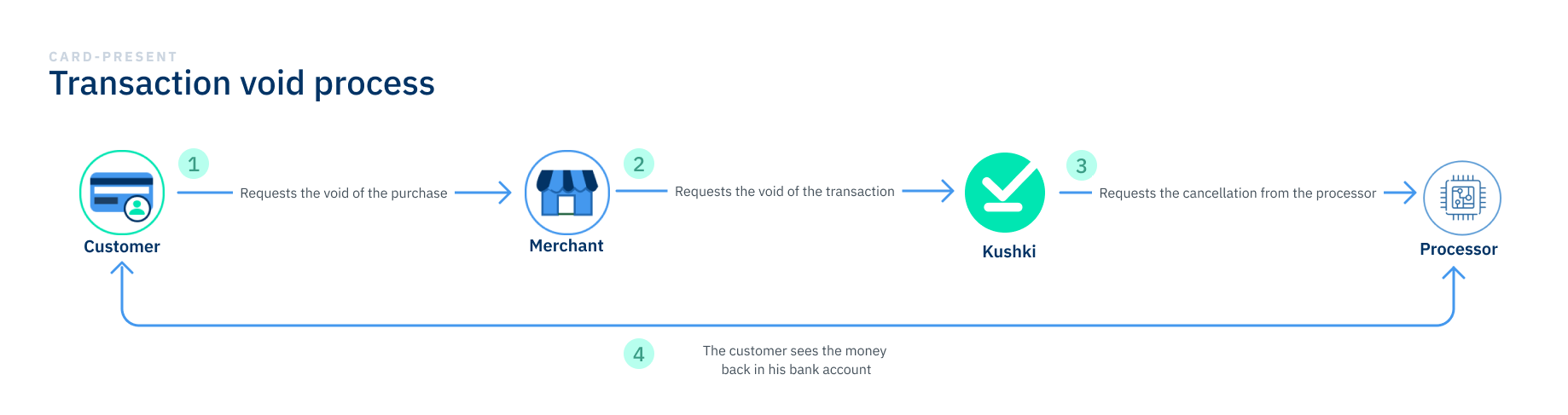
A void is generated when the return request is processed on the same day as the original transaction, before 23:59 (approximate time). When performing the void, Kushki makes three attempts to return with the processor; if the request is successful, the purchase will disappear from your client's statement of movements and they will receive their funds once the request is approved.
Anulaciones tarjeta presente en
You can void the authorization or an order identified by its transaction reference number transaction_reference. This field is provided when a charge or a deferred payment is successfully completed.
If you need to perform partial voids, you must send the amount in the amount object.
To make cancellations, you need to consume the endpoint https://api-uat.kushkipagos.com/pos/v1/transaction and send charge in the transaction_type field, Void in the transaction_mode field, and the transaction_reference of the transaction you are going to cancel as part of the request body. Please follow the steps in the guide available in the Kushki API.
The request you must send depends on the reading channel of your merchant's POS terminal (chip, magnetic stripe, or contactless [NFC] payments). Review the examples below:
Chip (ICC)
Magnetic stripe (MCR)
Contactless (NFC)
{
  "card": {
    "card_holder_name": "CUST IMP MC 103"
  },
  "amount": {
    "iva": 0,
    "tip": 0,
    "currency": "COP",
    "extra_taxes": {
      "iac": 0,
      "ice": 0,
      "airport_tax": 0,
      "travel_agency": 0
    },
    "subtotal_iva": 0,
    "subtotal_iva0": 60000
  },
  "country": "COL",
  "cvm_type": "none",
  "is_cashback": false,
  "is_deferred": false,
  "merchant_id": "0987654321",
  "pos_details": {
    "brand": "SUNMI",
    "model": "P2-EU",
    "version": "Kushki SunmiV1.1.26",
    "location": {
      "latitude": -0.22480833333333333,
      "longitude": -78.487955
    },
    "has_print": true,
    "terminal_id": "PB04216R20537"
  },
  "card_details": {
    "tracks": {
      "track_ksn": "FFFF4357486333600002",
      "enc_track2": "283587285CE10278E7FA50AD5C97CFFE87F472C9FE6406F8"
    },
    "enc_tlv": "CE447A062C49774934E42A7F826668C0C478E38402C158062EE794C0E471B43EA8CE49C256C2C8B157526B0B2BE74FC23F65E18D4F52B99A1A0910E6CCD9B11A32D6D537E2B6E2B011C89569DE6A3D53318080BC77E0E70B398ED3083FD7366CCF8FB4DBF34A116E6D52CFBEF26371878D842034E5029EF62DF235D2C427F04102E451773D9E8975978917E3BC531327702967052E239F8C592734AE14688E603C52B858FC1D97B763AE623603F1475FFFB065EC07AF7A29",
    "pin_ksn": "FFFF4357486333600002",
    "reading_type": "ICC"
  },
  "contact_details": {
    "email": "",
    "last_name": "",
    "first_name": "",
    "phone_number": "",
    "document_type": "-1",
    "document_number": "",
    "second_last_name": ""
  },
  "transaction_mode": "Void",
  "transaction_type": "charge",
  "transaction_reference": "f2f29080-0214-42c0-95a5-77ecf3434cd7",
  "is_smart_void": false,
  "client_transaction_id": "6680eadc-6c8d-44aa-8ca0-18e061c1472a"
}
Operation available without card a ⛔️ 💳
It is possible to perform (voids) by omitting the card details. To do this, you must send the omit_card field with a value of true. See the cardless transaction frame details.

Refund a transaction#

If the void is not possible:
Within the original day the transaction was generated,
After 23:59 (approximate time) on the transaction approval day, or
The three void attempts result in an error
A refund will be generated; which can take up to 7 business days to process and up to 20 business days to be reflected in your client's statement, according to the times and policies of the card issuing bank.
Through the Kushki API you can request a refund for a transaction that was previously authorized.
This transaction can be identified by its transaction reference number transaction_reference, which is an identifier that is generated once the charge is successfully completed.
For partial refunds, you must send the amount object in the endpoint.
To request the refund of the transaction, you need to consume the endpoint https://api-uat.kushkipagos.com/pos/v1/refund, following the steps in the guide available on the API.
The request you must send depends on the reading channel of your merchant's POS terminal (chip, magnetic stripe, or contactless [NFC] payments). Review the examples below:
JSON
JSON
JSON
{
  "card": {
    "card_holder_name": "CUST IMP MC 103"
  },
  "amount": {
    "iva": 0,
    "tip": 0,
    "currency": "COP",
    "extra_taxes": {
      "iac": 0,
      "ice": 0,
      "airport_tax": 0,
      "travel_agency": 0
    },
    "subtotal_iva": 0,
    "subtotal_iva0": 60000
  },
  "country": "COL",
  "cvm_type": "none",
  "is_cashback": false,
  "is_deferred": false,
  "pos_details": {
    "brand": "SUNMI",
    "model": "P2-EU",
    "version": "Kushki SunmiV1.1.26",
    "location": {
      "latitude": -0.22480833333333333,
      "longitude": -78.487955
    },
    "has_print": true,
    "terminal_id": "PB04216R20537"
  },
  "card_details": {
    "tracks": {
      "track_ksn": "FFFF4357486333600002",
      "enc_track2": "283587285CE10278E7FA50AD5C97CFFE87F472C9FE6406F8"
    },
    "enc_tlv": "CE447A062C49774934E42A7F826668C0C478E38402C158062EE794C0E471B43EA8CE49C256C2C8B157526B0B2BE74FC23F65E18D4F52B99A1A0910E6CCD9B11A32D6D537E2B6E2B011C89569DE6A3D53318080BC77E0E70B398ED3083FD7366CCF8FB4DBF34A116E6D52CFBEF26371878D842034E5029EF62DF235D2C427F04102E451773D9E8975978917E3BC531327702967052E239F8C592734AE14688E603C52B858FC1D97B763AE623603F1475FFFB065EC07AF7A29",
    "pin_ksn": "FFFF4357486333600002",
    "reading_type": "ICC"
  },
  "contact_details": {
    "email": "",
    "last_name": "",
    "first_name": "",
    "phone_number": "",
    "document_type": "-1",
    "document_number": "",
    "second_last_name": ""
  },
  "transaction_mode": "Authorization",
  "transaction_type": "refund",
   "transaction_reference": "f2f29080-0214-42c0-95a5-77ecf3434cd7",
  "client_transaction_id": "6680eadc-6c8d-44aa-8ca0-18e061c1472a"
}
Operation available without card ⛔️ 💳
It is possible to perform refunds by omitting the card details. To do this, you must send the omit_card field with a value of true. See the cardless transaction frame details. el detalle de la trama de la transacción cuando se quiere omitir esta información.
Modificado en 2026-10-21 20:52:40
Anterior
Transactions
Siguiente
Wire Transfers
Built with