Follow this step-by-step guide to learn how payments distribution by wire transfer works on the internet.Transfer payouts let you send funds directly to your users' accounts from a single Kushki disbursement account — without manual bank operations.We are working on our beta version of Bre-B Payouts. Stay tuned for the official launch! You can also contact your account manager for more information.
Supplier or vendor payments
Refunds and compensations
Due to our risk policies, available payment methods and integration types may vary at the time of onboarding. We will let you know how to proceed if this applies to your business.
Choose your payout method#
In Colombia you can disburse funds in two ways. Both use the same Kushki endpoints and can be configured independently based on your use case. | Bank account (ACH) | Bre-B key (Beta) |
|---|
| What do you need from the recipient? | Account number, bank, and account type | Only their key: ID, phone, email, alias, or merchant code |
| Settlement speed | Same business day or up to 72 business hours | Real-time (maximum 30 seconds) |
| Maximum amount | 13,900,000,000 COP | Equivalent to 1,000 UVB (updated annually by the Ministry of Finance and Public Credit) |
| Minimum amount | 1,000 COP | 1 COP |
| Requires bank list lookup? | Yes | No |
| Recipient confirmation | Not applicable | Yes — resolved name shown before initiating |
Use bank account (ACH) if you already have your users' bank details and need to send high amounts. Use Bre-B if you want real-time settlement and your users prefer to share only their phone number or email address. Note that Bre-B is currently in Beta — available for selected merchants in Colombia.
The Bre-B payout method is currently in Beta and available for selected merchants in Colombia. To request access, contact your account executive to evaluate activation on your MID.
The payment flow#
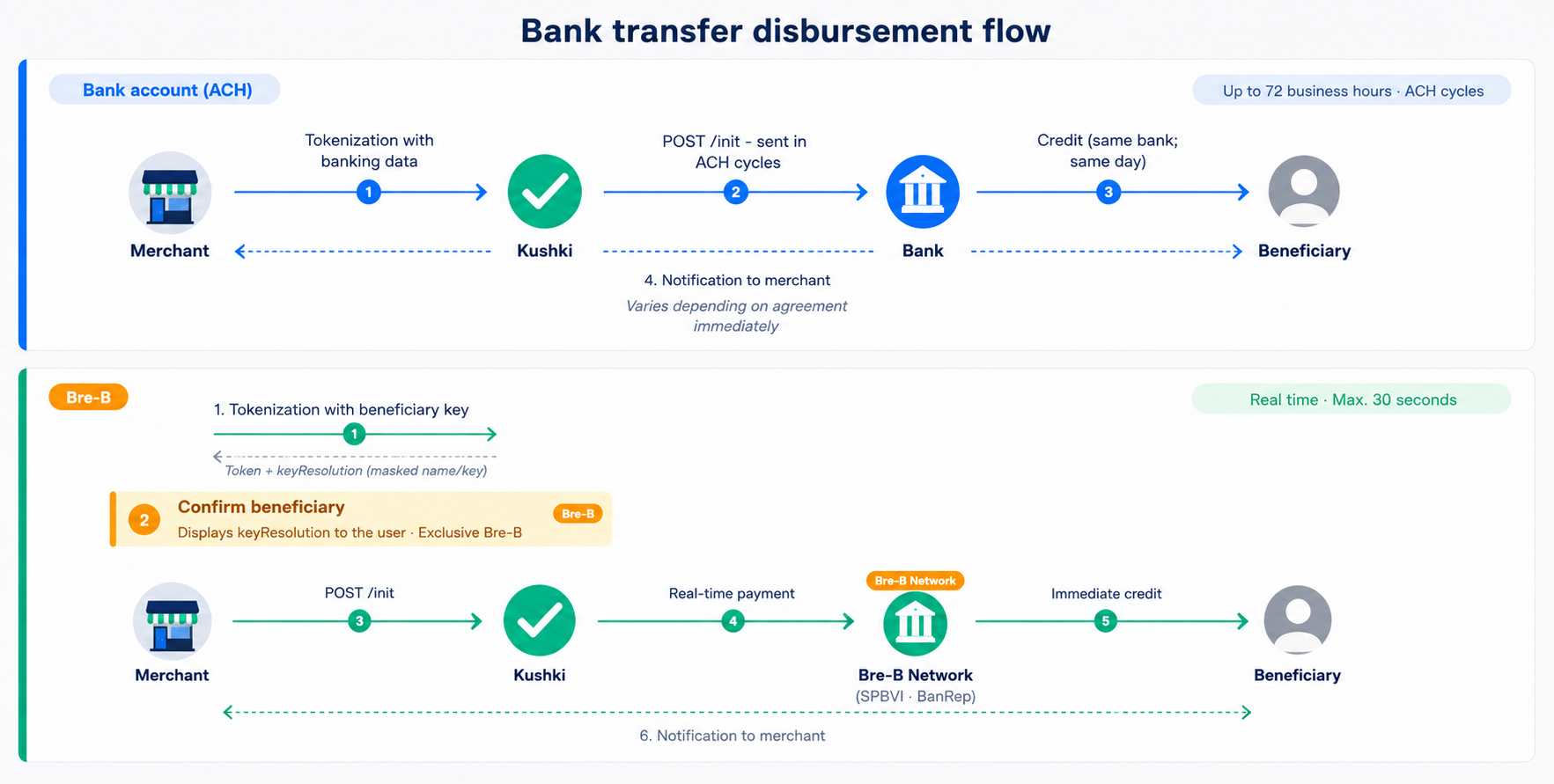
The diagram below shows both payout methods and their key differences:Payment process stages#
Reload funds into your Kushki disbursement account#
Before disbursing, make sure your Kushki merchant account has sufficient funds. If not, reload your disbursement account to avoid interruptions.You can check your available disbursement balance in your Console or via the API using the Balance for Payouts endpoint. 1. Data request#
In this stage, recipient data is collected and sent to Kushki for validation and processing.Bank account (ACH): account number, bank, and account type are collected.
Bre-B (Beta): only the recipient's payment key is sent. Kushki resolves the account holder's name in real time and returns it for you to confirm before proceeding.
2. Funds check#
Kushki receives the data you sent and validates that your merchant account has sufficient funds to process the payout. The balance is deducted immediately from your Kushki disbursement account.3. Authorization#
Once sufficient funds have been confirmed, we return a transaction reference (ticket number). At this point the payout has been initiated.3b. Recipient confirmation (Bre-B only)#
Before initializing, you must show the operator or end user the account holder's name (keyResolution.ownerName) to confirm the recipient's identity before executing the transfer. This step is required by the Banco de la República. (Bre-B Beta exclusive)4. Fund delivery#
Funds are sent to the bank or payment network:Bank account (ACH): all transactions initiated during the day are sent to the bank via ACH cycles. The bank distributes funds to users' accounts.
Bre-B (Beta): the transfer is settled in real time through the Low-Value Immediate Payment System (SPBVI) of the Banco de la República.
Merchant notification#
The bank or network will notify us of each transaction result and we will immediately notify you.5. User notification#
This step is optional but highly recommended. Once we have notified you of the transaction result, you can share it with your users.Note: The Kushki API accepts and processes payout requests 24/7. For ACH, the actual fund transfer is subject to Colombian banking cycles, which only operate during business days and hours. For Bre-B (Beta), processing is real-time.
Disburse to bank accounts
Integration guide for bank account payouts (ACH).Disburse with Bre-B (Beta)
Integration guide for real-time payouts using a payment key.