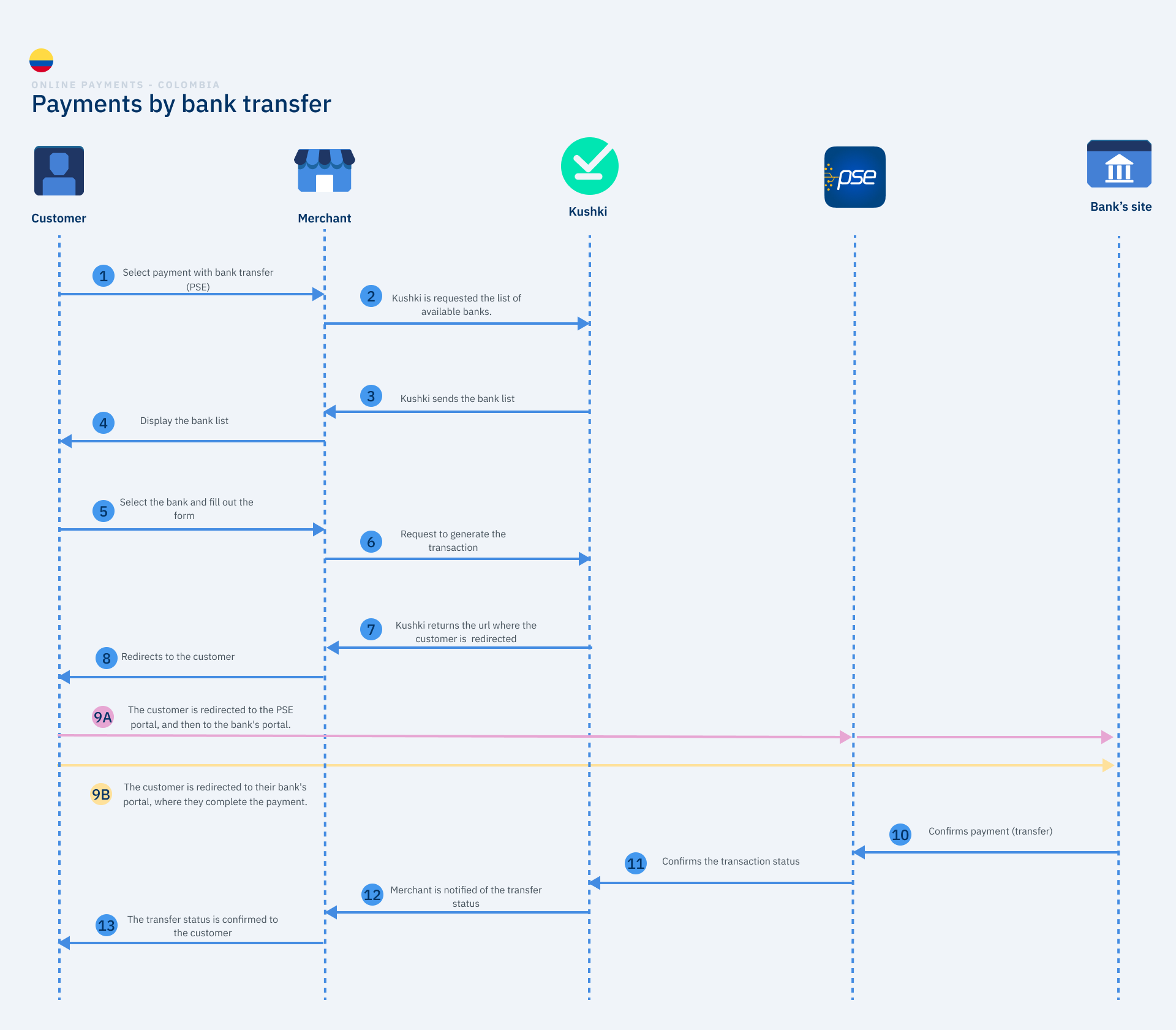
We explain how a payment by wire transfer works in KushkiIf your users do not have a credit card or wish to use the available balance in their bank accounts to make an online purchase, wire transfer is the ideal payment option. With Kushki your users can make payments with wire transfers through PSE, quickly and easily.
Want to accept Bre-B payments?
Bre-B payments are integrated from the Alternative payment methods (APM) section. See How do APM payments work?.
The payment process with wire transfers consists of allowing your customer to use the balance available in their bank account to pay for a purchase on your site or app. To do this, you must redirect your customer to the website of the bank selected in the payment form, in order to authorize the debit of the amount of the transaction from your account.
Step 9 has two options, depending on the version of PSE being used. Option 9A applies only to PSE (version 1.0), while option 9B applies only to PSE Avanza (version 2.0).
You must ask Kushki for the list of available banks so that your users can see them in the payment form.
Important
It is important that you request to Kushki the supported banks, so that your users can visualize through the form the list of available banks. The list will be sent to you automatically updated.
After showing your customers the list of available banks that Kushki returns to you, the payer must choose the bank, fill in the payment form data and select the option Pay.
Once all the customer data has been filled in and sent, you must generate a transaction initialization request to Kushki.
Only for PSE Avanza
In case Kushki has detected that not all the information required to generate the transaction is present, a form will be shown to the customer to fill in all the data only once, thus being registered in the databases. Once you have filled in the data, on the data processing authorization page, you must confirm if you want your data to be processed and this way you can send it to your banking portal to continue with the process.
The client will be redirected. The redirection URL will depend on the version of PSE being used.
9A. PSE (version 1.0). Redirect to PSE, then to the bank for authorization#
With the URL, you must redirect your user to the PSE portal. There, your user must fill in the indicated fields and click on the option Go to bank. When the user enters the site of their bank, authenticates, verifies the transaction data (description of the operation, amount and account to be debited), and accepts that the amount of the transaction will be debited from their bank account balance.
9B. PSE Avanza (version 2.0). Redirection to the bank for authorization#
With this transfer method you can improve the payment experience of your customers, since, once the bank is selected, they will be directed directly to their bank portal to complete the transaction, thus facilitating the payment process. When the user enters your bank's website, authenticates, verifies the transaction data (description of the transaction, amount and account to be debited) and accepts that the amount of the transaction will be debited from their bank account balance.
When the customer completes the transfer, the bank confirms the result of the transaction to PSE, which in turn notifies Kushki. In this way, we will confirm the final status of the transaction, so that you can notify your customers.