1. One-time card payments (Online)
Kushki Docs
English
  • Español
  • English
  • Home
  • Quick Start
    • Frequently Asked Questions
    • Moving to Production
    • Policy for Important API Changes
    • Test Data
    • Error Codes
    • Latest Features
  • Payment Glossary
    • Payments Glossary
  • One-time card payments (Online)
    • Supported card brands
    • Functionalities by business model
    • How do third party commissions work?
    • Integration guide Third Party Commissions
    • Network Tokens
    • One-step Payments
      • How do Card Payments Work?
      • Accept a Card Payment
      • Direct charge (without token)
      • Accept One-Time Payments with OTP
      • OTP Authentication Error Codes
      • Error codes for single card payments
    • Two-steps Payments
      • How do single payments with authorization and capture work?
      • Receive payments with authorization and capture
    • Refunds
      • Returns, cancellations, and refunds
    • 3DS Authentication
      • Introduction to 3DS
      • 3DS API integration
      • 3DS integration with kushki.js library
      • 3DS API integration plus kushki.js library
      • 3DS Error Codes
    • Apple Pay Payments
      • Apple Pay Configuration
      • Apple Pay Sandbox testing
  • Recurring Card Payments (Online)
    • Functionalities by business model
    • External subscriptions to Kushki
    • Authenticate your subscriptions with 3DS
    • Accept one-click payments with 3DS
    • Error codes in recurring charges
    • Apple Pay for Subscriptions
    • Scheduled payments
      • How do Credit or Debit Card Payment Recurring Charges Work?
      • Create a recurring charge
      • Manage your Scheduled Charges
    • OneClick Payments
      • Accepting One-Click Payments
      • How do OneClick payments with authorization and capture work?
      • Receive one-click payments with authorization and capture
  • Card-present payments
    • Card present payments
    • Accept card present payments
    • Test data
    • Webhooks for card present
    • Cloud Terminal API
      • Cloud terminal API overview
      • Take payments
      • Cancel a payment request
      • Check the status of a payment request
      • How to print a customized ticket?
    • App-to-app
      • App-to-app overview
      • Take payments
    • Terminal SDK
      • Terminal SDK Introduction
      • Take payments
    • Raw card-present API
      • Raw card-present API overview
      • Cryptographic key exchange
      • Sample script to encrypt information
      • Take Payments
      • Frequently Asked Questions
      • Error codes for card-present transactions
    • Transactions
      • Transactions
      • Cancel payments
    • Kushki One
      • First Steps
      • Autenticación y Cifrado de Requests
      • Accept payments with Kushki One
      • Amount Format
      • Async services and webhooks
      • Printing on SmartPOS terminal
      • Unified Error Catalog — Kushki ONE Connect
    • Kushki One Payment App
      • Overview
      • Process a payment
      • Split payment on the terminal
      • Refunds and PreAuth & Capture
      • Review Your Transactions
      • Terminal Setup
  • Wire Transfers
    • How do Payments by Wire Transfers Work?
    • Banks and transaction details for bank transfer payments
    • Receive Wire Transfers
    • Check the Status of a Transaction
  • Money Disbursement
    • Wire Transfer
      • How Does a Payment Distribution by Wire Transfer Work?
      • Payment Distribution to Bank Accounts
      • Error codes for transfer dispersions
  • Payment Links
    • Smartlinks
  • Plugins
    • Shopify
      • Shopify
      • Plugin Operation
    • VTEX
      • VTEX Integration Guide
  • Payment forms and buttons
    • Kajita
      • How Does it Work?
      • Payment Kajitas
    • Payment Button
      • Overview
      • Generate a payment button
  • Branch Offices Management
    • How to Onboard Submerchants via API
  • Notifications
    • Webhooks
    • Good Practices
    • Check your Webhooks
    • One-time Payments Webhooks
      • Webhook for One-Time Payments made with a card
      • Webhook for One-Time Payments by Wire Transfer
      • Webhook for One-Time Payments in Cash
    • Recurring Payments Webhooks
      • Webhook for Recurring Payments Made with Card
    • Payment Distribution Webhooks
      • Webhook for payment disbursement through wire transfer
    • Payment button Webhooks
      • Webhooks with Payment Button
    • Smartlinks Webhooks
      • Webhooks with Smartlinks
    • Refunds Webhooks
      • Webhook for Voids and Refunds
      • Chargeback Webhooks
HomeMexico 🇲🇽
Ecuador 🇪🇨Chile 🇨🇱Colombia 🇨🇴Peru 🇵🇪
HomeMexico 🇲🇽
Ecuador 🇪🇨Chile 🇨🇱Colombia 🇨🇴Peru 🇵🇪
Status
Soporte / Support
English
  • Español
  • English
  1. One-time card payments (Online)

Two-steps Payments

This functionality is available for the following models:
☑ Acquirer

☐ Aggregator
Receiving one-time card payments under the authorization and capture scheme consists of reserving the funds on your client's card, having the opportunity to execute the capture of funds until the service is completed. It also allows you to capture a different amount than the original authorization.

Operation Details#

Important
Keep in mind that the validity of the authorization may vary depending on the commercial negotiation.
ParticularityDetails
Supported card typesVisa and Mastercard debit and credit cards
Authorization duration7 days for debit cards and 28 days for credit cards.
Authorization end time7 days or 28 days from the time the authorization is generated
Reauthorization amountCan be higher or lower than the authorization amount. There is not maximum limit
Capture amountThe maximum amount to be captured may be 10% higher than the total amount of the initial authorization plus the n reauthorizations that may be executed
Number of capturesOnly 1 capture per authorization is allowed
Cancellation of authorization before the expiration dateRecommended, using the void endpoint
Cardholder limit restoration upon cancellationThe limit depends on the issuer to be restored
Cardholder limit restoration upon authorization validity expirationThe limit is immediately restored

Stages of the process#

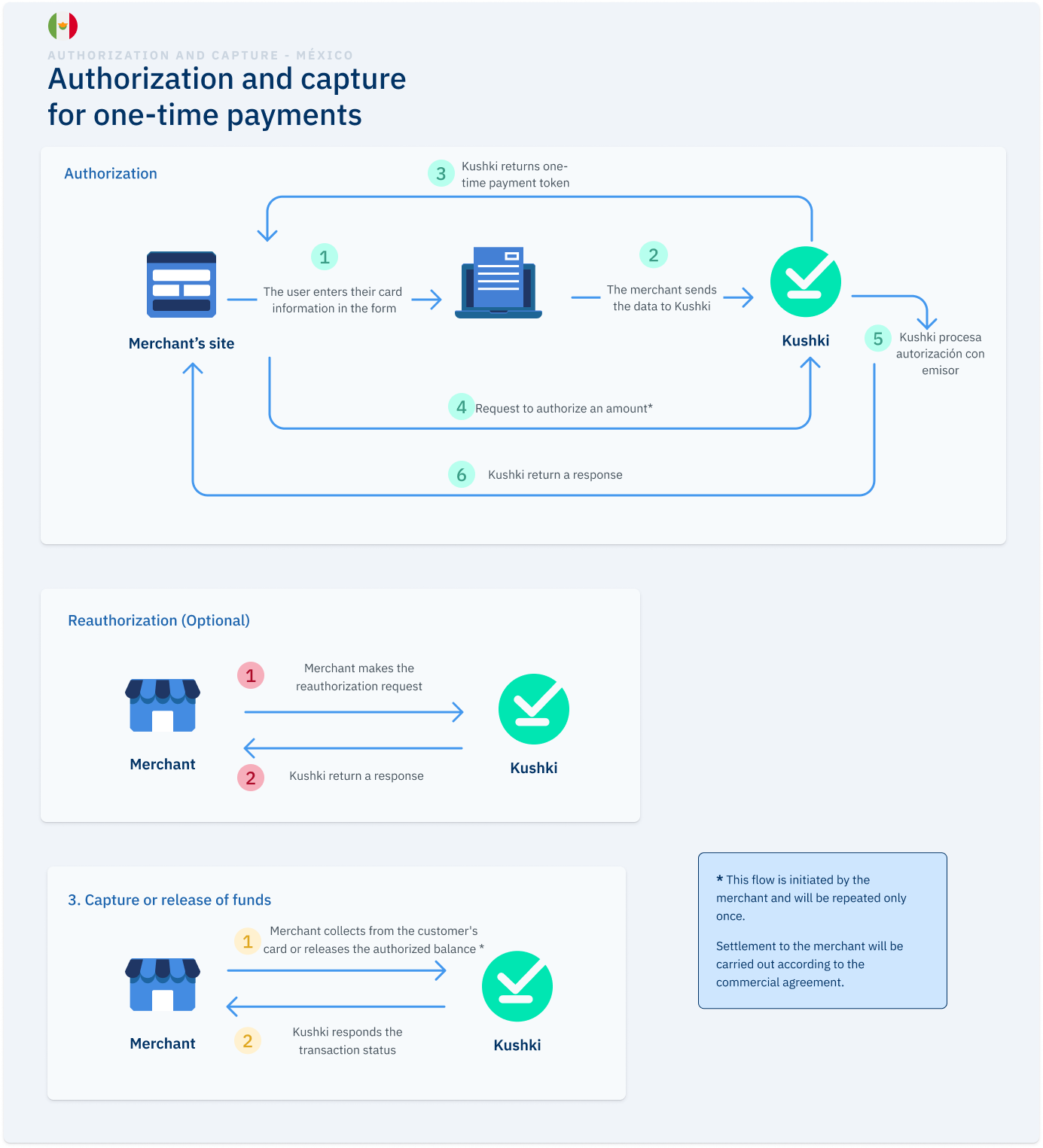
Authorization and capture (also called two-step payment), consists of two stages: Authorization of the amount and capture or release of funds.
Autorización y captura para pagos únicos en México

Authorization#

1. Payment method selection#

On your website or app, the user selects card as payment method and provides the card details they will use to pay.

2. Sending data to Kushki#

The merchant collects the data, sends it to Kushki and requests a unique authorization payment token.

3. Sending the token#

Kushki will receive the data and will send you the one-time authorization payment token.

4. Authorization amount#

Merchant requests Kushki to authorize the amount on the customer's card.

5. Funds Verification#

Kushki processes authorization with the issuer, verifying funds availability. If this process is successful, holds that amount on the customer's card to guarantee it to the merchant.

6. Notification#

Kushki returns a response from the authorization process.

Capture or release of funds#

1. Execution of the charge#

Once you have authorized the amount of your customer's card, you can request the collection or release of the authorized balance.

2. Notification of transaction status#

At this stage you will be notified of the status of the transaction. You can receive these notifications to a webhook that you expose for Kushki to consume. You also have the Kushki console to check the transactions along with the detail of each transaction and the status.

Receive payments with authorization and capture
Learn how to integrate the receipt of one-time card payments using the authorization and capture scheme.

Explore this section#

Receive payments with authorization and captureAuthorize now and capture laterRead article →
Modificado en 2026-10-21 22:31:41
Anterior
Error codes for single card payments
Siguiente
How do single payments with authorization and capture work?
Built with