Product in beta version 🔐👨We are working on our beta version. Stay tuned for its official release! You can also contact your account manager for more information.
Features#
Terminals#
Below is the list of readers supported by Cloud Terminal API integrations:Operations#
These are the operations available for integrations through Cloud Terminal API:Supported card brands#
The following card networks and brands are accepted through Cloud Terminal API integrations:Requirements#
Before you can perform an integration, you must meet the following requirements:Have the payment application installed and updated on the terminal. Minimum application version: 4.3.26.
Stable internet connection.
Allow communication with our external services through firewalls and similar services.
Environments#
Test any adjustments to your system in a dev development environment. environment. Remember that no real transactions will be processed in this environment.You can switch to the live environment to process real transactions when ready.Flow#
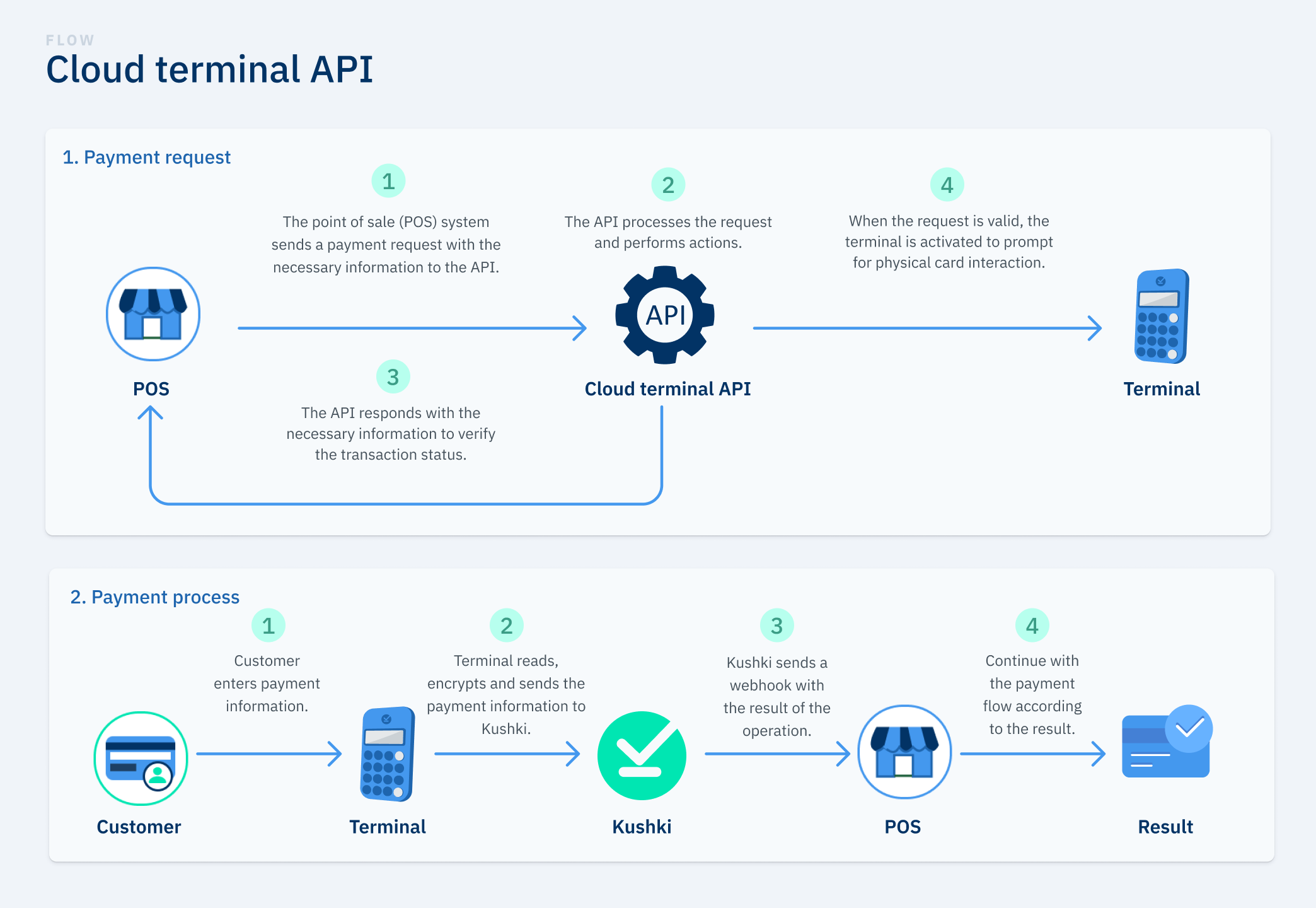
Learn more about the step-by-step payment process through Cloud Terminal API.Payment Request#
During this stage of the flow:1.
Your point of sale system is responsible for making a request to the Kushki API. You must send the request with the payment configuration that will appear in the payment application on the terminal.
2.
The Kushki API receives the request with the payment information for processing.
3.
The API returns a response to the request indicating the status.
4.
If the request is correct, the payment application is displayed with the configuration sent to the terminal.
Remember that for a terminal to be able to receive requests it must be in Integration Mode, be turned on and have a stable internet connection.
Payment process#
During this stage of the flow:1.
The customer enters the payment information in the terminal.
2.
The terminal is responsible for reading, encrypting and sending the payment information to Kushki to be processed.
3.
Kushki sends a webhook with the result of the operation.
4.
The flow continues according to the result of the operation.
Accept payments
Accept payments with a POS terminal from your point of sale through Cloud terminal API.Transactions
Get the list of transactions with information relevant to your operations.