
Create a recurring charge
Web
iOS
Android
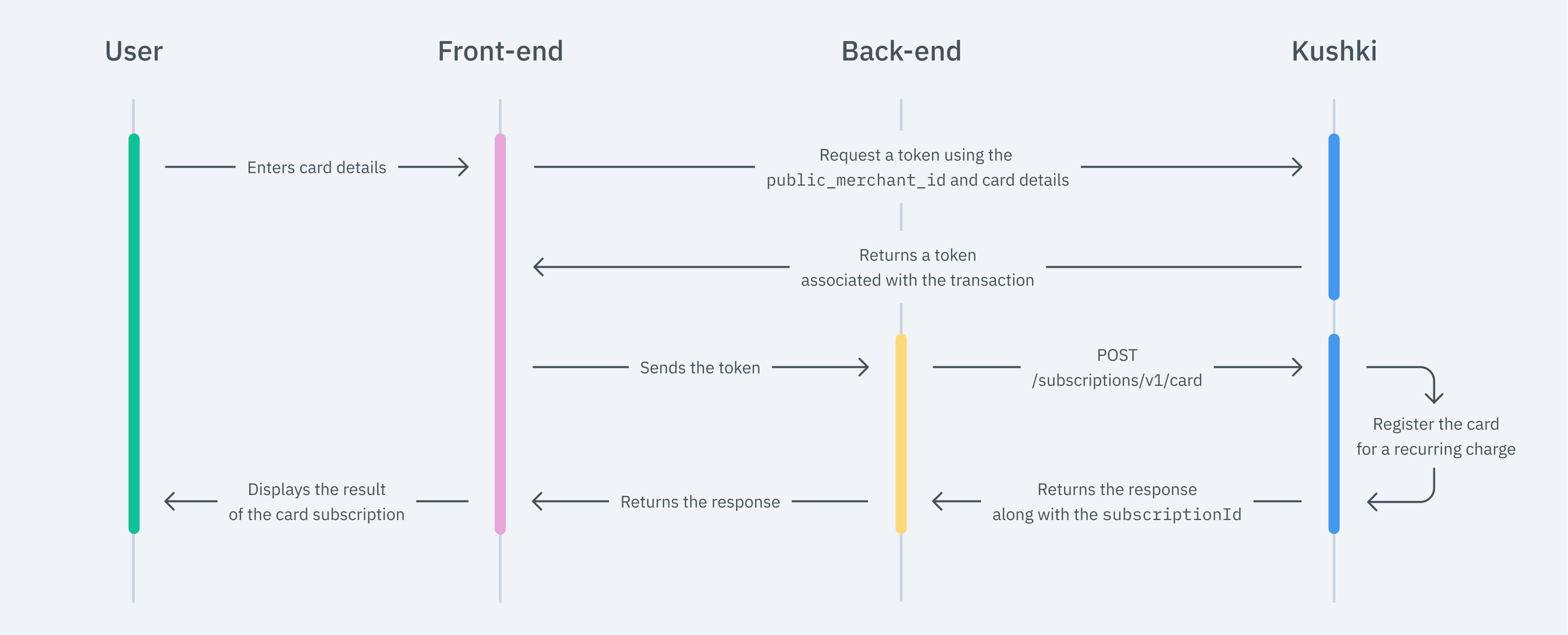
1. Set up your Front-end
Kajita
Create and customize your Kajita
Set up Kajita
kushki-checkout.js script in your payment page by adding it to the <head> of your HTML file. Always load kushki-checkout directly from cdn.kushkipagos.com. Do not include the script in a bundle or package or host a copy of it.Add Kajita to your Website
<body>, where you want the payment form to be displayed.action form according to the corresponding endpoint in your back-end. This will allow you to obtain the token.script tag.Kushki.js
Set up Kushki.js
Option 1 - CDN
script tag at the end of the <body> of your payment page.Option 2 - npm
Set up Kushki Object.
Collect User Information and Send it to your Back End
Kushki.js Hosted Fields
Import Kushki.js Hosted Fields into your app
Option 1 - CDN
<script> tag inside the <body> tag. Once imported, you will be able to access the resources described below to create a payment flow with Kushki.kushki.min.js (which brings the necessary code to store your merchant's credentials) and card.min.js (the module that brings the necessary functionalities for the flow with card payments).Option 2 - NPM
Option 3 - YARN
Create an instance of KushkiOptions
KushkiOptions which allows you to set the public key of the work environment (test or production) through the init() method.Initialize the form on the front-end
Step 1. Define containers for hosted fields.
initCardToken() method, it is required to place the necessary elements to be able to render each hosted field.Step 2. Create an instance of CardOptions
CardOptions with the transaction information, such as the amount, currency, among other parameters.isSubscription property with a value of true.Step 3. Render hosted fields with the initCardToken() method
CardOptions, you need to call the initCardToken() function to initialize an instance of ICard.Request a token to continue the payment flow
requestToken() method on the previously initialized card instance. This method performs 3DS and Sift Science validations automatically. Also, validate that all the fields are correct; otherwise it will throw an exception.2. Set up your Back End
JavaScript
Python
PHP
3. Test your Integration
54519515749254804574441215190335.4. Prepare your Certification
Modificado en 2026-10-14 19:43:38