1. Mexico 🇲🇽
Kushki Docs
English
  • Español
  • English
  • Home
  • Quick Start
    • Frequently Asked Questions
    • Moving to Production
    • Policy for Important API Changes
    • Test Data
    • Error Codes
    • Latest Features
  • Payment Glossary
    • Payments Glossary
  • One-time card payments (Online)
    • Supported card brands
    • Functionalities by business model
    • How do third party commissions work?
    • Integration guide Third Party Commissions
    • Network Tokens
    • One-step Payments
      • How do Card Payments Work?
      • Accept a Card Payment
      • Direct charge (without token)
      • Accept One-Time Payments with OTP
      • OTP Authentication Error Codes
      • Error codes for single card payments
    • Two-steps Payments
      • How do single payments with authorization and capture work?
      • Receive payments with authorization and capture
    • Refunds
      • Returns, cancellations, and refunds
    • 3DS Authentication
      • Introduction to 3DS
      • 3DS API integration
      • 3DS integration with kushki.js library
      • 3DS API integration plus kushki.js library
      • 3DS Error Codes
    • Apple Pay Payments
      • Apple Pay Configuration
      • Apple Pay Sandbox testing
  • Recurring Card Payments (Online)
    • Functionalities by business model
    • External subscriptions to Kushki
    • Authenticate your subscriptions with 3DS
    • Accept one-click payments with 3DS
    • Error codes in recurring charges
    • Apple Pay for Subscriptions
    • Scheduled payments
      • How do Credit or Debit Card Payment Recurring Charges Work?
      • Create a recurring charge
      • Manage your Scheduled Charges
    • OneClick Payments
      • Accepting One-Click Payments
      • How do OneClick payments with authorization and capture work?
      • Receive one-click payments with authorization and capture
  • Card-present payments
    • Card present payments
    • Accept card present payments
    • Test data
    • Webhooks for card present
    • Cloud Terminal API
      • Cloud terminal API overview
      • Take payments
      • Cancel a payment request
      • Check the status of a payment request
      • How to print a customized ticket?
    • App-to-app
      • App-to-app overview
      • Take payments
    • Terminal SDK
      • Terminal SDK Introduction
      • Take payments
    • Raw card-present API
      • Raw card-present API overview
      • Cryptographic key exchange
      • Sample script to encrypt information
      • Take Payments
      • Frequently Asked Questions
      • Error codes for card-present transactions
    • Transactions
      • Transactions
      • Cancel payments
    • Kushki One
      • First Steps
      • Autenticación y Cifrado de Requests
      • Accept payments with Kushki One
      • Amount Format
      • Async services and webhooks
      • Printing on SmartPOS terminal
      • Unified Error Catalog — Kushki ONE Connect
    • Kushki One Payment App
      • Overview
      • Process a payment
      • Split payment on the terminal
      • Refunds and PreAuth & Capture
      • Review Your Transactions
      • Terminal Setup
  • Wire Transfers
    • How do Payments by Wire Transfers Work?
    • Banks and transaction details for bank transfer payments
    • Receive Wire Transfers
    • Check the Status of a Transaction
  • Money Disbursement
    • Wire Transfer
      • How Does a Payment Distribution by Wire Transfer Work?
      • Payment Distribution to Bank Accounts
      • Error codes for transfer dispersions
  • Payment Links
    • Smartlinks
  • Plugins
    • Shopify
      • Shopify
      • Plugin Operation
    • VTEX
      • VTEX Integration Guide
  • Payment forms and buttons
    • Kajita
      • How Does it Work?
      • Payment Kajitas
    • Payment Button
      • Overview
      • Generate a payment button
  • Branch Offices Management
    • How to Onboard Submerchants via API
  • Notifications
    • Webhooks
    • Good Practices
    • Check your Webhooks
    • One-time Payments Webhooks
      • Webhook for One-Time Payments made with a card
      • Webhook for One-Time Payments by Wire Transfer
      • Webhook for One-Time Payments in Cash
    • Recurring Payments Webhooks
      • Webhook for Recurring Payments Made with Card
    • Payment Distribution Webhooks
      • Webhook for payment disbursement through wire transfer
    • Payment button Webhooks
      • Webhooks with Payment Button
    • Smartlinks Webhooks
      • Webhooks with Smartlinks
    • Refunds Webhooks
      • Webhook for Voids and Refunds
      • Chargeback Webhooks
HomeMexico 🇲🇽
Ecuador 🇪🇨Chile 🇨🇱Colombia 🇨🇴Peru 🇵🇪
HomeMexico 🇲🇽
Ecuador 🇪🇨Chile 🇨🇱Colombia 🇨🇴Peru 🇵🇪
Status
Soporte / Support
English
  • Español
  • English
  1. Mexico 🇲🇽

Card-present payments

Accept card present payments in your merchant by integrating Kushki's services
The easiest way to start accepting card-present payments at your local merchant is through one of our certified, ready-to-use terminals. Create and activate your account to start collecting payments with a terminal.
You can also choose one of the following integration types to perform terminal operations directly from your mobile, web, or desktop POS system.

Integrations#

To integrate card payments into your point-of-sale system, choose the terminal and integration type according to your business needs. You can choose one or more integration types and synchronize your sales on the same platform.
You must have a compatible terminal to perform an integration. If you do not have a terminal yet, find out how to acquire one.

Supported card brands#

Discover the card networks and brands available by integration type.
BrandCloud terminal APIApp to appTerminal SDKRaw card-present API
VisaSíSíSíSí
MastercardSíSíSíSí
CarnetSíSíSí-
American ExpressSíSíSí-
SodexoSíSíSí-
Sí ValeSíSíSí-
EdenredSíSíSí-

Terminals#

Learn about our available terminals.
Features per terminal:
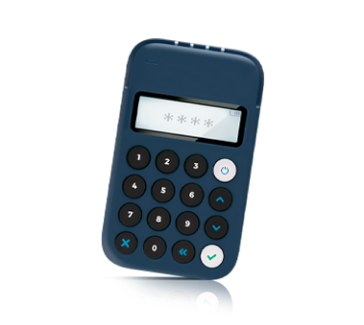
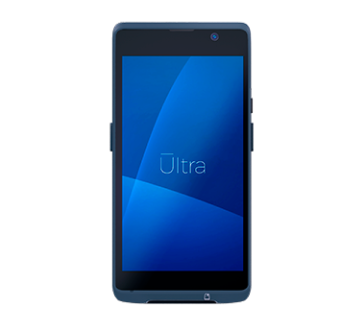
FeatureNanoUltraUltra P
Magstripe cardsSíSíSí
Chip cardsSíSíSí
Contactless cards / NFCSíSíSí
GPS-SíSí
ConnectivityBluetoothBluetooth, Wifi, 2G, 3G, 4GBluetooth, Wifi, 2G, 3G, 4G
Display-5" FW+ capacitive touch screen5.5" HD+,1440 x 720, Capacitive multi-touch
Camera-Rear (5 MP with flash) and front (0.3 MP)Rear (5 MP with flash) and front (0.3 MP)
Operating System-OS based on Android 11 (Go)OS based on Android 11 (Go)
Approximate dimensions (L x W x H)-148.5 x 72.5 x 15.6mm222 x 81.6 x 18.6mm
Approximate weight-225g400g
Printer--Built-in 58mm thermal printer. Print speed: 70mm/s
Processor-Cortex-A53, quad-core 2.0GHzCortex-A53, quad-core 1.5GHz
Memory-2GB RAM + 32GB ROM1GB RAM + 8GB ROM
Battery-3000mAh2540mAh
Power Adapter-Input: AC 100~240V. Output: DC 5V/1AInput: AC 100~240V. Output: DC 5V/2A
PortUSB type micro BType-C USBType-C USB
PIN entry modePin on TerminalPin on GlassPin on Glass

Operations#

Discover the operations you can perform by type of integration.
OperationCloud terminal APIApp to appTerminal SDKRaw card-present API
CompatibilityUltra, Ultra PNano, Ultra, Ultra PNano, Ultra, Ultra POthers
SaleSíSíSíSí
Cashback---Sí
TippingSíSíSíSí
Deferred paymentsSíSíSíSí
Pre-authorization and Capture---Sí
Reauthorization---Sí
Transaction searchSíSíSíSí
Void (same day)SíSíSíSí
Refund****
* Subject to commercial approval.

Test your integration#

Cloud Terminal APICharge from your POS with our terminalsRead article →
App to appCharge from your mobile POS with our appRead article →
Terminal SDKConnect your mobile POS to a terminalRead article →
Raw card-present APIUse your own terminals on our networkRead article →
Kushki OneOur omnichannel card-present solutionRead article →
Nano TerminalMeet the Nano terminalRead article →
Ultra TerminalMeet the Ultra terminalRead article →
WebhooksNotifications for card-present paymentsRead article →
Test dataTest with the available test dataRead article →
Accept card present paymentsStart accepting card-present paymentsRead article →
Card present paymentsAccept card-present payments with KushkiRead article →
Cloud Terminal APIConnect Ultra terminals to your POS via APIRead article →
App-to-appConnect terminals to your mobile POSRead article →
Terminal SDKConnect terminals via our Android SDKRead article →
Raw card-present APIConnect certified POS terminals to our networkRead article →
TransactionsList your transactionsRead article →
Kushki OneOur regional card-present solutionRead article →
Kushki One Payment AppModules, roles and flows of the SmartPOS appRead article →

Modificado en 2026-10-15 15:30:09
Anterior
Receive one-click payments with authorization and capture
Siguiente
Card present payments
Built with