1. Cloud Terminal API
Kushki Docs
English
  • Español
  • English
  • Home
  • Quick Start
    • Frequently Asked Questions
    • Moving to Production
    • Policy for Important API Changes
    • Test Data
    • Error Codes
    • Latest Features
  • Payment Glossary
    • Payments Glossary
  • One-time card payments (Online)
    • Supported card brands
    • Functionalities by business model
    • How do third party commissions work?
    • Integration guide Third Party Commissions
    • Network Tokens
    • One-step Payments
      • How do Card Payments Work?
      • Accept a Card Payment
      • Direct charge (without token)
      • Accept One-Time Payments with OTP
      • OTP Authentication Error Codes
      • Error codes for single card payments
    • Two-steps Payments
      • How do single payments with authorization and capture work?
      • Receive payments with authorization and capture
    • Refunds
      • Returns, cancellations, and refunds
    • 3DS Authentication
      • Introduction to 3DS
      • 3DS API integration
      • 3DS integration with kushki.js library
      • 3DS API integration plus kushki.js library
      • 3DS Error Codes
    • Apple Pay Payments
      • Apple Pay Configuration
      • Apple Pay Sandbox testing
  • Recurring Card Payments (Online)
    • Functionalities by business model
    • External subscriptions to Kushki
    • Authenticate your subscriptions with 3DS
    • Accept one-click payments with 3DS
    • Error codes in recurring charges
    • Apple Pay for Subscriptions
    • Scheduled payments
      • How do Credit or Debit Card Payment Recurring Charges Work?
      • Create a recurring charge
      • Manage your Scheduled Charges
    • OneClick Payments
      • Accepting One-Click Payments
      • How do OneClick payments with authorization and capture work?
      • Receive one-click payments with authorization and capture
  • Card-present payments
    • Card present payments
    • Accept card present payments
    • Test data
    • Webhooks for card present
    • Cloud Terminal API
      • Cloud terminal API overview
      • Take payments
      • Cancel a payment request
      • Check the status of a payment request
      • How to print a customized ticket?
    • App-to-app
      • App-to-app overview
      • Take payments
    • Terminal SDK
      • Terminal SDK Introduction
      • Take payments
    • Raw card-present API
      • Raw card-present API overview
      • Cryptographic key exchange
      • Sample script to encrypt information
      • Take Payments
      • Frequently Asked Questions
      • Error codes for card-present transactions
    • Transactions
      • Transactions
      • Cancel payments
    • Kushki One
      • First Steps
      • Autenticación y Cifrado de Requests
      • Accept payments with Kushki One
      • Amount Format
      • Async services and webhooks
      • Printing on SmartPOS terminal
      • Unified Error Catalog — Kushki ONE Connect
    • Kushki One Payment App
      • Overview
      • Process a payment
      • Split payment on the terminal
      • Refunds and PreAuth & Capture
      • Review Your Transactions
      • Terminal Setup
  • Wire Transfers
    • How do Payments by Wire Transfers Work?
    • Banks and transaction details for bank transfer payments
    • Receive Wire Transfers
    • Check the Status of a Transaction
  • Money Disbursement
    • Wire Transfer
      • How Does a Payment Distribution by Wire Transfer Work?
      • Payment Distribution to Bank Accounts
      • Error codes for transfer dispersions
  • Payment Links
    • Smartlinks
  • Plugins
    • Shopify
      • Shopify
      • Plugin Operation
    • VTEX
      • VTEX Integration Guide
  • Payment forms and buttons
    • Kajita
      • How Does it Work?
      • Payment Kajitas
    • Payment Button
      • Overview
      • Generate a payment button
  • Branch Offices Management
    • How to Onboard Submerchants via API
  • Notifications
    • Webhooks
    • Good Practices
    • Check your Webhooks
    • One-time Payments Webhooks
      • Webhook for One-Time Payments made with a card
      • Webhook for One-Time Payments by Wire Transfer
      • Webhook for One-Time Payments in Cash
    • Recurring Payments Webhooks
      • Webhook for Recurring Payments Made with Card
    • Payment Distribution Webhooks
      • Webhook for payment disbursement through wire transfer
    • Payment button Webhooks
      • Webhooks with Payment Button
    • Smartlinks Webhooks
      • Webhooks with Smartlinks
    • Refunds Webhooks
      • Webhook for Voids and Refunds
      • Chargeback Webhooks
HomeMexico 🇲🇽
Ecuador 🇪🇨Chile 🇨🇱Colombia 🇨🇴Peru 🇵🇪
HomeMexico 🇲🇽
Ecuador 🇪🇨Chile 🇨🇱Colombia 🇨🇴Peru 🇵🇪
Status
Soporte / Support
English
  • Español
  • English
  1. Cloud Terminal API

Take payments

Accept payments with a POS terminal from your point of sale through Cloud Terminal API. Cloud Terminal API allows you to send requests to an Ultra or Ultra P terminal from any compatible application to process a payment.
With Cloud Terminal API you can control your operation from your system and use a terminal as a peripheral (pinpad) to read the card information to process a payment.
All requests must be made from your back end.

Request data model#

These are all the parameters you can configure when making a request.
V1:
PropertyTypeRequiredDescription
serial_numberStringYesTerminal serial number.
amountNumberYesTransaction amount.
identifierStringYesUnique identifier per transaction generated on your side.
tipNumber-Tip amount.
descriptionString-Send a text that will appear in the terminal notification.
V2:
PropertyTypeRequiredDescription
serialNumberStringYesTerminal serial number.
amountNumberYesTransaction amount.
identifierStringYesUnique identifier per transaction generated on your side.
tipNumber-Tip amount.
descriptionString-Send a text that will appear in the terminal notification.
uniqueReferenceString-Unique identifier per transaction generated on your side to avoid duplicates. Application version 5.0.3 or higher is required to use this property.
showNotificationString-If set to true, a push notification will be received on the terminal for each request, otherwise the payment app will be automatically opened to process the payment.
ttlNumber-Number of seconds for the payment request to expire.
msiNumberNoOnly valid for transactions over 300 MXN. The Months Without Interest option must be enabled from the Billpocket app.
deviceTokenNumber-Device ID. It can be viewed from the Billpocket dashboard, section My devices. .
extrasObjectNoAdditional configurations in the payment request
extras.autoPaymentEnabledBooleanNoWhen this parameter is sent as true, the payment process will be triggered automatically without waiting for confirmation via the Pay button.
extras.timerFinishTRXNumeric (integer)NoNumber of seconds before the checkout summary screen closes after the purchase is completed.
extras.enableDialogTipBooleanNoIf sent as true, a dialog will appear to enter the tip amount during the payment process.

Operations#

Discover all the operations available through Cloud Terminal API integrations.

Sale#

The sales process begins when a customer wants to purchase a product or service at your establishment through a physical or digital payment method. During the process, your point of sale system sends a payment request with the necessary configuration to the payment application, which communicates with the terminal in a secure way to read, encrypt and send your customer's credit or debit card information to Kushki to be processed. You will receive the response to the request in the payment application. If the transaction has been successfully authorized, the authorized amount will be deducted from your customer's account immediately and will subsequently be settled to your bank account according to the settlement process. In case of an error, you will get more information in the payment app and the request can be retried again with a valid payment method
Send a request with the payment configuration from your point of sale system to the endpoint Collect card payments to perform a sales operation.
curl --request POST \
  --url https://kushkicollect.billpocket.dev/push-notifications \
  --header 'Accept: application/json' \
  --header 'Content-Type: application/json' \
  --header 'X-BP-AUTH: bpAuth' \
  --data '{
  "amount": 37,
  "identifier": "c68522bd-bfc1-4b08-bf99-30300806c25a",
  "serial_number": "TERM123"
}'

Tipping#

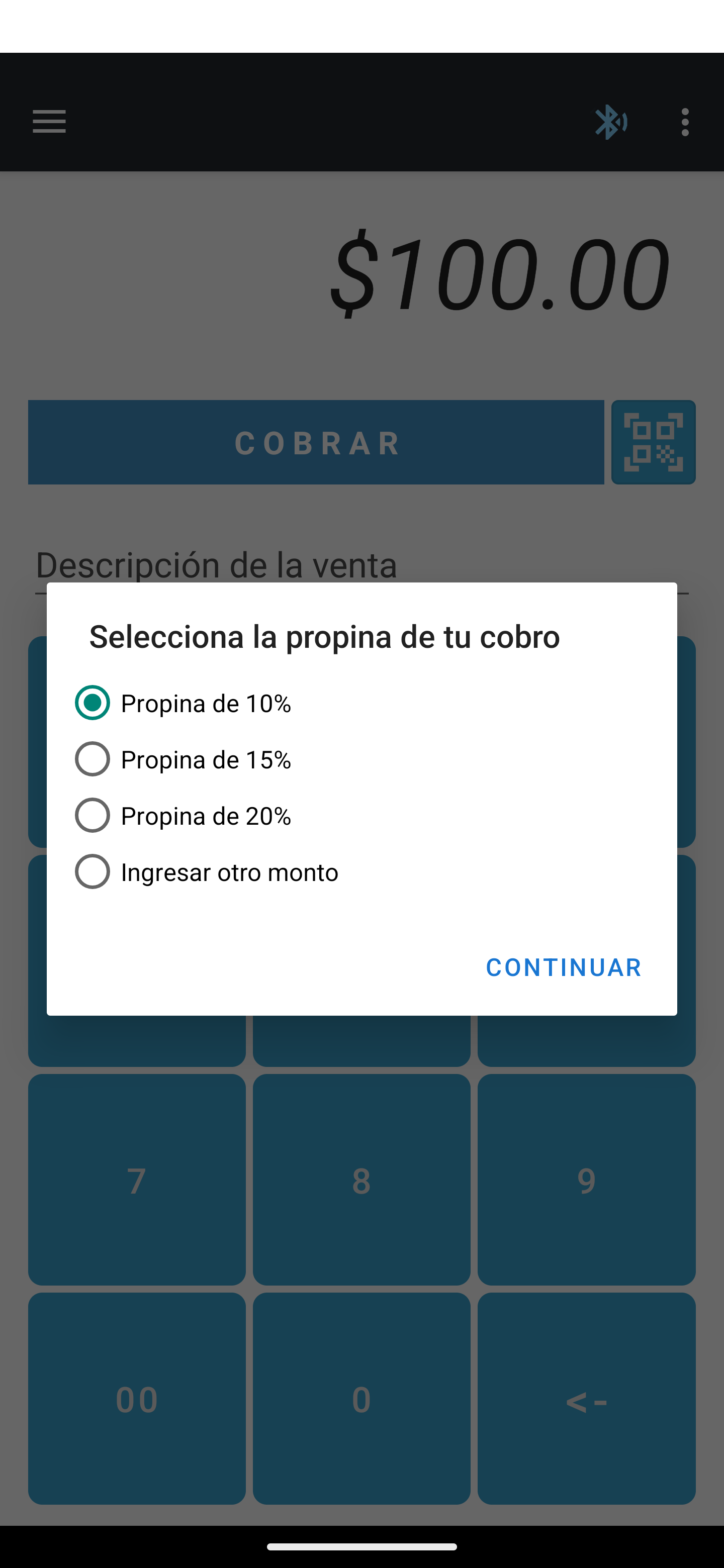
Add an additional tip amount during a sale transaction in the payment app during checkout. Choose from a predefined amount or enter a custom amount. If you do not require adding a tip, click outside the dialog to continue.
You need to activate the option within the payment app settings to receive tips.
Cloud terminal API propina - MX

Deferred payments#

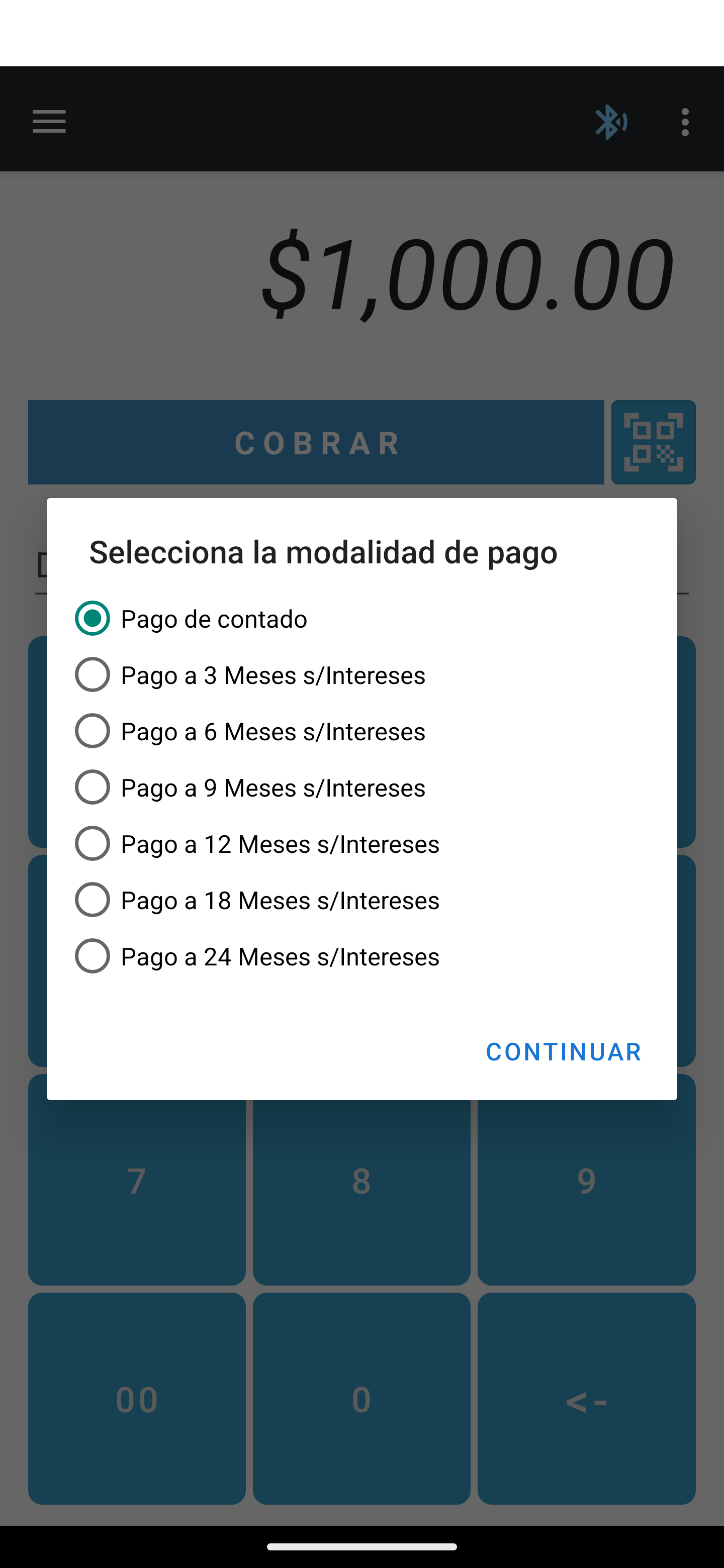
Increase your customers' average purchase amount at your establishment by offering the option to defer payment over a fixed number of installments. The transaction must meet certain requirements in order to be deferred. Review the requirements with your account manager.
To defer a payment, enable the option within the payment app settings and select the desired option during the checkout process.
Cloud terminal API diferidos
Please review the Cloud Terminal API Reference for more detailed information.

Response#

If the information sent is valid, you will get an HTTP status code 201 indicating that the request was successfully sent to the terminal.

Payment app flow#

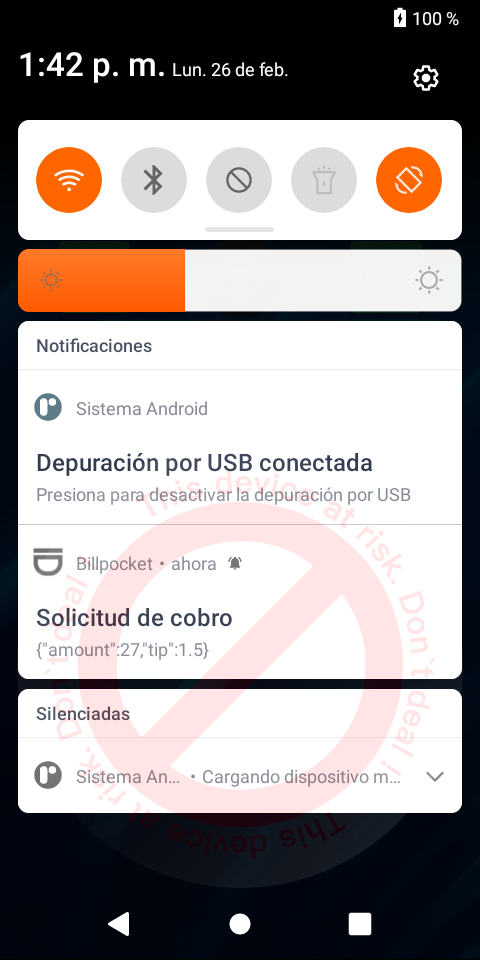
You will receive a push notification on the terminal which you must select to start the payment process.
Notificación push
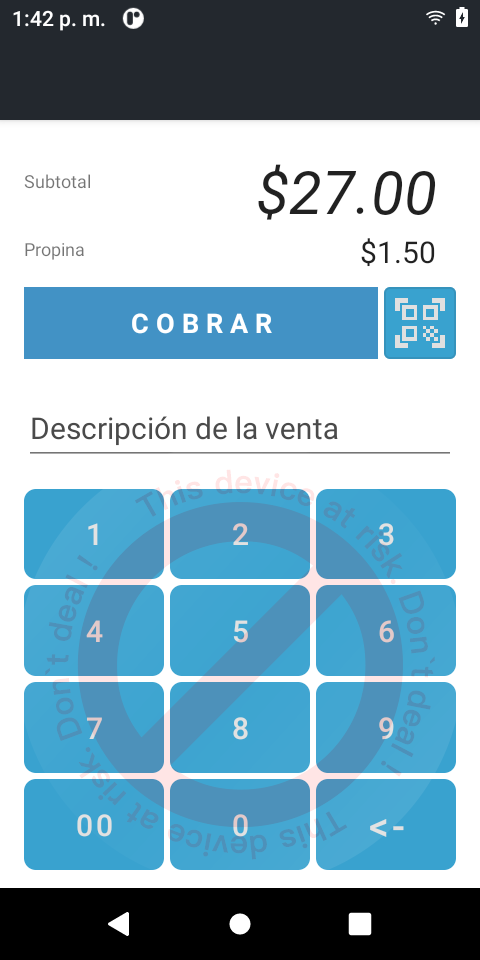
By selecting the notification, the payment application will be displayed with the information sent. Click on the COBRAR button to start reading the card.
payment app
Follow the steps on the screen to complete the process.
Check the result of the operation using the result property received via a webhook. If it has the value aprobada, the transaction was processed successfully, otherwise there was an error processing the transaction.

Webhooks
Receive notifications in your system with the events of the operations carried out. Discover all the available events.
Test data
Make any necessary adjustments to your system using the test data.
Modificado en 2026-10-14 19:44:14
Anterior
Cloud terminal API overview
Siguiente
Cancel a payment request
Built with