
Receive Wire Transfers
Web
iOS
Android
Allow your customers to use the available balance in their bank account to purchase your products or services from your website via a wire transfer. To do so, you must obtain your paying customer's email address, generate a Clabe account number to your customer, so that they can go to their bank's website and complete the wire transfer.The payment flow that you will integrate is as shown below: 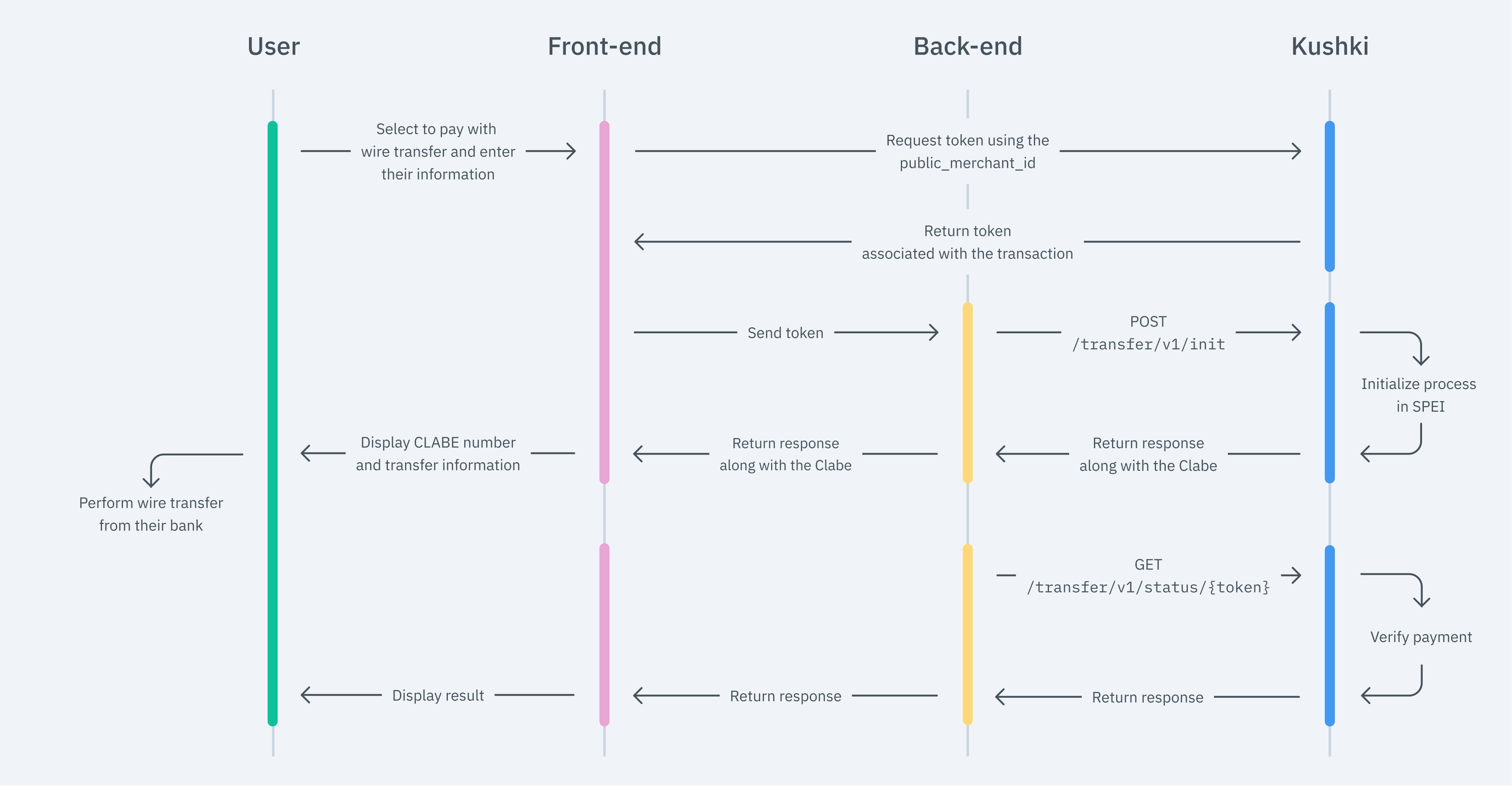
The front end is responsible for collecting the user’s main details, generating a token for such information through Kushki’s servers, and sending that information to the back end to start the payment process. You have two options to integrate: Kajita and Kushki.js. Kushki has payment forms ready to collect card information securely. You can use any of our versions: Cajita: our first version of the payment form. Not customizable. Kajita: is the second version, which allows you to add customizations from your Administration Console and even have several versions of Kajita, one for each payment method, for example. With Kushki you can create your Kajitas from the Administration Console. Click here to learn how to do this. Include the Kajita needs a place to live on your page. Enter the following code in your website's For Kajita (v.2): For Cajita (v.1) Remember to configure the action of the Then, add the following
For Kajita (v.2) you can obtain the script from your Administration Console as here explained. For Cajita (v.1), add the next script and make sure that the form has been rendered: This will create a predesigned form on your website to accept payments. You can use Kajita to offer not only payments through wire transfers, but also in cash and with card. Use Kushki.js if you need more control over the "look & feel" or appearance of your payment form. Use the following Install the package from npm. Then import it into your code using the following code. Set up
Add the following code to your application First, embed the form in your payment page adding the required fields. You can design it as you prefer. For example: If you want your customers to be notified of their transactions, make sure to capture your customer's email address in the payment form. In addition to this, remember to enable the notification option from your administration console. Then, for the moment when the user submits the form, add a token request and send it to your back end. Check the full reference on our Kushki.js reference The back end is responsible for receiving the token obtained from your front end and starting the payment process with Kushki. When the user submits the form, your front end sends a token to an endpoint that you specified previously. With this token, you must make a call to our endpoint to obtain the CLABE account code associated with the email address specified by your customer in the form configured in step 1. Check our API Reference for more information. In response to this call, show your customer the CLABE number generated along with the payment reference so that they can log in to their bank portal and complete the transfer. You will need to show your customer the Clabe ( The Clabe account will not change for your paying customer, as long as the same email address is entered when requesting the token. If the transaction is not paid, it will remain in If the amount sent when consuming the init differs from the amount paid at the bank, the transfer will be declined. In this case, an immediate refund will be made to the customer. The transaction will remain in To find out the status of the bank transfer made by your customer you can use any of these options: The final result of this test data depends on your merchant's configuration: it requires the test environment (sandbox) to be active for your merchant and the assigned processor to support simulating certain statuses. If you don't get the expected result, contact your Kushki account manager or support. Use the following test data in the UAT environment to make sure your integration is ready. Approved transaction: send Declined transaction: send Check the result with Read the following guidelines for technical certification approval (required to obtain productive account credentials): The calculation of taxes and the total amount must be the correct amount. Messages displayed on the screen should be aligned with Kushki's responses. All Kushki responses must be saved and recorded (required in case you need support). In the event of successful receipt of the Webhook notification, respond to the request with a The "Pay" button is disabled after the first click. If the result of the transaction is Kushki's logo must be visible for the customer. You can find our logo in several formats here. Make sure to send all the variables required, specified in the API reference.
1. Set up your Front end
Kajita
Create and customize your Kajitas
Set up Kajita
kushki-checkout.js script in your payment page by adding it to the <head> of your HTML file. Always load kushki-checkout directly from cdn.kushkipagos.com. Do not include the script in a bundle or package or host a copy of it.Add Kajita to your website
<body>, where you want the payment form to be displayed.action form according to the corresponding endpoint in your back end, to obtain the token.script tag.For Kajita (v.2) you can obtain the script from your Administration Console as here explained.
Kushki.js
Set up Kushki.js
Option 1 - CDN
script tag at the end of the <body> of your payment page.Option 2 - NPM
Set up Kushki object
Collect User Information and Send it to your Back End
Send notifications to your customers
2. Set up your Back End
JavaScript
Python
PHP
{
  "bank": "Transfer Processor",
  "referenceNumber": "1111111",
  "referenceProcessor": "641641241726965121",
  "ticketNumber": "1641241726965127",
  "transactionReference": "fb247919-2c5e-4ef2-ab75-21fc38b5a7e4"
}referenceProcessor) so that they can log into their banking portal and complete the transfer. Be sure to save the other information obtained for future reference.Importante ❗️⛔️
initializedTransaction status for up to 7 days. After this period, it will remain as expiredTransaction. Contact us if you wish to reduce this period to less than 7 days (1 day minimum).initializedTransaction status for up to 7 days. After this period, it will remain as expiredTransaction.3. Check the transfer status
4. Test your Integration
documentNumber: 123456789 when requesting the token (any number other than 999999990 is also approved).documentNumber: 999999990.GET /status/{token}. See more detail in Test data.4. Prepare your Certification
statusCode 200, and inform your customer.Initialized, a new transaction must not be allowed until approved or rejected.Modificado en 2026-10-21 22:32:56